<vbox> 621
Example
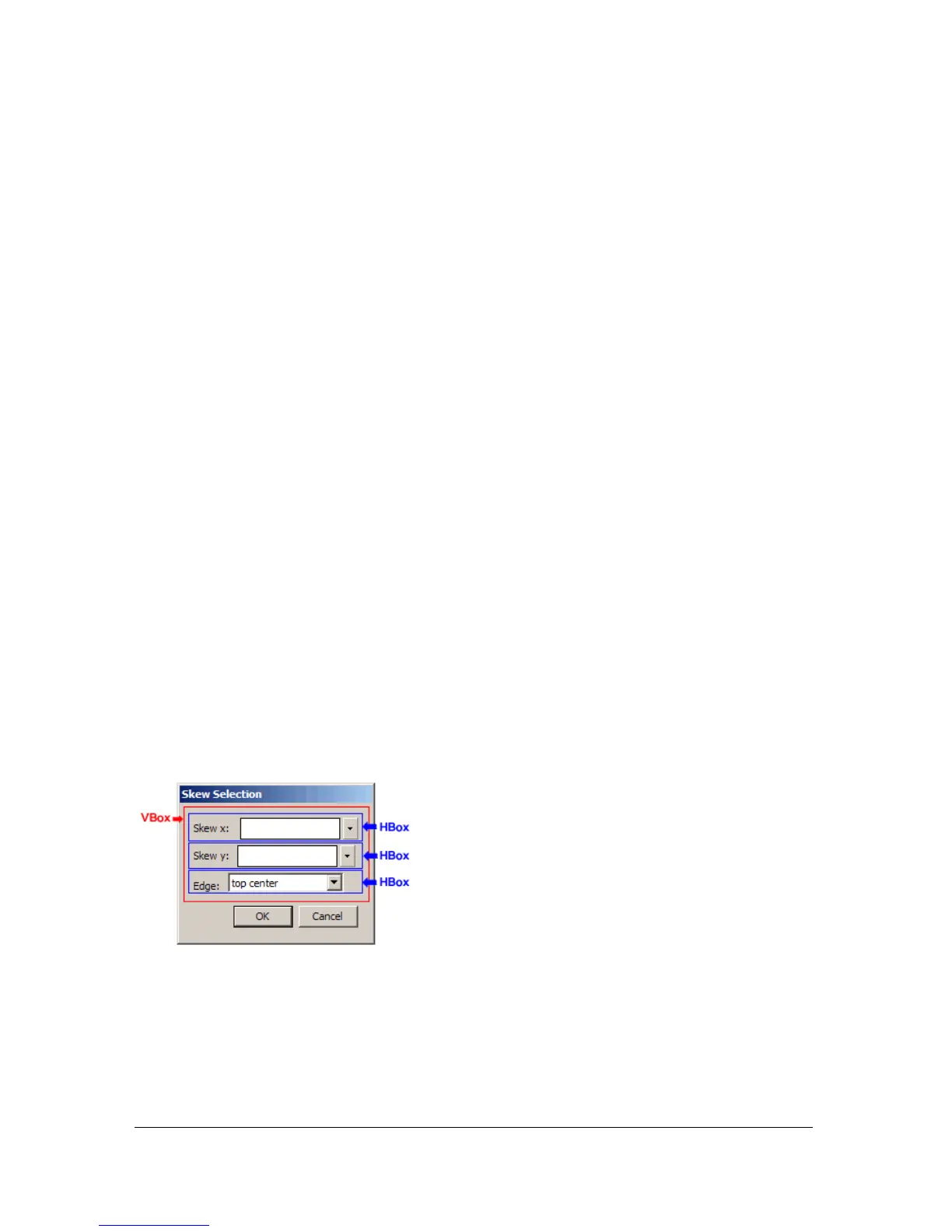
The following example redefines the <grid>-based dialog box used in the <popupslider>
example with
<vbox> and <hbox> tags instead:
<dialog id="skew-dialog" title="Skew Selection" buttons="accept, cancel">
<vbox>
<hbox>
<label value="Skew x: " control="xSkew" align="left"/>
<popupslider id="xSkew" minvalue="-180" maxvalue="180"/>
</hbox>
<hbox>
<label value="Skew y:" control="ySkew" align="left"/>
<popupslider id="ySkew" minvalue="-180" maxvalue="180"/>
</hbox>
<hbox>
<label value="Edge:" control="edge" align="left"/>
<menulist id="edge">
<menupop>
<menuitem label="top center"/>
<menuitem label="right center"/>
<menuitem label="bottom center"/>
<menuitem label="left center"/>
</menupop>
</menulist>
</hbox>
</vbox>
</dialog>
The following figure shows the Skew Selection dialog box defined using <vbox> and <hbox>
tags instead of the
<grid> tag. Red and blue outlines of the VBox and HBox containers have
been added to show how these container tags are used to define the layout:



 To Next Page