24
OPERATING INSTRUCTIONS
Warning:when theappliance is notinuse keepthelid raised to preventdeformation of thevacuum airtight
gasket.
Beforeuse,alwaysthoroughlycleanyourapplianceandanyaccessoriescomingincontactwithfood(containers,
caps,jarsetc.)asdirectedinthe“CLEANINGINSTRUCTIONS”section.
1-Positioningtheappliance
Positiontheapplianceinadryplaceonalevelsurface,makingsurethattheworkareainfrontoftheapplianceitselfis
clearofobstaclesandthereisenoughroomtoaccommodatethebagswiththefoodtobepacked.Plugthepowercord
intothesocketonthesideoftheapplianceandplugthepowercordintoapowersocketcorrespondingtothevoltageof
the appliance (see plate details).
2-Turningontheappliance
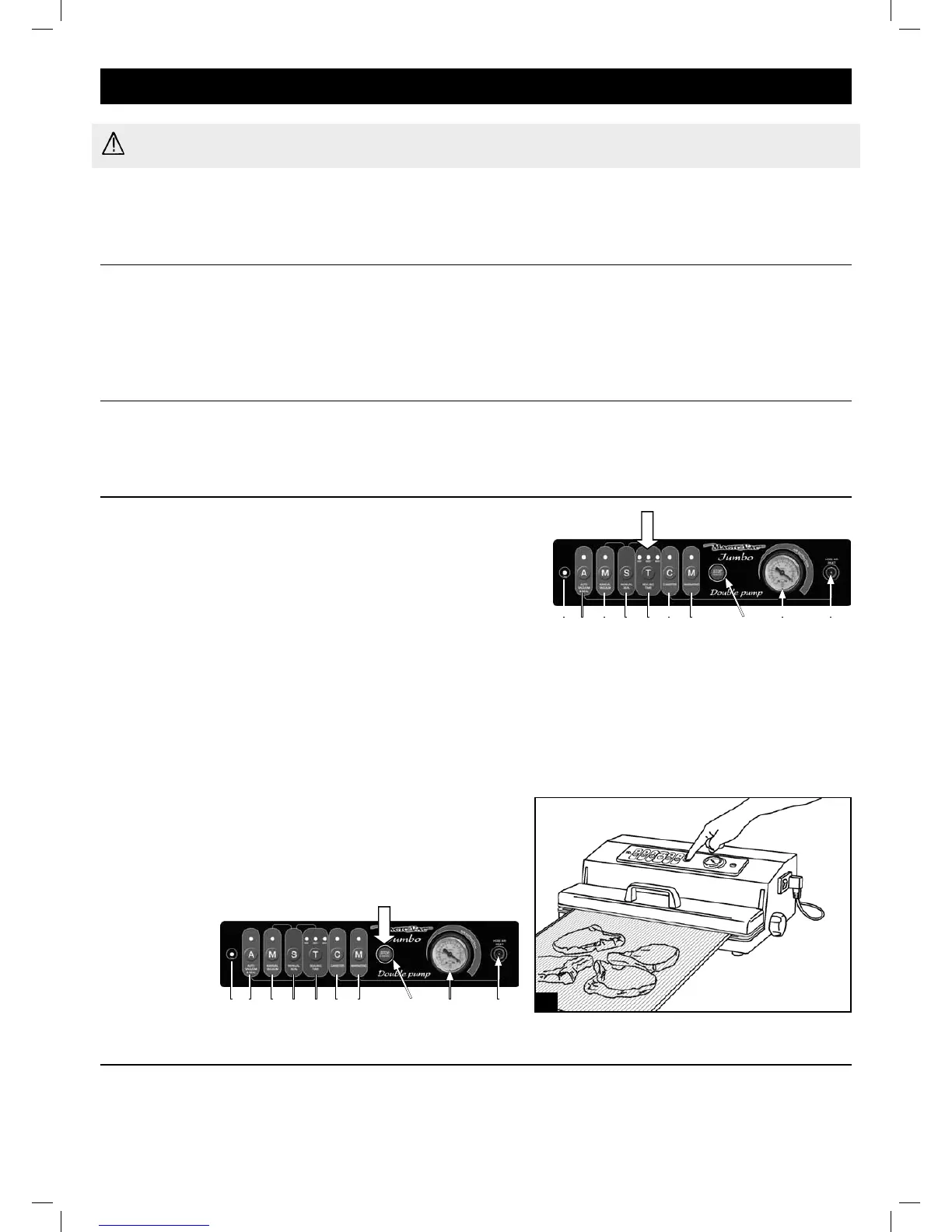
Press the switch (1)locatedonthesideoftheappliance;onthedisplayboththegreenONlight(2A)andtheredlight(2F)
indicatingsealingtime(MED)willturnon.
3-Settings
3.1-Settingsealingtime
Forsettingsealingtimepressthe“T”button(2F)beforestarting
the packing cycle. The factory set sealing time remains in
memoryuntil:
- adifferentsealingtimeisselected;
- theSTOPbuttonispressed;
- theapplianceisswitchedoffbyputtingtheswitchinthe“0”
position or disconnecting the power supply cord from the
power socket.
Thepositionoftheredindicatorlightabovethebuttonindicatestheselectedsealingtime:
•MIN(leftredlighton)-minimumsealingtime,recommendedforsealingseveralbags;
•MED(centralredlighton)-mediumsealingtime,suitableformostapplications;everytimeitisturnedon,the
applianceautomaticallyrevertstothefactorysetsealingtime,i.e.mediumtime.
•MAX(rightredlighton)-maximumsealingtime,recommendedforthepreservationofwetfoodstuffs.
3.2-STOP/CANCELbutton-2C
-TostoptheapplianceatanytimepresstheSTOP/CANCEL
button (2C) as shown in gure A; then release the lid by
rotating one of the 2 handles (7) of the “Lock & Unlock
System”.
4-Tipsonusingbags
MAGIC VAC
®
bagsareavailableinseverallengths:20,30and40cm.Choosethebagsizesuitedforthefoodyouintend
topreserve.Checkthatthebagyouaregoingtouseisatleast8cmlongerthanthefoodtobepackaged,takinginto
accountanadditional2cmforeachtimethebagwillbesubsequentlyreused.
(2C)(2A) (2B) (2D) (2E) (2F) (2G) (2H) (3) (4)
(2C)
(2A) (2B) (2D) (2E) (2F) (2G) (2H) (3) (4)
A


 To Next Page