EasyManua.ls Logo

Marantz SR4300 - Service Manual

Marantz SR4300
61 pages
Print Icon
To Next Page IconTo Next Page
Loading...
SR4300
09AW855010 MIT
First Issue 2002.12
Service
Manual
R
Please use this service manual with referring to the user guide ( D.F.U. ) without fail.
AV Surround Receiver
TABLE OF CONTENTS
SECTION PAGE
1. TECHNICAL SPECIFICATIONS........................................................................... 1
2. WIRING DIAGRAM ............................................................................................... 5
3. BLOCK DIAGRAM ................................................................................................ 7
4. SCHEMATIC DIAGRAM ....................................................................................... 9
5. PARTS LOCATION............................................................................................. 31
6. IC DATA .............................................................................................................. 45
7. EXPLODED VIEW AND PARTS LIST ................................................................ 51
8. SERVICE PROCEDURE .................................................................................... 55
9. ELECTRICAL PARTS LIST ................................................................................ 58
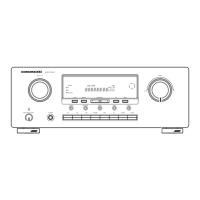
SR4300
CLEAR
F/P
MODE
TUNING/PRESET
MEMORY
PHONES
SURROUND
AV SURROUND RECEIVER SR4300
STANDBY
POWER ON/OFF
MUTE
S-DIRECT
HT-EQ
DSS/VCR2
DVD
CDR/MD
TAPE
CD
TUNER
TV
A/D
DIMMER
6.1CH-IN
VCR1
UP
VOLUME
DOWN
SR4300 /A1B/A1G/F1N/K1G
/L1G/N1B/N1G/U1B
CLEAR
F/P
MODE
TUNING/PRESET
MEMORY
PHONES
SURROUND
AV SURROUND RECEIVER SR4300
STANDBY
POWER ON / STNDBY
MUTE
S-DIRECT
HT-EQ
DSS/VCR2
DVD
CDR/MD
TAPE
CD
TUNER
TV
A/D
DIMMER
6.1CH-IN
VCR1
UP
VOLUME
DOWN
SR4300 /F/U
SR4300 /A/K/L/N

Other manuals for Marantz SR4300

Questions and Answers

  • A
    ashleythompsonSep 3, 2025
    Why is my Marantz Receiver outputting sound from the wrong source?
    • D
      denise39Sep 3, 2025
      If your Marantz Receiver is outputting sound and pictures from equipment other than what's selected with the function selector, the input cable might be connected incorrectly. Refer to the connection diagram to ensure the cable is properly connected.
  • K
    Kathryn CaseSep 1, 2025
    Why is there noise during AM reception on my Marantz SR4300?
    • R
      Roger DavisSep 1, 2025
      If you're experiencing noise during AM reception on your Marantz Receiver, it might be due to interference from other electrical fields. Try changing the location where the AM indoor antenna is set up.
  • T
    Tanya HarperAug 31, 2025
    How to fix FM or AM reception failure on my Marantz SR4300 Receiver?
    • A
      alexis14Aug 31, 2025
      If you're not getting any FM or AM reception on your Marantz Receiver, the antenna connection might be incomplete. Ensure the indoor FM and AM antennas are correctly connected to their respective outlets on the receiver.
  • E
    Erin SimpsonAug 29, 2025
    What to do if my Marantz Receiver has no sound and picture even when power is on?
    • J
      james75Aug 29, 2025
      If your Marantz Receiver isn't producing any sound or picture even when powered on, several factors could be at play. First, check if the mute function is activated and deactivate it using the remote. Ensure that all input cables are correctly connected according to the connection diagram. Verify that the master volume isn't turned down completely and that the function selector is set to the correct position.
  • E
    Edward TateAug 27, 2025
    Why is there no output to Sub Woofer Out on my Marantz SR4300 Receiver?
    • B
      Becky LangAug 28, 2025
      If there's no output to the Sub Woofer Out on your Marantz Receiver, check if 'Sub-woofer = NONE' has been selected in the SETUP mode. If so, select 'Sub-woofer = YES'.
  • R
    Robin Ingram DDSAug 26, 2025
    Why is there no sound coming from the surround back speakers on my Marantz Receiver?
    • A
      Adrian BlackAug 26, 2025
      If you're not getting any sound from the surround back speakers on your Marantz Receiver, ensure the surround back speaker cable is correctly connected. The surround mode must be set to EX/ES. Also, verify that 'Surround back = NONE' hasn't been selected in the SPEAKERS SIZE SETUP and adjust accordingly.
  • Z
    Zachary ElliottAug 25, 2025
    Why is there no sound coming from the surround speakers on my Marantz SR4300 Receiver?
    • T
      Tommy BrownAug 25, 2025
      If you're not getting any sound from the surround speakers on your Marantz Receiver, check that the surround speaker cables are correctly connected. If 'STEREO' is selected as the surround mode, no sound will be output from the surround speakers, so select a different surround mode. Also, ensure that 'Surround = NONE' hasn't been selected in the setup mode and adjust accordingly.
  • J
    Julie HallAug 22, 2025
    Why is there no sound coming from the center speaker on my Marantz Receiver?
    • R
      Renee ElliottAug 23, 2025
      If you're not getting any sound from the center speaker of your Marantz Receiver, ensure the center speaker cable is correctly connected. If 'STEREO' is selected as the surround mode, no sound will come from the center speaker, so select a different surround mode. Also, check that 'Center = NONE' hasn't been selected in the setup mode and adjust accordingly.

Summary

Shock, Fire Hazard Service Test

1. Technical Specifications

Audio Section Specifications

Power output, input sensitivity, and frequency response details.

2. Wiring Diagram

3. Block Diagram

4. Schematic Diagrams

Digital;Audio PCB (AD;DA)

Schematic for the Digital/Audio PCB, covering AD/DA conversion.

Power Amplifier PCB Schematic

Digital;Audio PCB (E-VR) Schematic

Digital;Audio PCB (CPU) Schematic

Front PCB Schematic

Digital;Audio PCB (DSP) Schematic

Main PCB Schematic

Video PCB Schematic

6.1 CH;Pre Out PCB Schematic

5. Parts Location

Front PCB Component Layout

Digital;Audio PCB Component Layout

Digital;Audio PCB Component Layout (Continued)

Main PCB Component Layout

Video PCB Component Layout

Video PCB Component Layout (Continued)

6. IC Data

ICF101:PT6302 Pin Assignment & Block Diagram

Pin configuration and functional block diagram for the PT6302 IC.

ICS03:M61516 FP Pin Assignment & Block Diagram

ICS08:AK4529 Pin Function

ICS13:CS49326 Pin Assignment & Block Diagram

ICS19:AK4112 Pin Function

ICS18:H8;3026 Pin Function

7. Exploded View and Parts List

Parts List - Front Panel & Wires

8. Service Procedure

System Error Displays

9. Electrical Parts List

Safety Component Notes

Critical safety warnings for replacing specific components.

Video PCB Parts List

Main PCB Parts List (Part 1)

Main PCB Parts List (Part 2)

Main PCB Parts List (Part 3)

Main PCB Parts List (Part 4)

Main PCB Parts List (Part 5)

Main PCB Parts List (Part 6)

Main PCB Parts List (Part 7)

Main PCB Parts List (Part 8)

Main PCB Parts List (Part 9)

Main PCB Parts List (Part 10)

Main PCB Parts List (Part 11)

Main PCB Parts List (Part 12)

Front PCB Parts List

Front PCB Parts List (Continued)

Power Amplifier PCB Parts List (Part 1)

Power Amplifier PCB Parts List (Part 2)

Power Amplifier PCB Parts List (Part 3)

Power Amplifier PCB Parts List (Part 4)

Power Amplifier PCB Parts List (Part 5)

Power Amplifier PCB Parts List (Part 6)

Marantz SR4300 Specifications

General IconGeneral
Frequency Response10 Hz - 100 kHz (+1, -3 dB)
Signal to Noise Ratio98 dB
HDMI Inputs0
Component Video Inputs2
Digital Audio Inputs2 Optical, 1 Coaxial
TypeAV Receiver
Surround Sound FormatsDolby Digital, DTS, Dolby Pro Logic II
Total Harmonic Distortion0.08%
Tuner SectionAM/FM
Analog Outputs2
Input Sensitivity200mV
Video Inputs2 S-Video
Video Outputs1 S-Video

Related product manuals