Basic service 25
LAMP MAINTENANCE
The following lamp types are supported:
• Osram HSD 250
• Philips MSD 250/2
• Philips MSD 200
Installing any other lamp may damage the fixture!
Allow the lamp to cool for at least 5 minutes before packing and moving the
fixture. To avoid possible damage, remove the lamp when shipping the fixture.
Warning! Always disconnect the fixture from AC power and allow it to
cool for 5 minutes before installing the lamp.
Installing a lamp in the Wizard.
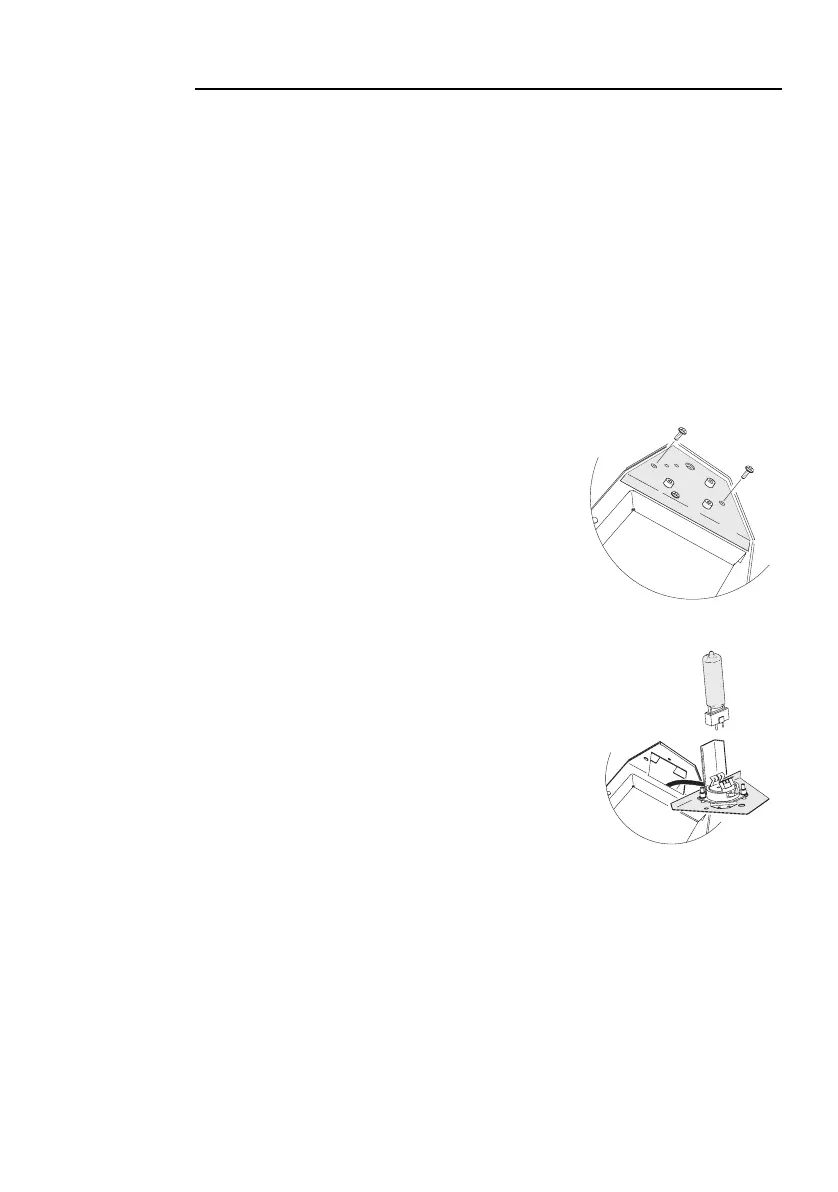
1 Disconnect the fixture from AC power. If replacing a
lamp, allow it to cool for at least 5 minutes before
removing the lamp-access cover. The lamp cools
faster with the cover in place. It can take up to 15
minutes for the fixture to cool completely.
2 Remove the two lamp access screws from the lamp-
access cover, and lift the cover off.
3 If replacing a lamp, grasp the old lamp by the reflector
and pull it out of the holder. Then pull the socket off the
lamp. Do not pull the wires.
4 Push the socket fully onto the pins of the new lamp.
5 Clean the glass bulb with the cloth supplied with the
lamp, particularly if your fingers touched the glass. A
clean, lint-free cloth wetted with alcohol may also be
used.
6 Gently push the lamp into the holder until it snaps into
place.
7 Replace the lamp-access cover and screws.
Adjusting the lamp
The Wizard lamp assembly is adjusted at the factory. Due to differences between
lamps, however, fine adjustment may be improve performance.
1 Disconnect the fixture from AC power.















 To Next Page