EasyManua.ls Logo

Martin MAC III - User Manual

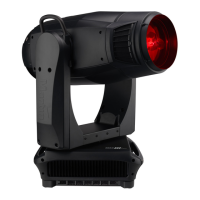
Martin MAC III
60 pages
Print Icon
To Next Page IconTo Next Page
Loading...
MAC III™ Wash
USER MANUAL

Questions and Answers

  • N
    Natasha HendersonAug 2, 2025
    What to do if my Martin Light Fixture has no light and a lamp error message?
    • E
      epierceAug 3, 2025
      If a Martin Light Fixture shows no light and displays a lamp error message, the cause may be a blown lamp. To resolve this, disconnect the fixture and replace the lamp. Alternatively, the lamp might not be installed; in that case, disconnect the fixture and install the lamp. Finally, check that the lamp access door is fully seated and locked in place, as the safety switch might be open.
  • J
    Jamie EllisAug 10, 2025
    Why do my Martin Light Fixtures respond erratically to the controller?
    • J
      Joseph SteeleAug 10, 2025
      If Martin Light Fixtures reset correctly but respond erratically, there could be a bad data link. Inspect the connections and cables, correct any poor connections, and repair or replace damaged cables. Ensure the data link is terminated by inserting a DMX termination plug in the data output socket of the last MAC III Wash on the data link. Check the fixture address and protocol settings for incorrect addressing. A defective fixture might be disturbing data transmission; unplug the XLR in and out connectors and connect them directly together to bypass one fixture at a time until normal operation is regained. Have the fixture serviced by a qualified technician.
  • A
    antonio82Aug 17, 2025
    How to troubleshoot a completely dead Martin MAC III?
    • A
      Ashley WilsonAug 17, 2025
      If one or more of your Martin Light Fixtures are completely dead, start by checking that the power is switched on and the cables are properly plugged in to ensure the fixture is receiving power. If the fixture still doesn't power on, it may be due to a blown primary or secondary fuse. In this case, isolate the fixture from power and refer to the Martin service documentation or contact Martin for service.
  • D
    derrick44Aug 26, 2025
    Why does the lamp in my Martin MAC III Light Fixture cut out intermittently?
    • J
      Jenny WoodAug 26, 2025
      If the lamp in your Martin Light Fixture cuts out intermittently, it may be due to the fixture overheating. Allow the fixture to cool down, clean it to improve ventilation, and reduce the ambient temperature around it.

Summary

Safety Information

Protection from Electric Shock

Guidelines for preventing electric shock during operation and maintenance.

Lamp Safety Precautions

Precautions for handling and replacing the discharge lamp safely.

Burn and Fire Protection

Warnings and precautions to prevent burns and fire hazards.

Fall Injury Prevention

Guidelines for safe rigging and preventing injuries from falls.

AC Power and Connection

Power Connection Procedures

How to connect the fixture to AC power safely and correctly.

Applying Power to the Fixture

Procedure to turn on the fixture after connecting power.

Lamp Installation and Safety

Lamp Replacement Procedure

Step-by-step guide for safely replacing the lamp.

DMX Data Link Setup

Connecting the DMX Data Link

Procedure for connecting DMX data cables between fixtures.

Physical Installation and Rigging

Clamping Fixture to a Truss

Instructions for securely attaching the fixture to a truss.

Control Panel Operations

Using the Control Panel Interface

How to navigate and operate the fixture via its control panel.

Advanced Control Panel Settings

Fixture Information and DMX Monitoring

DMX Signal Monitoring

Monitoring live DMX signal data for troubleshooting including rate, quality, and start code.

Adjusting Settings via DMX

Effects Control via DMX

Shutter, Strobe, and Dimming Effects

Controlling shutter, strobe, and smooth dimming effects.

Beam and Movement Effects Control

Focus, Zoom, and Linking

Controlling beam focus, zoom, and linking them for automatic adjustment.

Pan, Tilt, and Followspot Mode

Control of pan and tilt movement, and enabling followspot mode.

Followspot Handle Usage

Followspot Handle Safety Precautions

Safety warnings for installing and using followspot handles.

RDM (Remote Device Management)

RDM ID and Communication

Finding the fixture's unique RDM ID and how it communicates via RDM.

MAC III Wash Supported Standard RDM Commands

List of standard RDM commands supported by the fixture.

Manufacturer Specific RDM Commands

List of manufacturer-specific RDM commands.

Service and Maintenance

Service Utilities Overview

Accessing utilities for rigging, servicing, and firmware updates.

Event Log Functionality

Monitoring performance, errors, and warnings via the event log.

Calibration Procedures

Software and Firmware Updates

Updating Firmware via USB

Step-by-step guide to update firmware using a USB memory device.

Cleaning and Maintenance

MAC III Wash DMX Protocol

CMY, CTO, and Color Wheel Control

Controlling CMY color mixing, CTO, and the color wheel.

Focus, Zoom, Pan, and Tilt DMX Control

DMX control for beam focus, zoom, pan, and tilt movements.

Control Panel Menu Navigation

Service and Display Messages

Troubleshooting Common Issues

Power and Data Link Issues

Troubleshooting steps for no power and DMX data link problems.

Mechanical and Lamp Issues

Diagnosing and resolving mechanical position loss and lamp issues.

Technical Specifications

Martin MAC III Specifications

General IconGeneral
BrandMartin
ModelMAC III
CategoryLight Fixture
LanguageEnglish

Related product manuals