EasyManua.ls Logo

Master Image HORIZON3D - System Firmware Upgrade Procedure

Master Image HORIZON3D
81 pages
Print Icon
To Next Page IconTo Next Page
To Previous Page IconTo Previous Page
Loading...
Installation & Operation Manual | HORIZON3D
© MASTERIMAGE 3D, Inc.
55
10.3. System Firmware Upgrade Procedure
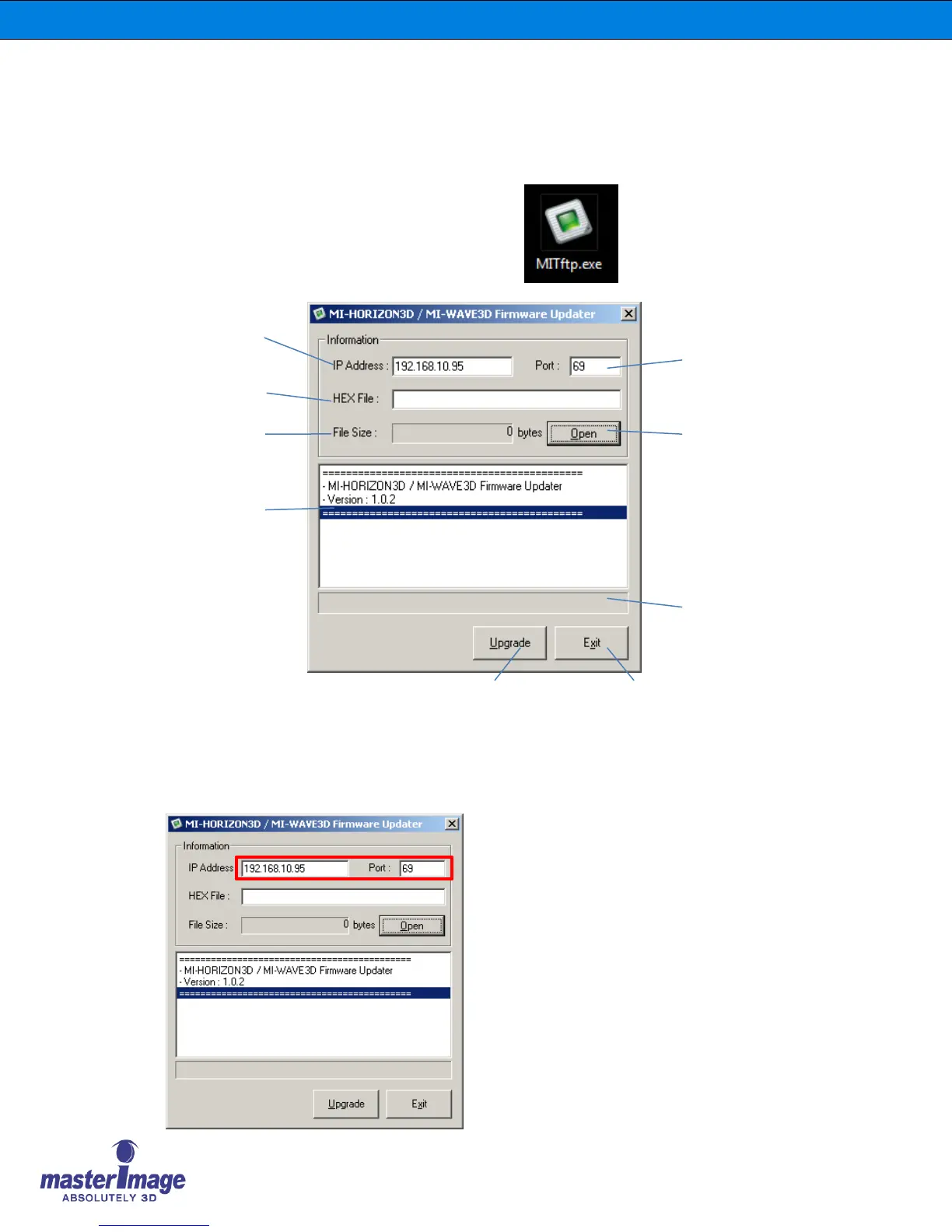
1. Connect the HORIZON3D control box to your PC with the Ethernet cable.
2. Execute “MITftp” utility by double-clicking the
utility’s icon on your PC.
3. Configure the utility to match your individual site network requirements.
Devices IP Address
(Default: 192.168.10.95)
Hex file
name
Hex file size
Log message
Upgrade button
Exit button
Updating progressive bar
Open Hex file
TFTP Port number
(Default: 69)
Enter the device IP address and Port
Number.
Default: IP: 192.168.10.95 Port: 69

Table of Contents

Other manuals for Master Image HORIZON3D