Installation & Operation Manual | MI-WAVE3D
The options available for selection are:
Manual – Control via front panel button
GPIO (37-9) – Automation via the 37-pin GPIO cable connection
GPIO (15-9) – Automation via the 15-pin GPIO cable connection
Ethernet – Automation via server ethernet connection
Sync Pulse – Automation via GPIO/TTL sync pulse detection
Click [Save & Reset] to accept any changes.
9.3.11. Sync Pulse Automation Reference Frequency
via the Monitor Application
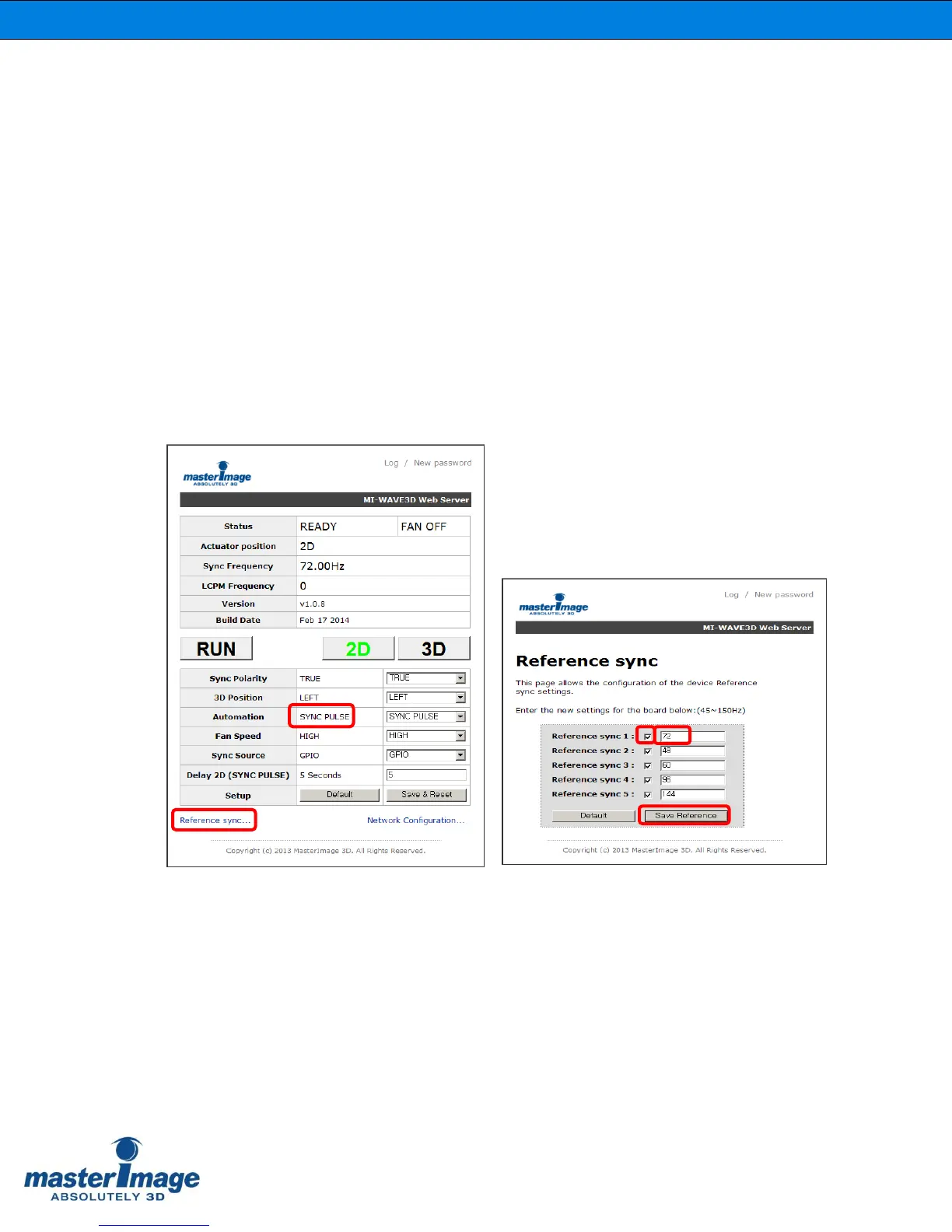
Set the reference frequencies when the automation source is set to Sync Pulse.
Once the Automation Source has been set to Sync Pulse click [Reference Sync] in the
bottom left of the application.
Up to five reference frequencies can be activated and these can be altered from 45-
150Hz as required. The default settings being 72Hz, 48Hz, 60Hz, 96Hz and 144Hz.
Deselect the check box for any frequency that is not currently being used or required.
Click [Save Reference] to accept any changes.
Click your browser back button to return to the main screen.



 To Next Page