17
ROEL parameters
Here is the detail of the parameters needed for ROEL protocol:
Listening port:
Define the server listening port. ROEL use TCP protocol.
Panel Timeout:
Define the default value for panel timeout. This value is in seconds.
If a panel doesn’t send anything during a time superior than the set value, then a timeout event will be
send to the user.
Maximum Connections:
Maximum simultaneous connections allowed for this server. The default is 50.
If you network problem or panel timeout occurs, then you should adjust this value.
To save the server, click on the button
3i/Pegasus server parameters details
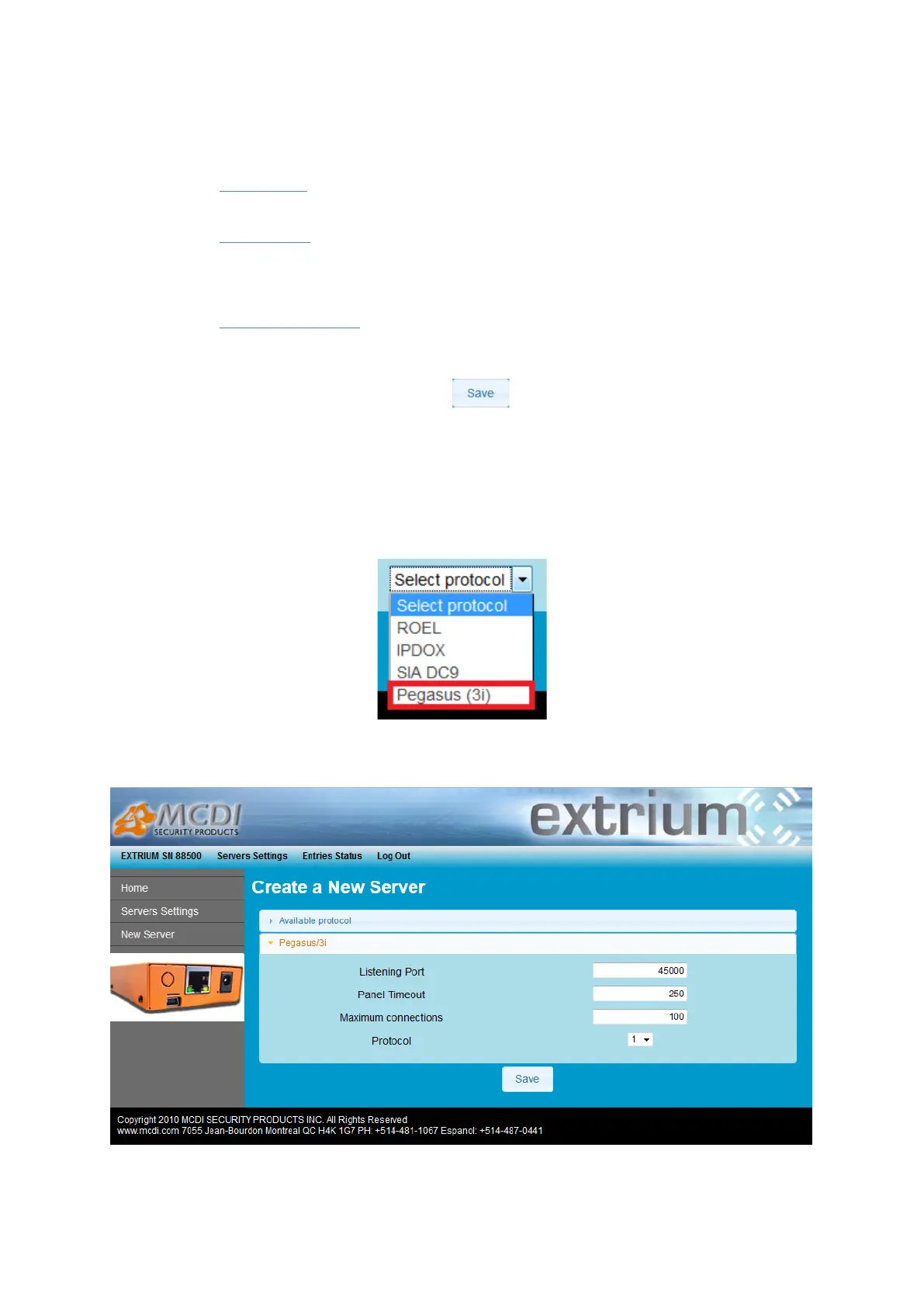
To add a new 3i/Pegasus server, follow the steps described on the previous section “How to add a server”,
and choose “Pegasus (3i)” in the protocol selector.
Pegasus/3i selection
A new page with a list of parameter should appear:
Pegasus/3i parameters


 To Next Page