McHale V Series Baler
82
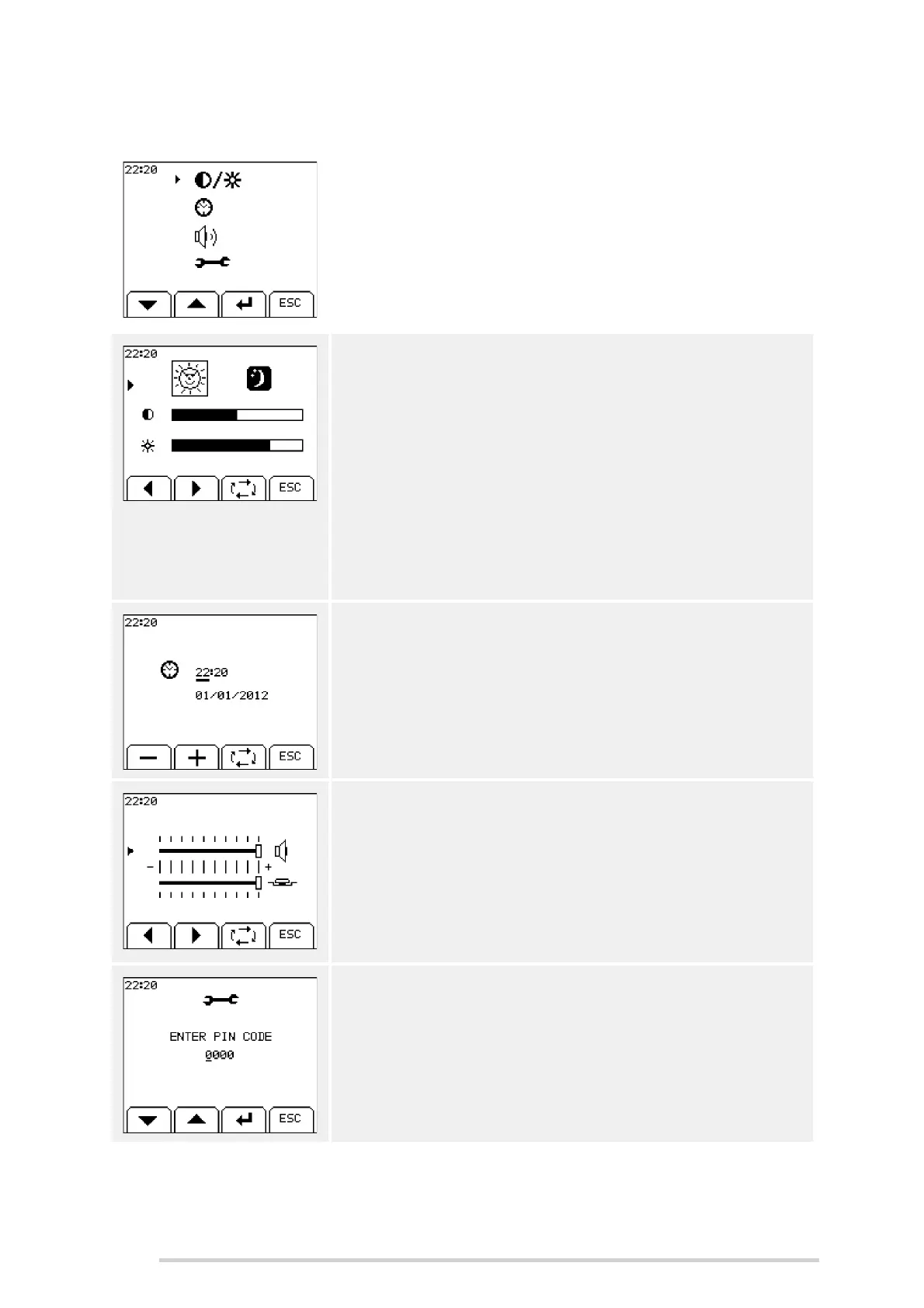
7.4.11 Control unit setup
This menu allows the user to adjust settings in relation to
the controller. Use the up and down keys (buttons 1 and
2) to move the arrow up/down, then press enter (button 3)
to select the current option.
Press ‘ESC’ (button 4) to return to the main menu.
Contrast
Extremes of temperature may affect the contrast of the
display, which is adjustable from the contrast menu. There
are night and day options so the operator can store two
different settings, a bright one for day and slightly darker
for night use.
Use the left and right arrows (buttons 1 and 2) to select
between day and night. When you have selected day/
night, press button 3 to move to brightness/contrast. Use
the left and right arrows (buttons 1 and 2) to adjust the
setting.
Clock adjust
This is used to set the time on the clock, which is always
displayed on the top left of the screen. A date setting is
also available.
Press button 3 to select a setting. Use the + and - softkeys
(buttons 1 and 2) to increase/decrease the setting.
Volume
The beeper and key tone volumes are both adjustable.
Press button 3 to select the beeper/key tone volume. Use
the left and right arrows (buttons 1 and 2) to adjust the
setting.
Technician menu
Reserved for McHale technicians. This menu is password
protected as settings in it are critical to correct machine
operation.



 To Next Page