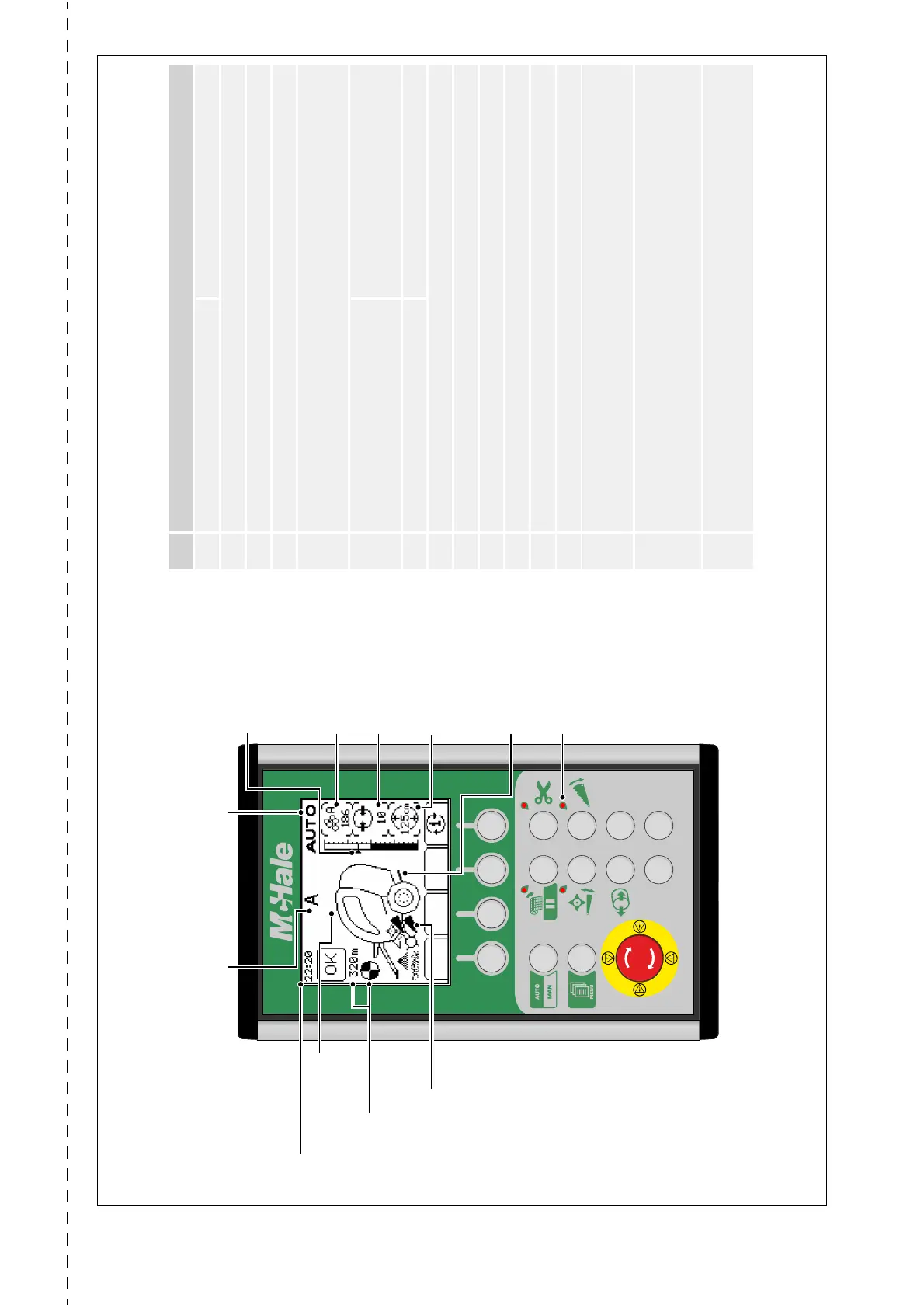
No. Function
Manual (MAN) Automatic (AUTO)
1
Multi function
2
Multi function
3
Multi function
4
Information button. Press to toggle between the displayed information on the
right of the screen (bale total, density, target diameter, voltage, net layers,
knife pressure, live bale diameter and net stretch).
5
Net feed Press once to start netting bale early.
Hold to delay net feeding.
Press to feed net after a net error.
6
Cut net Cut net after a net error
7
Floor diverter
8
Knife diverter (Machines with chopper unit knives only)*
9
Release density pressure
10
No function
11
No function
12
No function
13
AUTO/MAN button.
Press to switch between manual and automatic modes.
Press and hold to switch to SEMI mode
14
Menu button.
Press once to enter the machine menu.
Also used to do a factory reset on the control box by holding down and
switching on the power to the box.
15
Emergency stop button.
Press to turn off the box.
Twist clockwise to turn on.
*Functionality in relation to chopper unit knives applies only to models with chopper units!
Displays diameter
setting (or knife
pressure*)
Press i to toggle (button 4)
Net symbol
Rotates as net is applied & shows
total net used (m). Turns white
when the net knife trips
Clock
Bale shape indicator
Arrows show direction to steer for
optimum bale shape
Kicker movement
displays bale transfer
1234
56
78
910
11 12
13
14
15
Current bale profile
Displays the current bale profile setting, A - E
Displays manual (MAN) or
automatic (AUTO) mode
Knife indicator*
Appears when knives are fully up
Red indicator lights
One beside button 5, 6, 7 & 8
These illuminate to prompt the
operator which button to press next
Displays density
setting or net layers
or net stretch
Press i to toggle (button 4)
Bale diameter display
Arrow shows the target diameter
Displays bale total or
voltage or live bale
diameter
Press i to toggle (button 4)
V Series Control unit overview (net)
(Software Version EPS660-126)



 To Next Page