73 of 289
Adjustment Procedure
1. Open the Tools>Maintenance menu and then click the Head Timing tab. Click the Head Up button
(or on the machine keypad, press the Adjustment key and the Up Arrow key.
2. Use the machine keypad to move the needle case to the closest needle noted in the machine
base.
3. If the needle is bent or damaged, replace the needle.
4. To inspect hook timing you need to adjust the machine to 201.5° ± 0.5°. To achieve this position,
click on the [Hook Timing] Button.
a. Verify that the current Z Position reads 201.5.
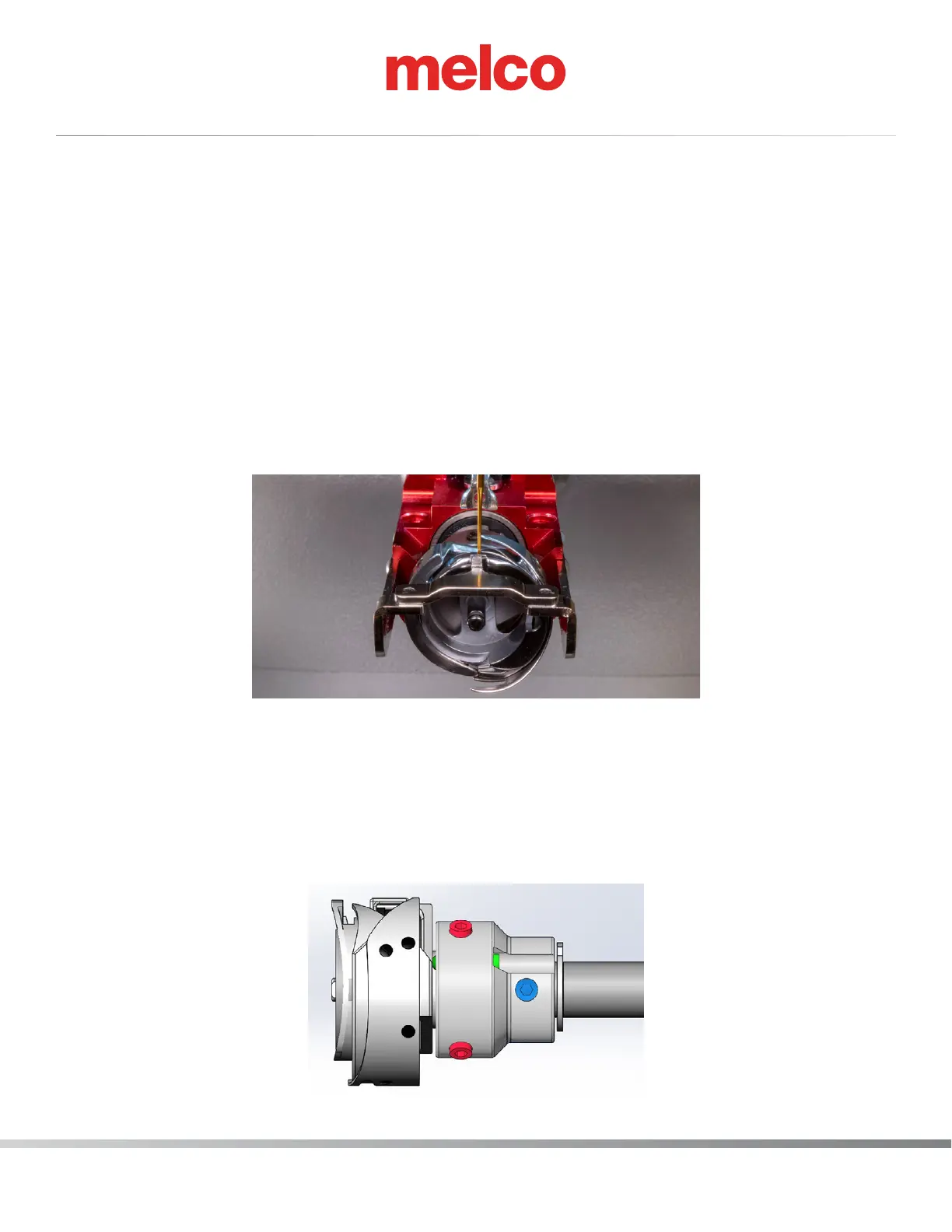
5. You can now adjust the hook timing if needed, using the following image as a guide.
To set the hook timing rotationally, align the hook point to the approximate hook timing position
as shown in the following image. (The following image reects the view of the needle and hook
point when looking from the front of the machine).
Remember the optimal position is such that the hook point is even with the left side of the needle.
Please note that it is not uncommon to repeat the adjustment several times to obtain the correct
hook timing.
6. Slightly loosen the two timing set screws (highlighted in blue in the image below) with a 2 mm
bent hex wrench and then rotationally position the rotary hook so that the hook point is even with
the left side of the needle. Lightly tighten each of the two timing set screws before fully tighten-
ing them.



 To Next Page