Chapter 3 Advanced Usage
Connecting a Network Audio Player Directly
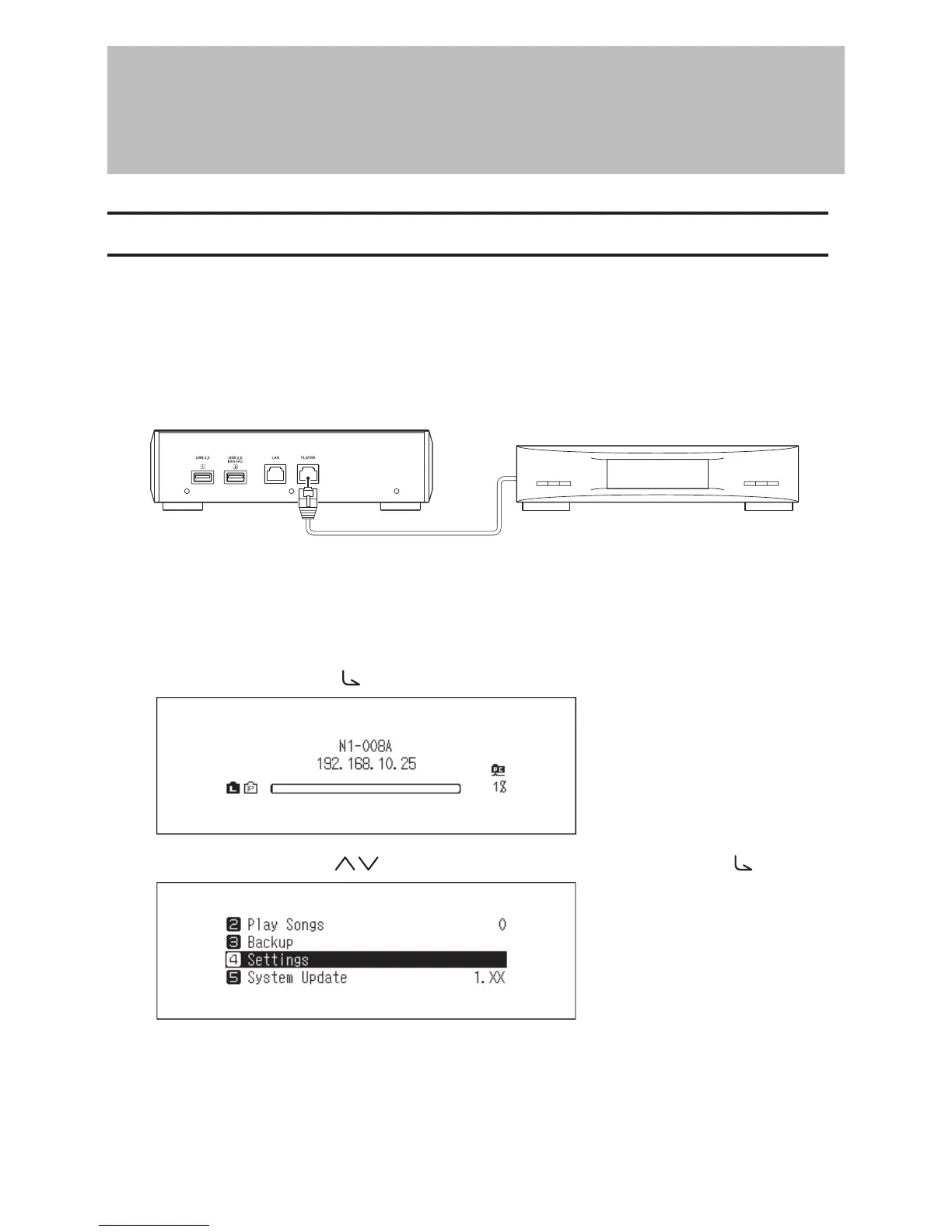
Set the N10/N100 to isolated mode if it is directly connected to the Network Audio Player with an Ethernet cable
and no other devices are on the network. If using this mode, the N10/N100 will not be connected to the router so it
won’t be able to be controlled using the app. For playback, use the Network Audio Player’s display panel and remote
controller to select a music file. If a Network Audio Player is not available, it will not be able to select a music file.
To configure isolated mode, follow the procedure below.
Note: Give the N10/N100 plenty of space for airflow. Do not stack it with other devices that may give off heat.
N10/N100 (Rear) Network Audio Player
1 Connect the N10/N100’s player port and a Network Audio Player with the provided Ethernet cable. Do not
connect the Ethernet cable to the Ethernet port for a router or hub.
2 Turn on the Network Audio Player.
3 Press the Menu/Enter button ( ) to display the menu list at the home screen.
4 Press the Up/Down buttons ( ) and select “Settings”, then press the Menu/Enter button ( ).
30



 To Next Page