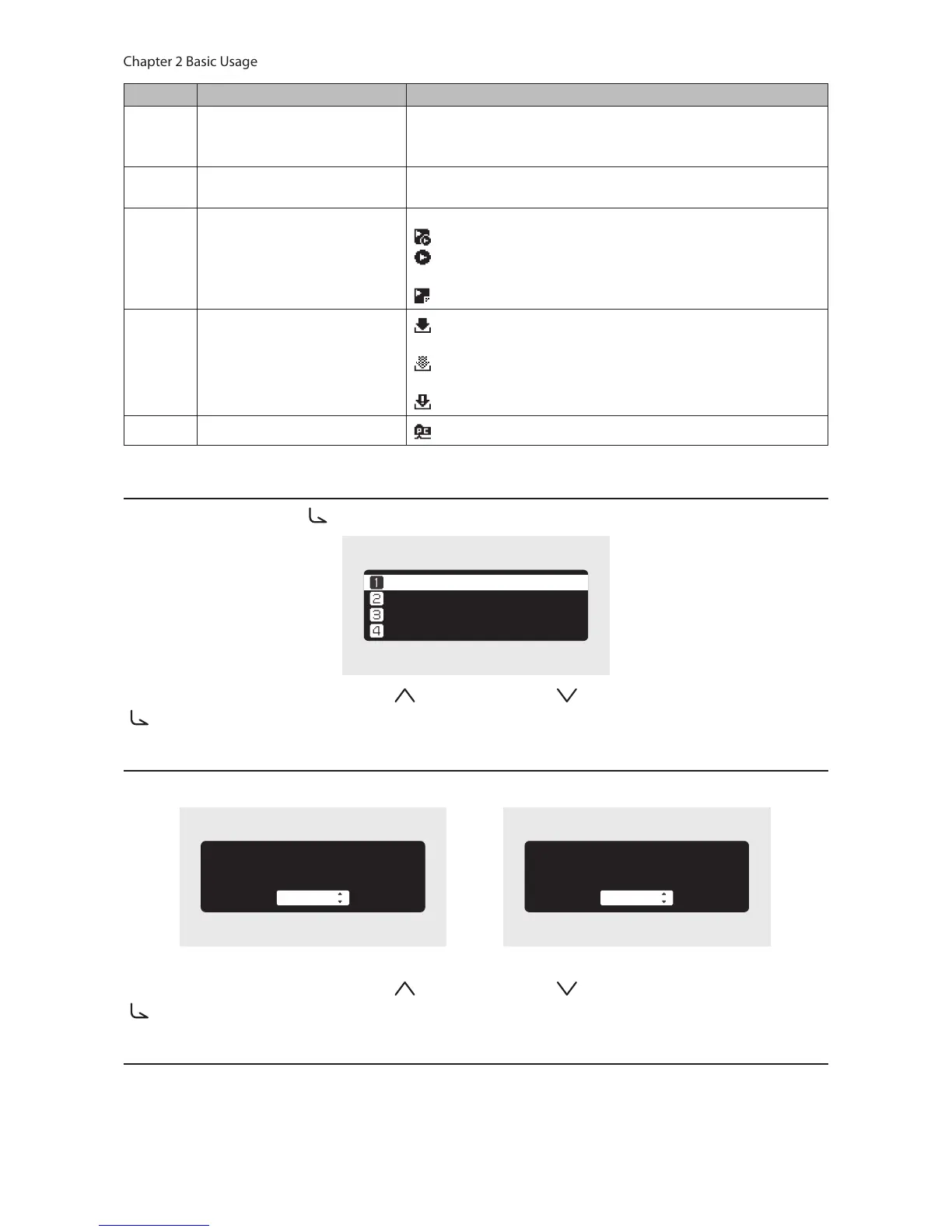
Number Item Description
8 IP Address
Displays the IP address. The IP address is used when accessing
the N10/N100 from a computer. If no IP address is displayed, the
player port is set to isolated mode.
9
Usage Capacity of Internal
Drive
Displays the used capacity of the internal drive in the N10/N100,
using a bar chart and a percentage (%).
10 Controller Settings
The icon will appear when a USB-DAC is connected.
: Displays when controller mode is configured to “Hybrid Mode”.
: Displays when controller mode is configured to “UPnP/DLNA
compatible Mode”.
: Displays when controller mode is configured to “Playlist Mode”.
11 Status of Downloader
: Displays when an account was added and periodic downloads
is enabled.
: Displays when an account was added but periodic downloads
is disabled.
: Displays when an error occurs and downloading failed.
12 Status of File Sharing
: Displays when file sharing is enabled.
Menu
Press the Menu/Enter button ( ) while the home screen is displayed.
ùęĆęĚĘ
èėĔĜĘĊÆùĔēČĘÆ Ö
èĆĈĐĚĕ
ùĊęęĎēČĘ
Move the cursor by pressing the Up button ( ) or the Down button ( ), then press the Menu/Enter button
( ) to make a selection.
Dialog
When confirming the operation, the dialog screen will be displayed.
çđđÆĉĆęĆÆĜĎđđÆćĊÆđĔĘęÔÆéĔēęĎēĚĊå
õñ
çđđÆĉĆęĆÆĜĎđđÆćĊÆđĔĘęÔÆéĔēęĎēĚĊå
éĆēĈĊđ
Move the cursor by pressing the Up button ( ) or the Down button ( ), then press the Menu/Enter button
( ) to make a selection.
Streaming Screen
When the N10/N100 starts streaming music files, the display panel will show the streaming music information.
Notes:
• If the music file is playing on a computer, the music information will not be displayed on the display panel.



 To Next Page