• When you press the Back button ( ), the entered characters are deleted from the right side. To change the
friendly name, press the Back button ( ) and delete all characters except for the first, then enter the new
friendly name.
• When you press the Menu/Enter ( ), the entered character is saved and another character can be selected.
Press the Menu/Enter button ( ) twice to stop configuring the friendly name.
• If you delete all the characters, the display will go back to the previous screen.
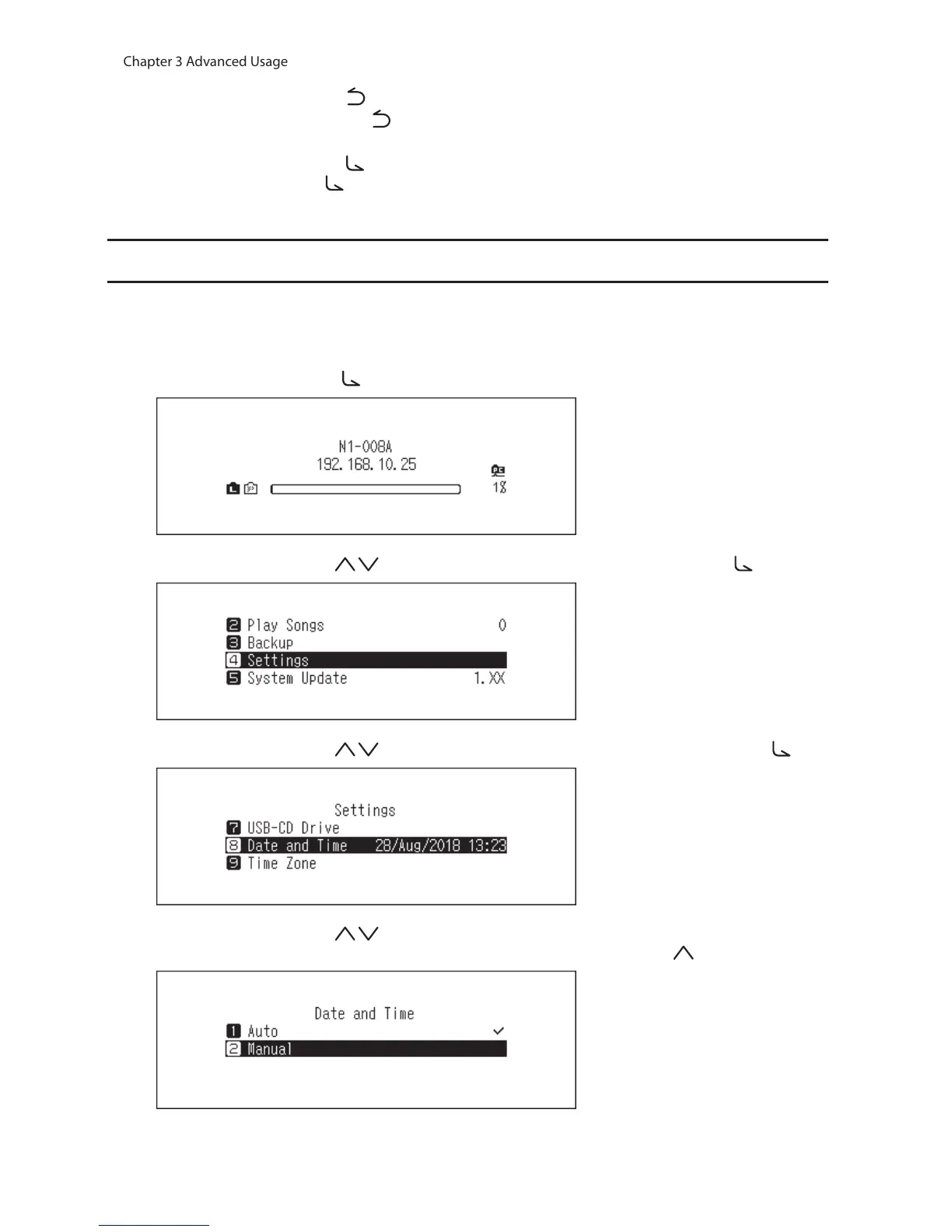
Configuring the Date and Time
To configure the time settings, follow the procedure below.
Note: To use features that require an Internet connection such as downloading files from the streaming sites,
configure the time settings so that they are acquired from the NTP server.
1 Press the Menu/Enter button ( ) to display the menu list at the home screen.
2 Press the Up/Down buttons ( ) and select “Settings”, then press the Menu/Enter button ( ).
3 Press the Up/Down buttons ( ) and select “Date and Time”, then press the Menu/Enter button ( ).
4 Press the Up/Down buttons ( ) and select whether to configure the time settings so that they are either
automatically acquired from the NTP server or manually, then press the Menu/Enter ( ) button.



 To Next Page