Notes:
• Create an account on one of the streaming sites above before using downloader. Also, make sure the N10/N100
is connected to the Internet. You can verify if the N10/N100 is connected to the Internet from Status > Network >
LAN.
• To use this function, the time settings should be acquired from the NTP server automatically.
• Do not move the folder under the “download” folder that contains the account name in its folder name to another
folder. If the folder is moved, the N10/N100 may download the same music files again.
Adding Accounts
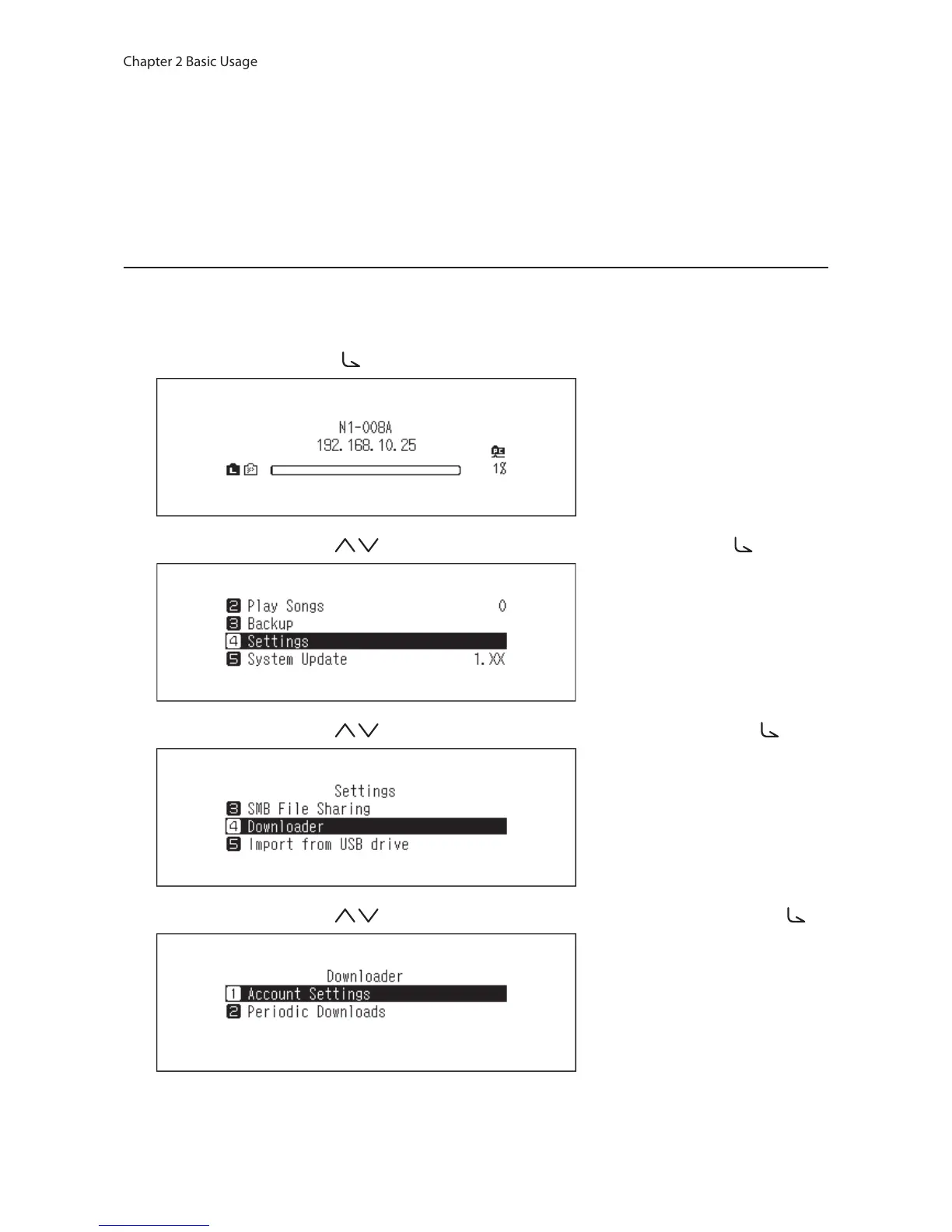
To add an account from a streaming site to the N10/N100, follow the procedure below.
1 Create an account on the streaming site.
2 Press the Menu/Enter button ( ) to display the menu list at the home screen.
3 Press the Up/Down buttons ( ) and select “Settings”, then press the Menu/Enter button ( ).
4 Press the Up/Down buttons ( ) and select “Downloader”, then press the Menu/Enter button ( ).
5 Press the Up/Down buttons ( ) and select “Account Settings”, then press the Menu/Enter button ( ).



 To Next Page