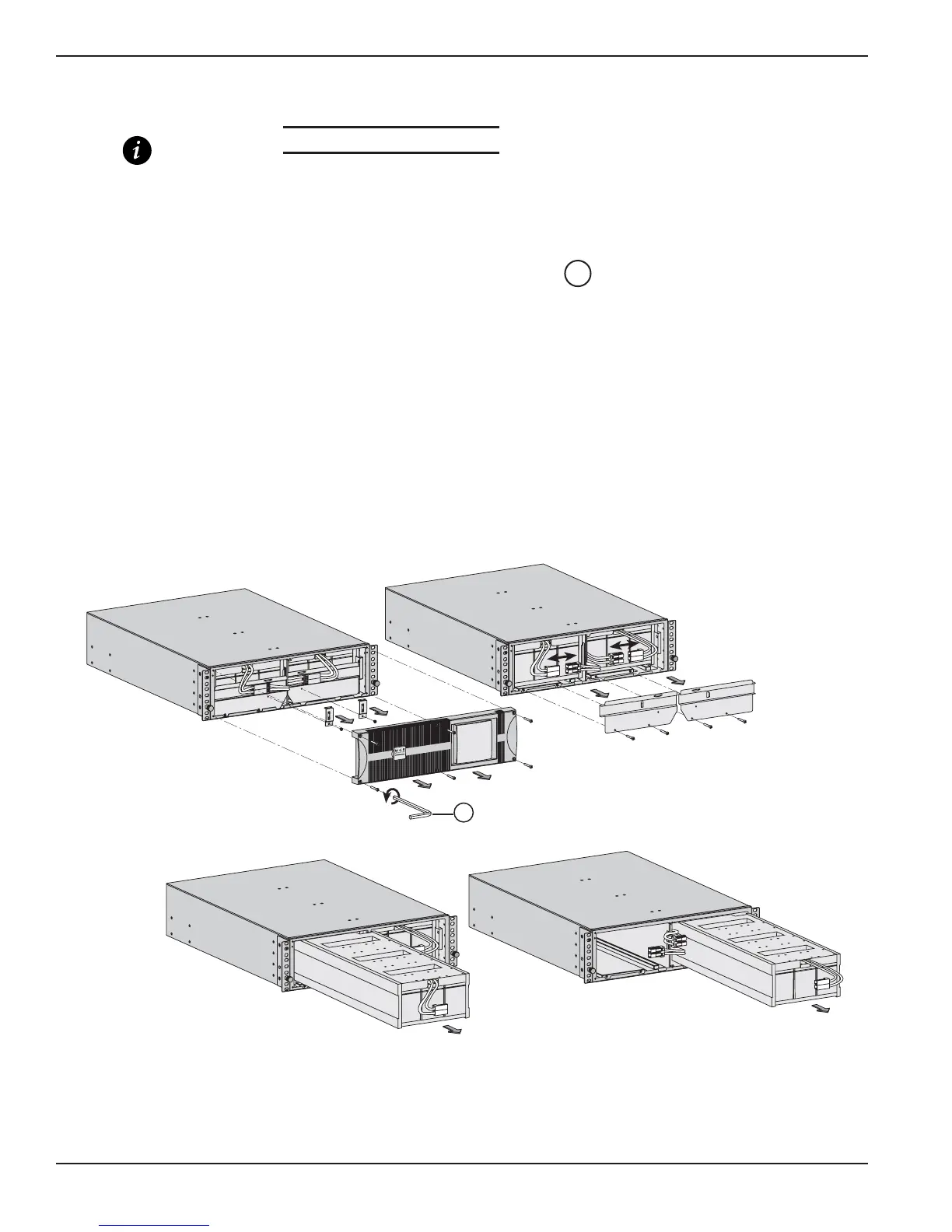
2.4.2 Prepare Battery Module for Rack Mounting
IMPORTANT This step requires two people.
The Battery Module is very heavy (151 lbs.). To ease its rack mounting, you can remove the battery pack from the
Battery Module, as explained below.
Proceed as follows:
1. Unscrew the six screws securing front panel using Bezel hex driver .
2. Unscrew the brackets securing the battery connectors.
3. Disconnect Battery plugs.
4. Unscrew the brackets securing the battery pack. Remove battery bracket pack covers.
5. Pull the left and right battery packs out and set aside for reinstalling after the Battery Module cabinet has been
rack mounted.
6. Mount Battery Module cabinet on rack.
7. Re-install the battery pack in reverse order.
Figure 2-5: Accessing Battery Pack.
44
EX 5/7/11RT Systems
Installation2 — 6 86-86000-00 B00





 To Next Page