Installation and User Manual
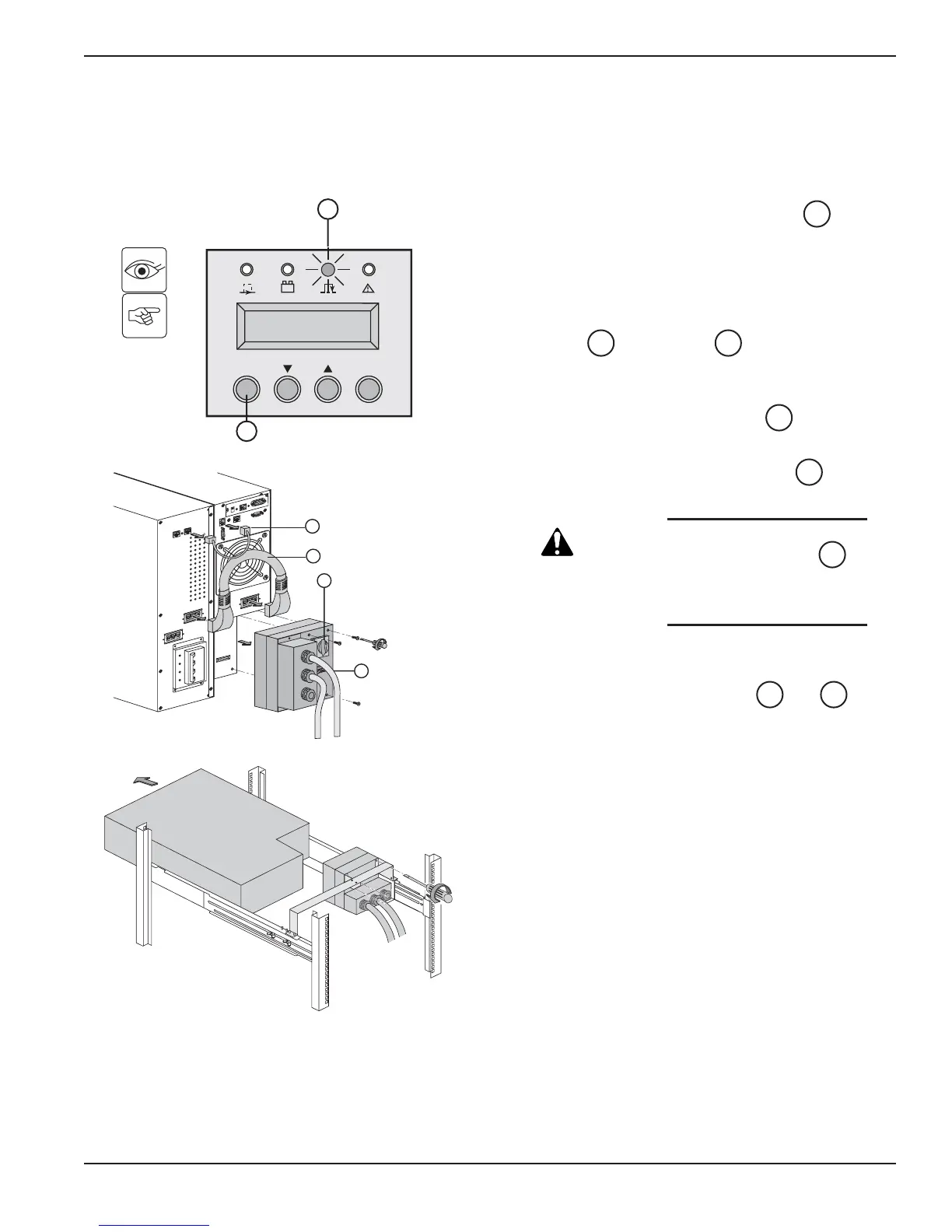
4.2 Hot Swapping the Power Module
This operation can be performed without interrupting the load.
Figure 4-1: Disconnecting the Power Module.
Maintenance 4 — 386-86000-00 B00
1. Stop the system with the OFF button
(press more than 3 seconds). System is now
powered by Bypass AC source.
Check if UPS is on Bypass AC source by
verifying that:
LED is ON (If LED is not ON, do not
turn the manual bypass and call the after sales
support department).
2. Turn the manual bypass switch to the
BYPASS position.
3. Switch the battery circuit breaker(s) to the
OFF position.
CAUTION: Do not switch the Normal AC
source circuit-breaker to
the OFF position.
Doing so will disconnect
power to the load.
4. Loosen three screws to remove the
Input/Output box.
5. Disconnect the battery cables and
from the Power Module.
The Power Module can be replaced.
The connected equipment is powered by the
Bypass AC source.
4240
8
14
7
1717
20
configuration.





 To Next Page