Installation and User Manual
4.4 Hot Swapping the Battery Module
During the replacement of the Battery Module, it is imperative to use the same type and number of element as the
original Battery Module provided with the UPS to maintain an identical level of performance and safety. In case of
doubt, don’t hesitate to contact our Customer Care Center for more information, or refer to our web site at
www.mgeups.com.
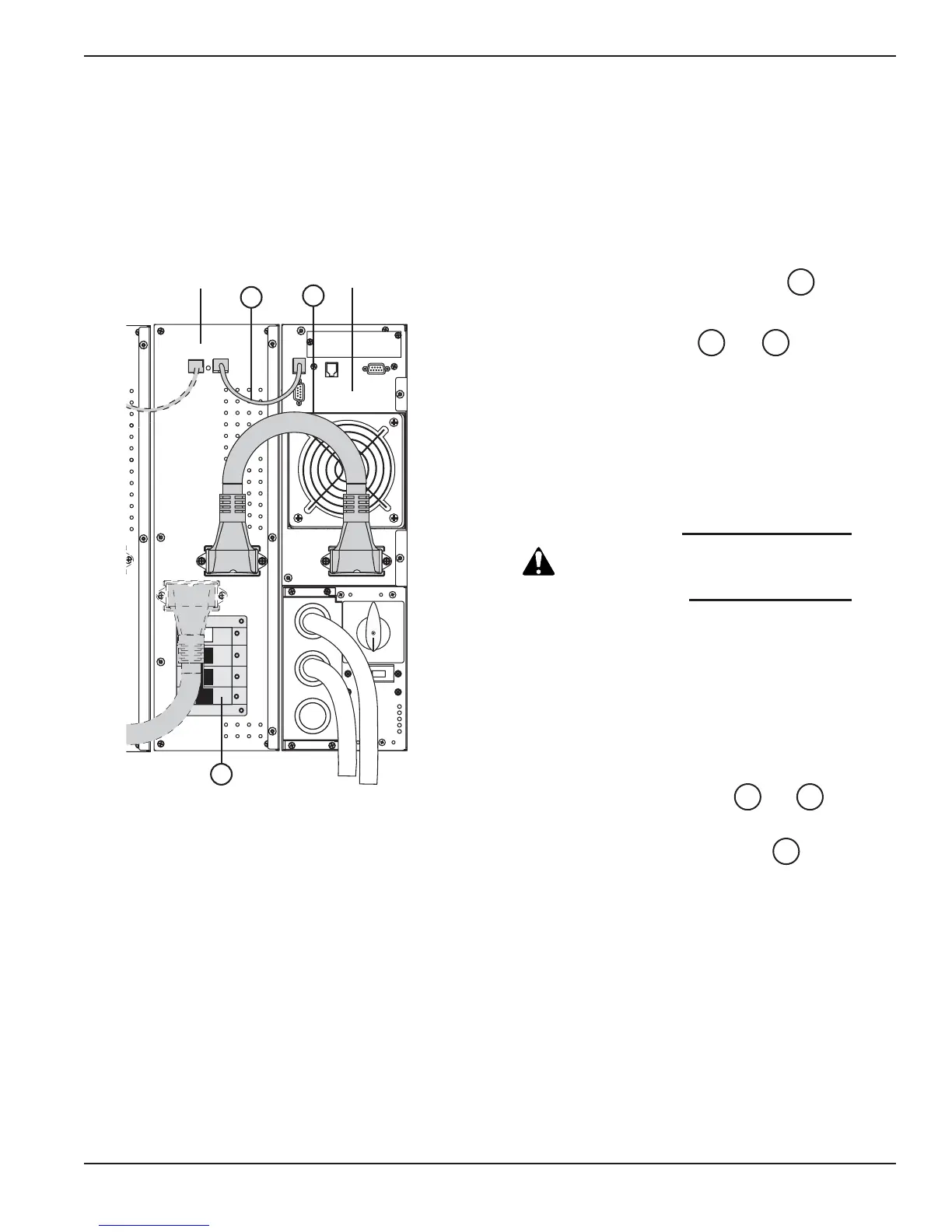
Figure 4-3: Rear view of the Battery Module.
Maintenance 4 — 586-86000-00 B00
4.4.1 Disconnecting the Battery Module
1. Switch the battery circuit breaker(s) to
the OFF position.
2. Disconnect the cables and from the
Power Module.
The Battery Module can be replaced.
The connected equipment is powered by the UPS,
but not protected.
It is also possible to replace the battery packs
instead of Battery Module.
CAUTION:
Always replace both
battery packs with
new ones.
To remove battery pack:
1. First, switch the battery circuit breaker(s) to
the OFF position.
See section 2.4.2 and follow instructions for
battery pack replacement.
4.4.2 Re-connecting the Battery Module
1. Reconnect the battery cables and to
the Power Module.
2. Switch the battery circuit breaker(s) to the
ON position.
14
4240
4240
14





 To Next Page