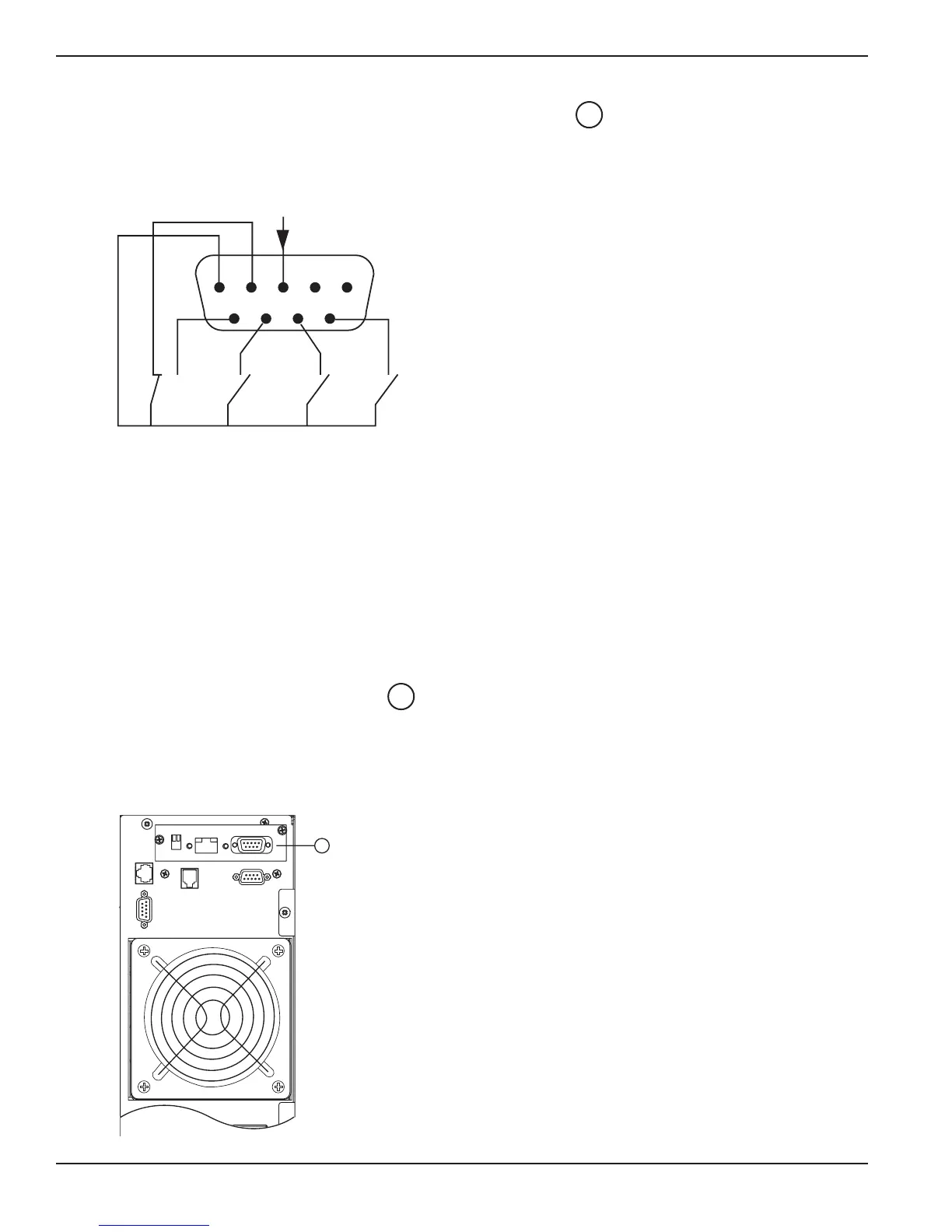
2.5.2 Connecting the Dry (Relay) Contact Communication Port
The system status is indicated by the connection of common pin (Pin 5) to the appropriate pins. Refer to the pin
explanations below for details.
Figure 2-9: Relay Pin Connections for Communication Port.
2.5.3 Installation of Optional Transverse Card
It is not necessary to shut down the UPS to install the optional communications card, except for USB card. Following
is a typical installation of the Transverse card (optional Network Management card PN 66074 is shown below).
Proceed as follows:
1. Remove the slot cover secured by two screws.
2. Insert the Transverse card into the slot .
3. Secure the card with both screws.
4. Refer to user manual of the Network Management Card for set-up.
Figure 2-10: Communication Card Slot with Network Management Card installed.
1
2
EX 5/7/11RT Systems
Installation2 — 10 86-86000-00 B00
pin is closed.
Pin 1, 2: not used.
Pin 3: Remote Power Off signal (5 to 27 VDC, 10 mA max).
Pin 4: Operation on mains (not on battery). (48VDC, 2A max.)
Pin 5: User common.
Pin 6: Operation on automatic bypass.
Pin 7: Low battery.
Pin 8: Load protected
Pin 9: Operation on battery.
Legend:
NO: contact normally open.
NC: contact normally closed.





 To Next Page