Operating Instructions - Synchroprint 3000 (Manual-Registration Version)
________________________________________________________________________________
Operating Instructions - Synchrprint 3000 (Manual-Registration Version) V1-1 Page 31 of 49
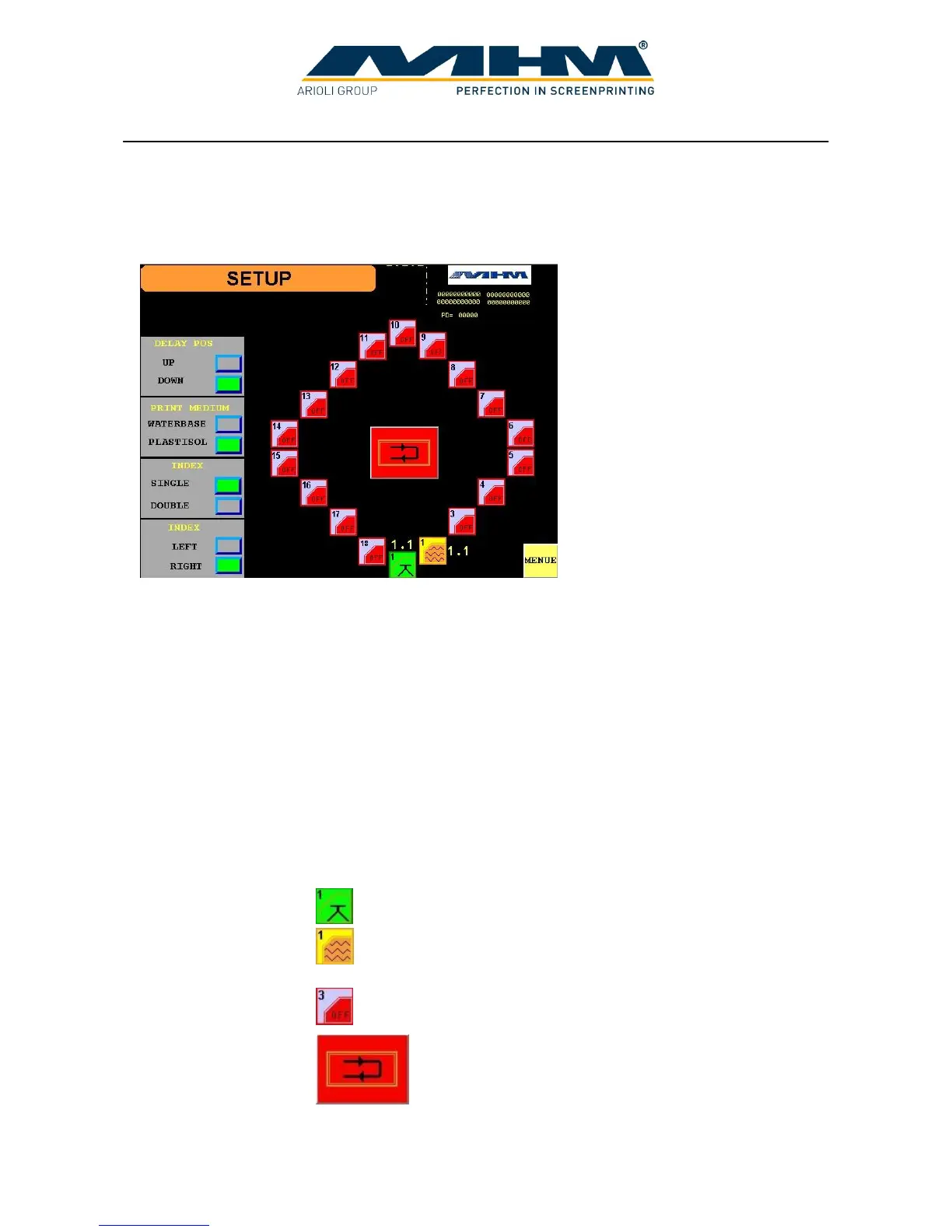
7.5. Command screen ‘SETUP’
This screen allows the operator to enter all parameters required in order to set-up the machine for
each particular print job/run.
DELAY POS Allows the operator to choose whether the screens will be in their raised
or lowered position during the waiting time between printing cycles.
PRINT MEDIUM If waterbased is selected, the printing cycle will start with a print stroke
and end with a flood stroke, therefore leaving the screen flooded. If
plastisol is selected the cycle starts with a flood stroke and ends with a
print stroke, therefore leaving the screen clear.
INDEX Choose between single and double index modes. The setting of double
index may be selected for production using 4 operators.
INDEX Choose the direction of the turntable/index rotation during printing.
PRINT STATIONS Shows the settings of each individual print station. (The number of print
stations depends on the model/type of machine). Pressing any print
station key on the display will lead to the screen ‘PROGRAM
STATION’. From here, the following functions are possible:
Choose the number of flood/print strokes required.
Indicates flash cure unit present and allows control of the flash
cure unit timing from the main control panel of the machine.
Station disabled /switched off.
RESET Used as a ‘one touch’ key to quickly set the number of
flood/print strokes required to 1. (Most popular setting).
The key may be used individually for all print stations.
MENU Press ‘MENU’ to exit this screen and return to the ‘MENU’ screen.



 To Next Page