Operating Instructions - Synchroprint 3000 (Manual-Registration Version)
________________________________________________________________________________
Operating Instructions - Synchrprint 3000 (Manual-Registration Version) V1-1 Page 37 of 49
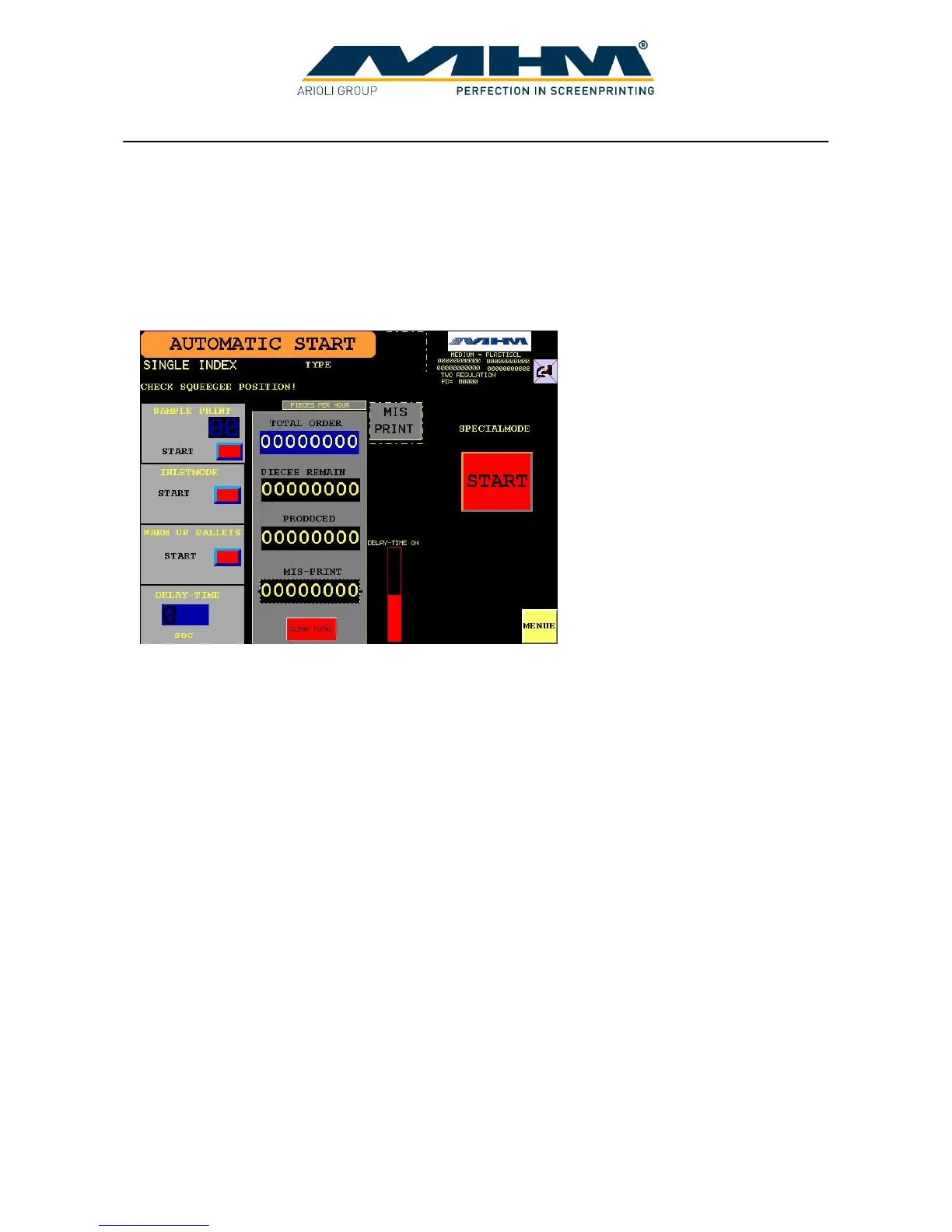
7.8. Command screen ‘AUTOMATIC’
From this screen the automatic production process may be controlled. Once production has
commenced (active), the display will change to the screen in section 7.8.2. shown on the next page.
7.8.1. Automatic Production (Not Active)
SAMPLE PRINT Automatically prints a ‘one off’ or test/proof sample piece. (Multiple
pieces may be selected).
INLETMODE Activates each selected print station/flash cure unit in sequence when
commencing a production run. (Prevents printing onto empty pallets).
WARM UP PALLETS Starts the pallet ‘warm-up’ feature. Upon selection the display will
switch to the command screen ‘WARM UP PALLETS’ (see 7.7.1
Command screen ‘WARMUP PALLETS’).
DELAY-TIME Controls and displays the dwell-time between the turntable
movements/indexes. (Will display active countdown during production).
MIS PRINT This key is pressed each time a garment is loaded incorrectly by the
operator or is faulty. The ‘PIECES REMAIN’ number will then increase
by one unit as will the ‘MIS-PRINT’ counter. (This will ensure the
correct amount of pieces are printed during the production run with the
number of faulty pieces being accurately recorded).
START Starts the automatic production process.
MENU Exits this screen and returns to the ‘MENU’ screen.
Pieces/counter displays These counters are detailed in section 7.7 Command screen ‘MANUAL’.



 To Next Page