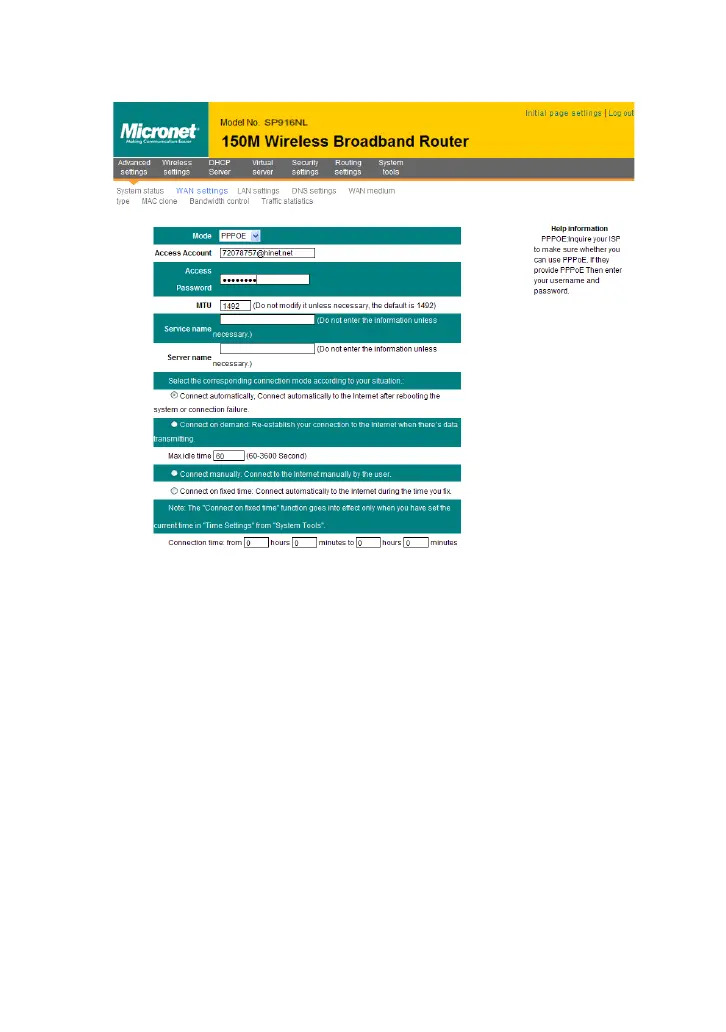
Mode: Show your current connection mode.
Access Account: Enter the account provided by your ISP.
Access Password: Enter the password provided by your ISP.
MTU: Maximum Transmission Unit. It is the size of the largest data
packet that can be sent over the network. The default value is 1492.
Do NOT modify it unless necessary, but if a specific website or web
application software cannot open or be enabled, you can try to
change the MTU value to 1450, 1400, etc.
Service Name: The connection name for current PPPOE, enter it if
necessary:otherwise, leave it blank.
AC Name: The service name, enter it if necessary:otherwise, leave
it blank.
Connect Automatically: Connect automatically to the Internet after
rebooting the system or connection failure.
Connect on Demand: Re-establish your connection to the Internet
after the specific time (Max Idle Time). Zero means you are
connected to the Internet all times. Otherwise, enter the minutes to



 To Next Page