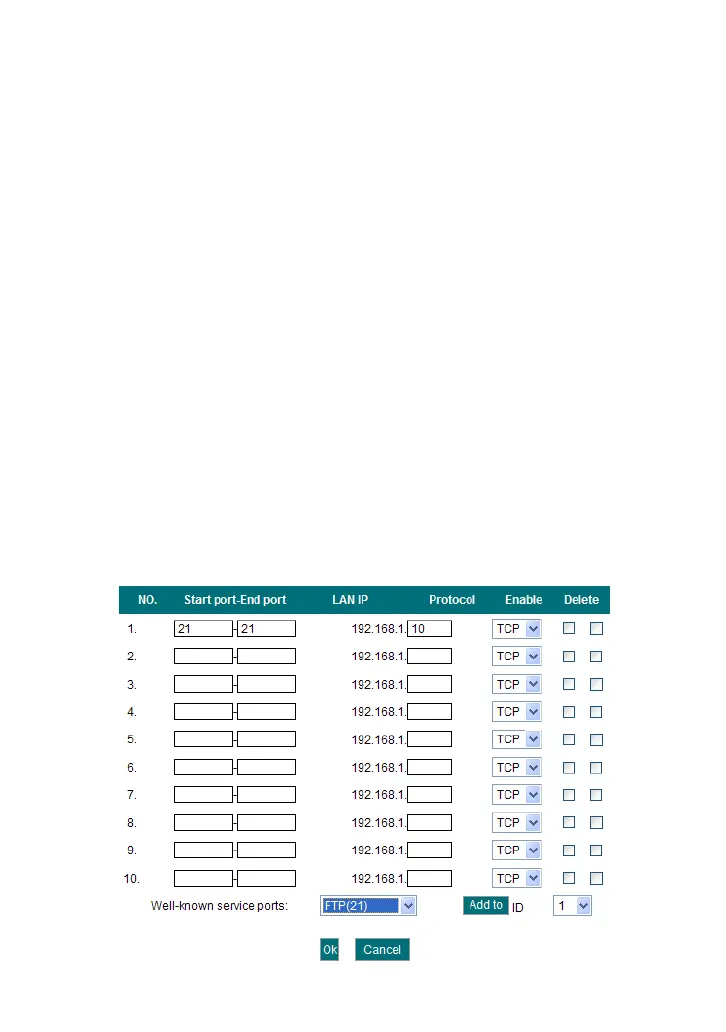
the ID drop-down list and then click “Add”, this port will be added
automatically to the ID list. For other well known service ports that
are not listed, you can manually add them to the list.
Add to: Add the selected well-known port to the policy ID.
For Example: You want to share some large files with your friends outside
of your local area network, however, they are too big, and it’s not
convenient to transfer them. Then, you can build a FTP server on your
computer and set the router’s port range forwarding to enable your friends
to access to these files on your computer. Suppose that your FTP server or
your computer’s static IP address is 192.168.1.10, and you wish your
friends can access the server through the default port 21 and adopts TCP
protocol.
Please follow the steps below to configure.
1.Enter 21 in both start port and end port fields, or you can also select FTP
from the well-known service port and its port 21 will be added to the
corresponding field automatically.
2. Enter 192.168.1.10 in the LAN IP column, and then select “Both” as the
protocol and select “Enable”.
3. As the picture shown below.



 To Next Page