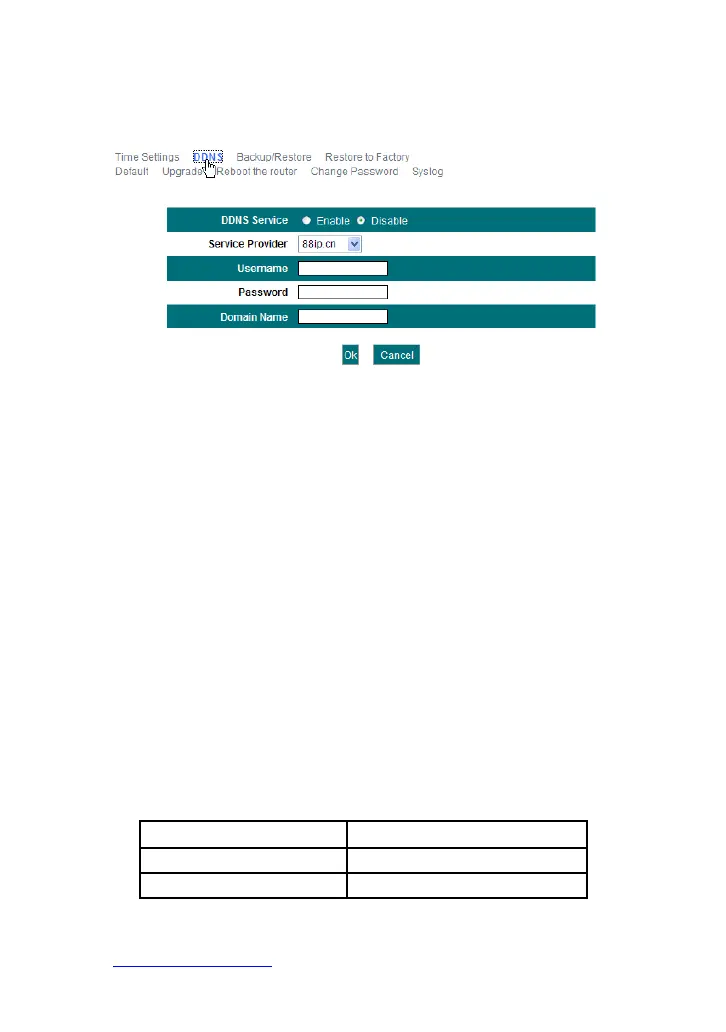
providing DNS service and implementing dynamic domain name
resolution.
Main features:
1. Mostly, your ISP provides a dynamic IP address and the DDNS is
used to capture the changeable IP address and match to the fixed
domain. Then users can have access to the Internet to communicate
with others outside the network.
2. DDNS can help you to establish a virtual host in your home or
company.
DDNS: Click the radio button to enable or disable the DDNS service.
Service provider: Select one from the drop-down list and click
“Sign up” for registration.
Username: Enter the username that you use to register from the
DDNS provider
Password: Enter the password that you use to register from the
DDNS provider
Domain name: Enter the effective registered domain name
For example:
Establish a Web server in the local host 192.168.1.10 and register in
3322.org as follows:
Username Micronet
Password 123456
Domain Name Micronet.3322.org
After mapping the port in the virtual server, and setting account information
in DDNS server, you can then access the web page by entering
http:// micronet.3322 .org in the address field.



 To Next Page