Home
MicroNet
Wireless Router
SP916NL
Page 8 (1.3 LED Indicator and Port Description)
MicroNet SP916NL - 1.3 LED Indicator and Port Description; Front Panel LED Indicators
80 pages
Manual
Save Page as PDF
To Next Page
To Next Page
To Previous Page
To Previous Page
Loading...
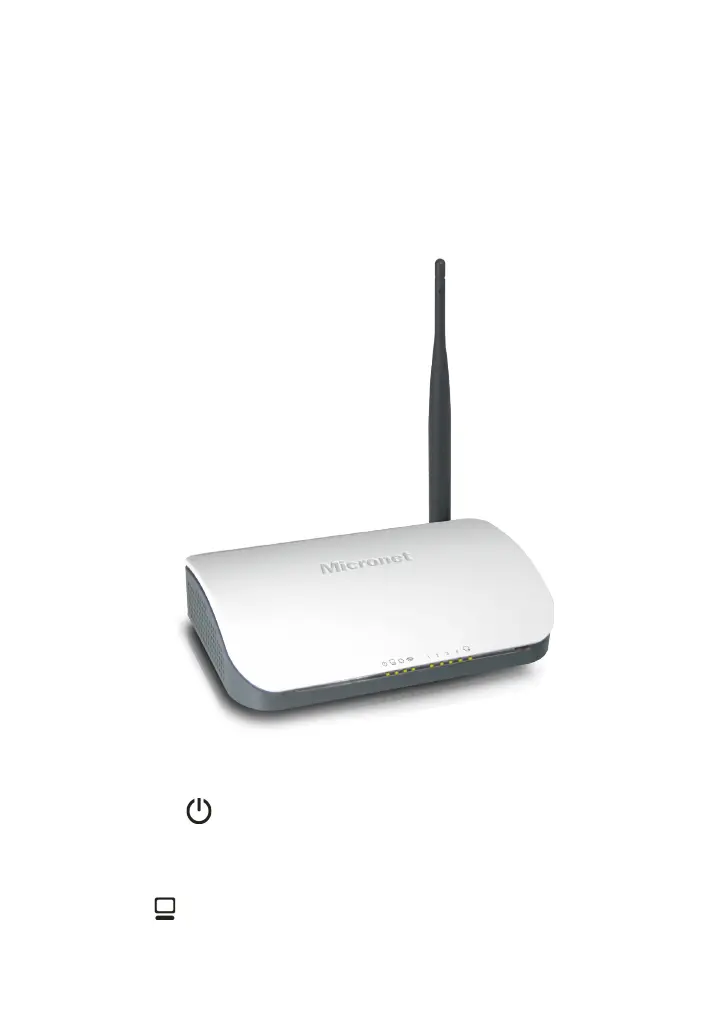
1.3 LED Indicator and Port Description
Front Panel and LED Indicator Show
LED indicator description on front panel
:
POWER
When turns green,
Always ON indicates the power
connects well.
SYS
When turns green, blinking indicates the system runs
4
7
9
Table of Contents
Main Page
Default Chapter
2
Table of Contents
2
Package Contents
5
Product Features
6
Hardware Installation
11
Product Installation
11
Network Application Plan
13
3 How to Configure to Access the Internet
19
How to Set the Network Configurations
19
Log in to the Router
23
Fast Internet Access
24
Acces
24
Fast Encryption
25
4 Advanced Settings
27
System Status
27
Wan Settings
28
Lan Settings
31
Dns Settings
31
Wan Medium Type
32
Mac Clone
33
Bandwidth Control
34
Traffic Statistics
37
5 Wlan Settings
39
Wireless Basic Settings
39
Wireless Security Settings
43
Wps Settings
44
Wpa- Psk
45
Wpa2- Psk
46
Wireless Access Control
47
Connection Status
48
6 Dhcp Server
49
Dhcp Client List
49
7 Virtual Server
51
Port Range Forwarding
51
Dmz Settings
54
Upnp Settings
54
8 Security Settings
56
Client Filter Settings
56
Ddress Filter
57
Url Filter Settings
58
Remote Web Management
59
9 Routing Settings
61
Routing Table
61
Static Routing
61
10 System Tools
63
Time Settings
63
Ddns
63
Backup/Restore
65
Restore to Factory Default
66
Upgrade
67
Reboot the Router
67
Password Change
68
Syslog
68
Log out
69
Appendix 1 Glossary
71
Appendix 2 Product Features
72
Appendix 3 Faq
73
Appendix 4 Clear Wireless Configuration
75
Appendix 5 Regulatory Information
79
Other manuals for MicroNet SP916NL
Quick Installation Guide
2 pages
Related product manuals
MicroNet SP916GK
41 pages
MicroNet SP916GN
77 pages
MicroNet SP3367A
70 pages
MicroNet T18 Pro
14 pages



 To Next Page