CARDIAC STIMULATOR
ENGLISH Page 25 of 49
1
1
1
1
USING THE KEYBOARD AND THE TOUCH
DISPLAY
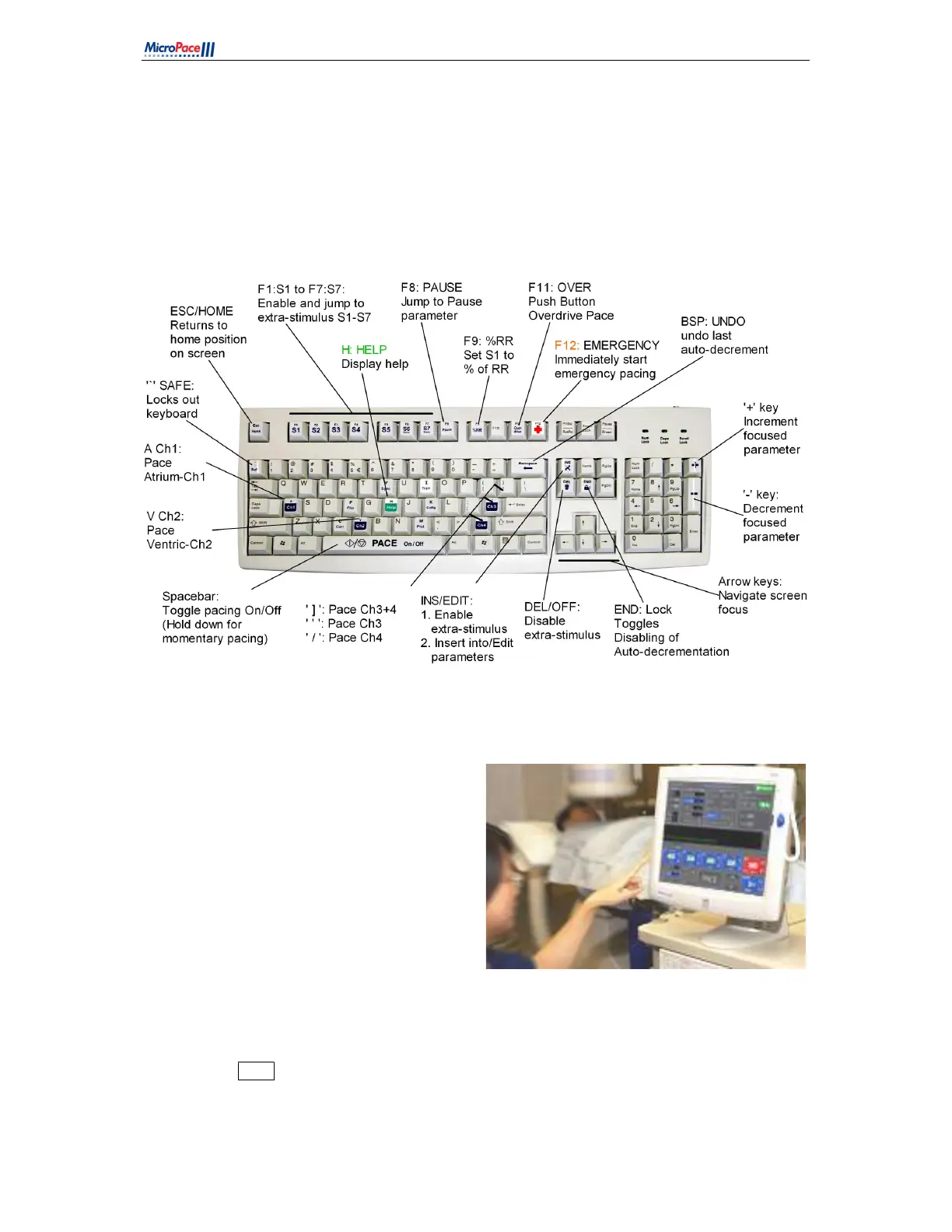
The Stimulator may be operated by keyboard alphanumeric hot keys indicated in software menus and
on key labels, Figure 9 shows the main hot keys.
Figure 9 Keyboard Layout
The Touch Screen is a 15” touch LCD display
You may use your finger, gloved finger or
a soft stylus, such as the back of a plastic
pen.
The user may focus screen parameters by
touching them and then modify their
values with the + / - buttons on the screen.
This includes S1 to S6 and all menus in
the upper half of the screen.
Numerical entry may be by a numeric
keypad opened either by the NumPad
touch button or by double tapping the
parameter.
Press and hold the purple Emergency
Pace button for instant pacing at any time.
Press ‘ALT Menu’ to display more, alternate menus.
Press Enter button on the screen when displayed to enter values or exit menus.
Press on Exit Icon (‘X’ in a box) to exit menus.
Figure 10 Touch Screen



 To Next Page