CARDIAC STIMULATOR
ENGLISH Page 37 of 49
12.9 Software configuration.
Configuration Menu. Software configuration, including various safety limits and options may be
adjusted by the installing technician according to customer preferences using the password protected
CONFIG utility, hotkey 'K'.
Storing multiple Protocol Defaults. You may store up to 8 different sets of Protocol Parameter
defaults. Store Parameters as above except after pressing 'Alt-S', select one of eight memories.
Retrieve a protocol by the 'Alt-R' hotkey, followed by the number of the memory.
12.10 Sound Configuration
The Stimulator system outputs the sounds produced during use (stimulus sound, sensed ECG and
others) to external speakers (as well as continuing to make the sound internally in the PC and the
SGU).
WARNING:
Any connected amplified speakers must be powered by a medically isolated mains power source,
such as the Micropace Isolation Transformer MP3107.
12.11 Safety Features
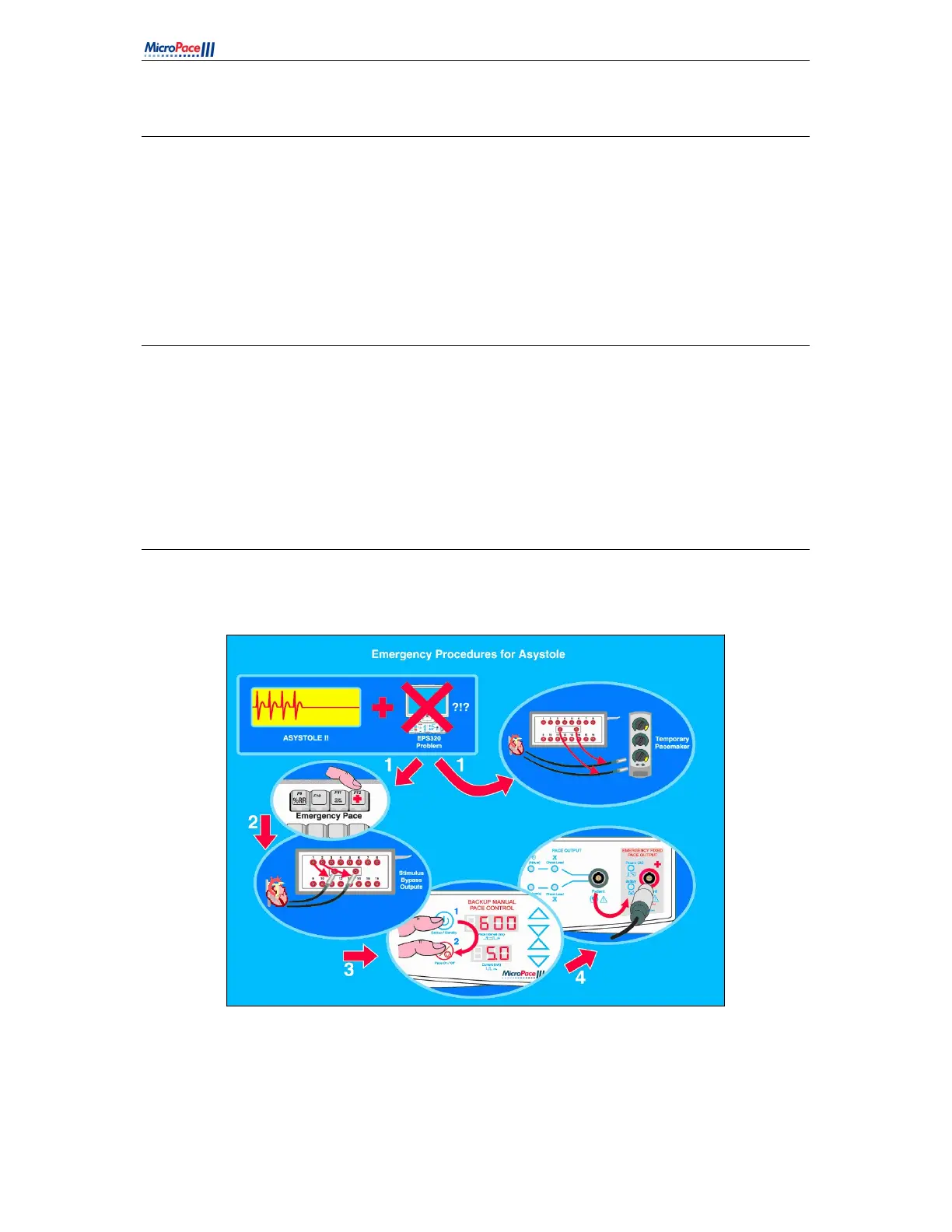
For urgent pacing, press F12. If Computer fails use Backup Manual Pacing on SGU (Step 3 below); if
SGU itself fails, use Emergency Pace (Step 4 below).
Figure 15 For urgent pacing



 To Next Page