20
7.4.6 APTT Units
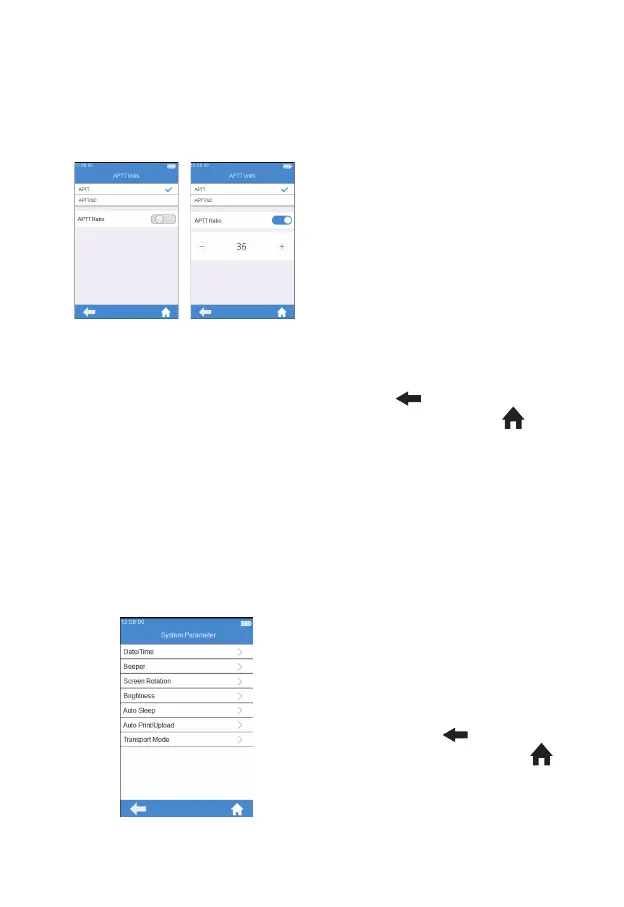
Click “APTT Units” from Test
Parameter menu (see gure 3-7)
to enter the APTT Units menu (see
gure 3-16). The display format
of the APTT test result can be set
as required. The available display
formats are: APTT and APTT/QC.
After selecting a format, APTT test
result is displayed accordingly.
The normal mean of APTT can be
set under the format option. If the
button is grayed out, the normal
mean of APTT is Off. If the button
is blue, the normal mean of APTT
is On. The normal mean can be
changed by touching “-“ and
“+”.
Click "
" to return to the
previous screen and click " " to
return to the main menu.
Note: APTT Ratio = APTT Value/Normal APTT, which is used to evaluate
the endogenous coagulation function of patients. The doctor should
adjust the normal APTT mean based on local clinical results to obtain
an accurate ratio. The normal APTT mean is 36 by default, which is
determined by Micropoint based on parallel tests of 20 healthy individuals.
7.5 System Parameter
Click "System Parameter" from
the Settings screen (Figure 3-1) to
enter the screen (Figure 3-17) that
prompts the user to set the system
parameter. Click "
" to return to
the previous screen and click " "
to return to the main menu.
(3-16)
(3-17)



 To Next Page