26
8 Sample Test
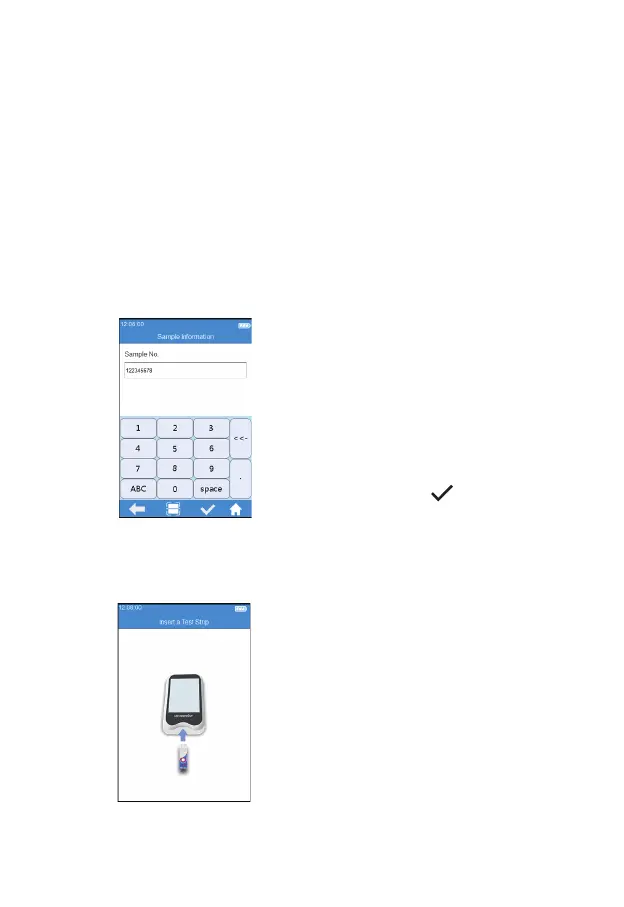
8.1 Input Sample No.
When the sample No. switch is turned off, skip the step of inputting
the sample No. and insert the test strip directly. When the sample
number switch is turned on, the sample can be numbered manually or
automatically. If auto numbering is selected, please enter the screen for
inserting the test strip directly after entering the sample test channel, the
system then generates a sample No. automatically; if manual numbering is
selected, please input the sample No. manually and save it after entering
the sample test channel (as shown in Figure 4-1), then enter the strip
insertion screen.
Click the "Sample Test" icon
from the main menu (Figure 2-1)
to enter the sample information
screen (Figure 4-1), and manually
enter the sample number, which
consists of numbers, uppercases
and lowercases, and space. The
character length should be between
1-20, then click "
" to save.
8.2 Insert a Test Strip
Save the sample No. and enter the
strip insertion screen, then insert
the test strip in the direction shown
in Figure 4-2. Keep inserting the
strip from the right direction until
the sample well on it is align with
the dot on the instrument. If the test
strip is already inserted, please skip
the strip insertion screen and enter
the next screen to input the test
strip information.
(4-1)
(4-2)



 To Next Page