34
(5-1)
9 Quality Control
Onboard QC Test
The qLabs
®
ElectroMeter also measures the clotting time in the Quality
Control (QC) zone of PT-INR or APTT strip. If the QC result fails to fall
within a predetermined range, the qLabs
®
ElectroMeter will display an
error code rather than give a possible erroneous PT-INR or APTT result..
This safety measure guards the user against situations in which the
qLabs
®
PT-INR or APTT Test strip may have been subjected to very high
temperatures or humidity (which could happen if the foil pouch is torn or
punctured).
Liquid QC Test
Micropoint Biotechnologies Co., Ltd. has optional liquid controls for
qLabs
®
system. The qLabs
®
PT-INR and APTT liquid controls are used
with qLabs
®
PT-INR and APTT test strips to verify the qLabs
®
system
performance, respectively. It is recommended that two levels of liquid
controls are used to perform the test.
The qLabs
®
PT-INR and APTT liquid controls can be purchased separately
from Micropoint Biotechnologies Co., Ltd. Please refer to the qLabs
®
PT-INR and APTT liquid controls package insert for detailed operation
instructions.
Only use qualifi ed qLabs
®
Controls for QC test.
The speci c procedure for external QC test are as follows.
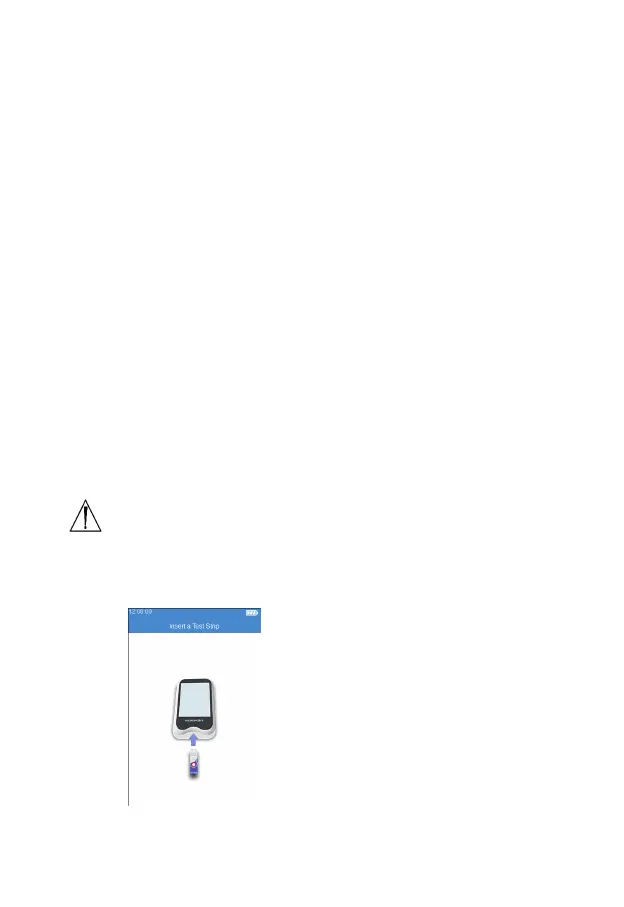
9.1 Insert a Test Strip
Click the "QC Test" icon from the
main menu screen (Figure 2-1)
to start the QC test, and insert
the test strip in the direction as
indicated by the gure (Figure 5-1).
Keep inserting the strip from the
right direction until the the sample
well on it is align with the dot on
the instrument. If the test strip is
already inserted, please skip the
strip insertion screen and enter the
next screen to input the test strip
information.



 To Next Page