27
8.3 Input Test Strip Information
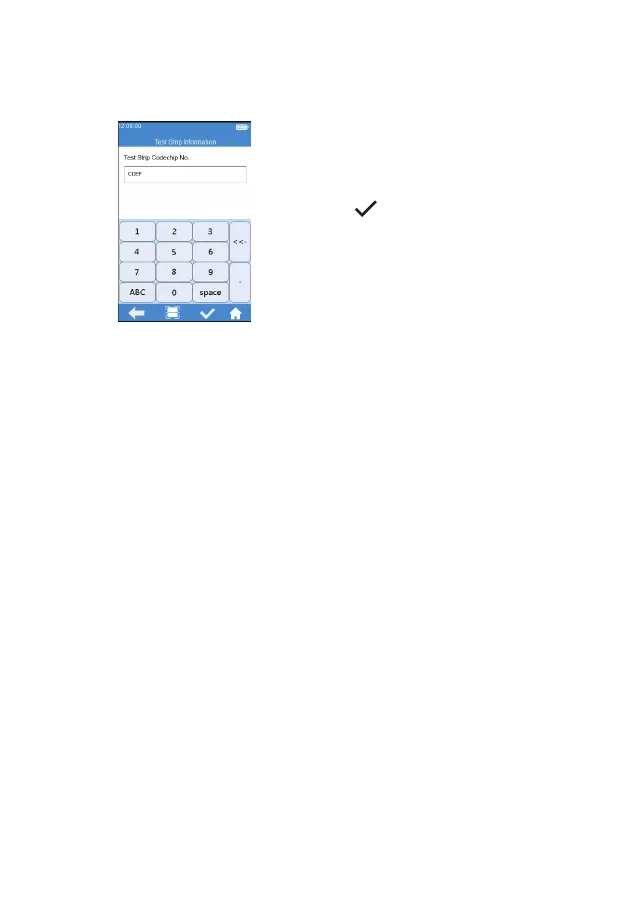
After the test strip is inserted, please
enter the test strip information
screen (Figure 4-3), and input the
Codechip number of the test strip,
the Codechip number can be
inputted through manually input and
click "
" to save, or by scanning
the barcode on the package of the
test strip. The package of the test
strip bears the Codechip number of
the test strip. The Codechip number
of the test strip must be input, or
the system will deliver a warning
message indicating that the input is
invalid when you click Save.
Note:
When Meter scans, the indicator will be automatically lights up first.
The white area in the rectangular light field is the sensing area. When
scanning, the scan port should be aligned with the barcode, and the
position, distance and angle between the barcode and scan port should
be adjusted according to the light eld.
Location: The barcode should be placed in the white sensing area with the
barcode direction align with the long axis of the white sensing area.
Distance: Adjust the distance between the barcode and meter scan port
to make sure the barcode ts completely within the white sensing area.
Angle: The light eld should be as perpendicular to the barcode plane as
possible, and the vertical deviation should have the highest recognition
rate within ±5°.
(4-3)



 To Next Page