In-Application Programming Using PCIe Interface
DG0584 Demo Guide Revision 5.0 8
Note: Snapshots of the SmartFusion2 Security Evaluation Kit board with the complete set up is given in the
Appendix: SmartFusion2 Security Evaluation Kit Board, page 23.
2.4.1 Programming the SmartFusion2 Security Evaluation Kit Board
The following steps describe how to program the SmartFusion2 Security Evaluation Kit board:
1. Download the demo design from:
http://soc.microsemi.com/download/rsc/?f=m2s_dg0584_liberov11p8_df
2. Switch ON the power supply switch, SW7.
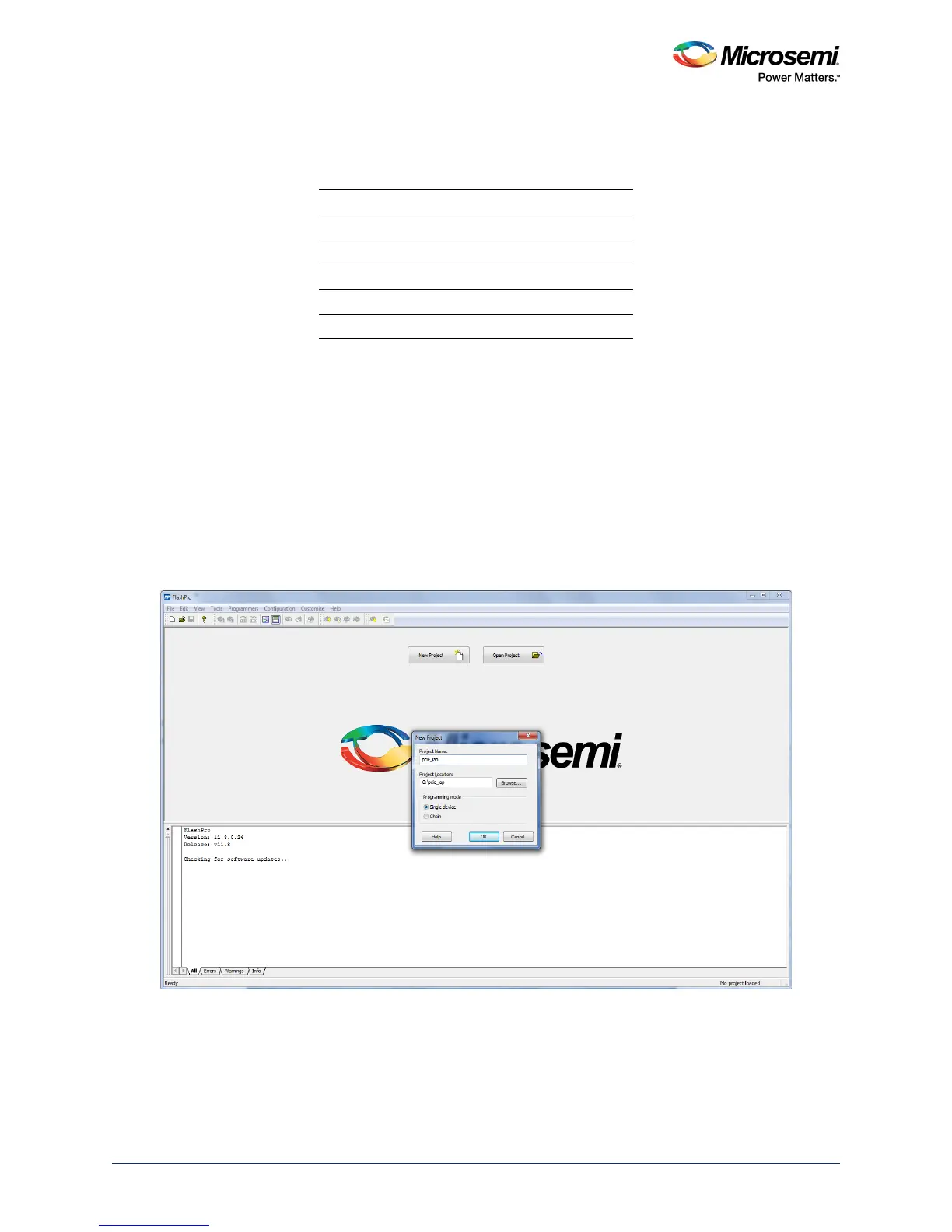
3. Launch the FlashPro software.
4. Click New Project.
5. In the New Project window, enter the project name as pcie_iap.
6. Click Browse and navigate to the location where you want to save the project.
7. Select Single device as Programming mode.
8. Click OK to save the project.
Figure 5 • FlashPro New Project
Table 2 • SmartFusion2 Security Evaluation Kit Jumper Settings
Jumper Pin From Pin To Comments
J22 1 2 Default
J23 1 2 Default
J24 1 2 Default
J8 1 2 Default
J3 1 2 Default




 To Next Page