In-Application Programming Using PCIe Interface
DG0584 Demo Guide Revision 5.0 11
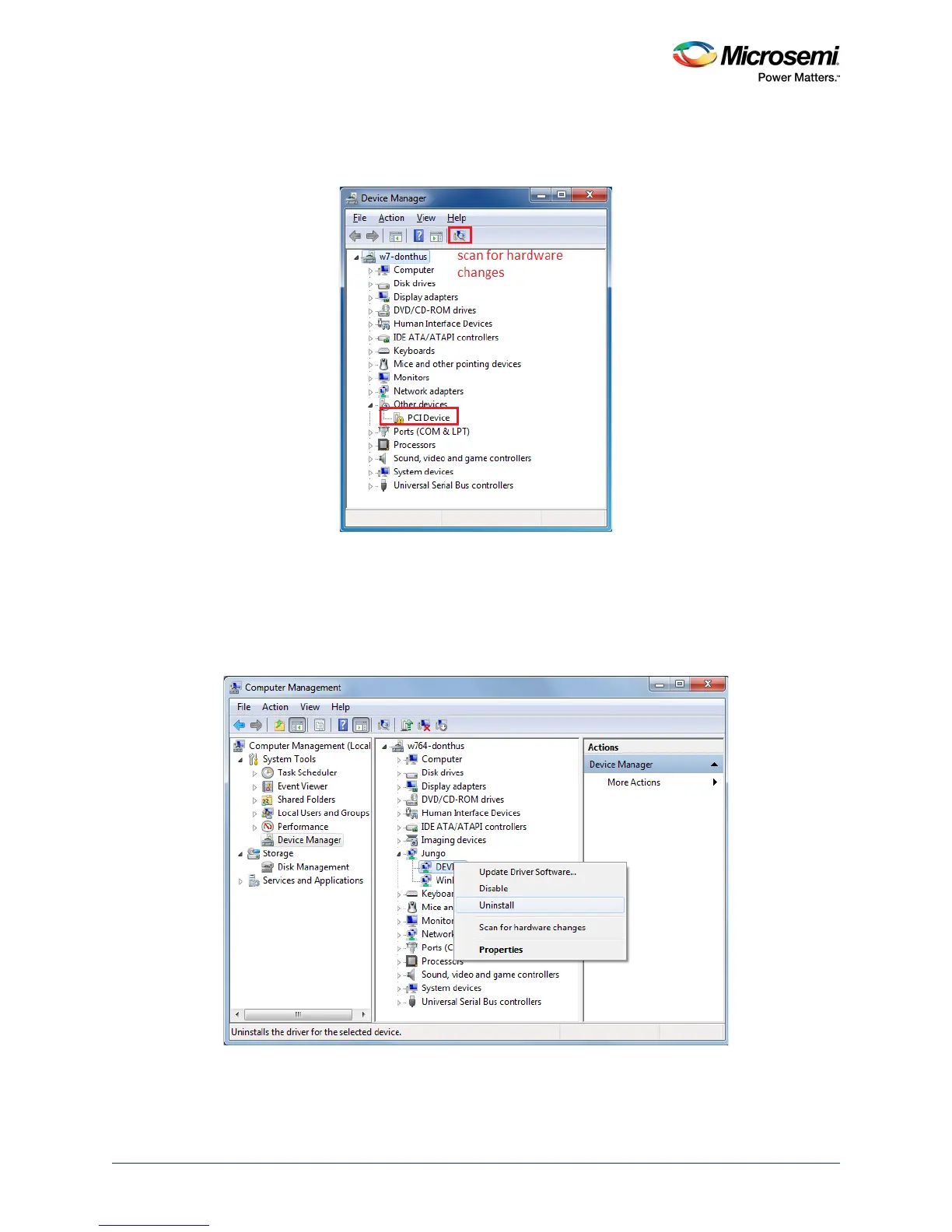
4. Switch on the host PC and check the Device Manager for PCIe Device. The following figure shows
the example Device Manager window. If the device is not detected, power cycle the SmartFusion2
Security Evaluation Kit and click option in the Device Manager.
Figure 9 • Device Manager - PCIe Device Detection
Note: If the device is still not detected, check if the BIOS version in the host PC is latest and PCI is enabled in
the host PC BIOS.
5. If the host PC has any other installed drivers such as previous versions of Jungo drivers for the PCIe
device, uninstall them. To uninstall previous versions of Jungo drivers, follow steps i and ii.
• To uninstall previous Jungo drivers, go to Device Manager and right-click DEVICE, as shown in
the following figure.
Figure 10 • Uninstall Jungo Driver




 To Next Page