OM-272476 Page 21
14
85
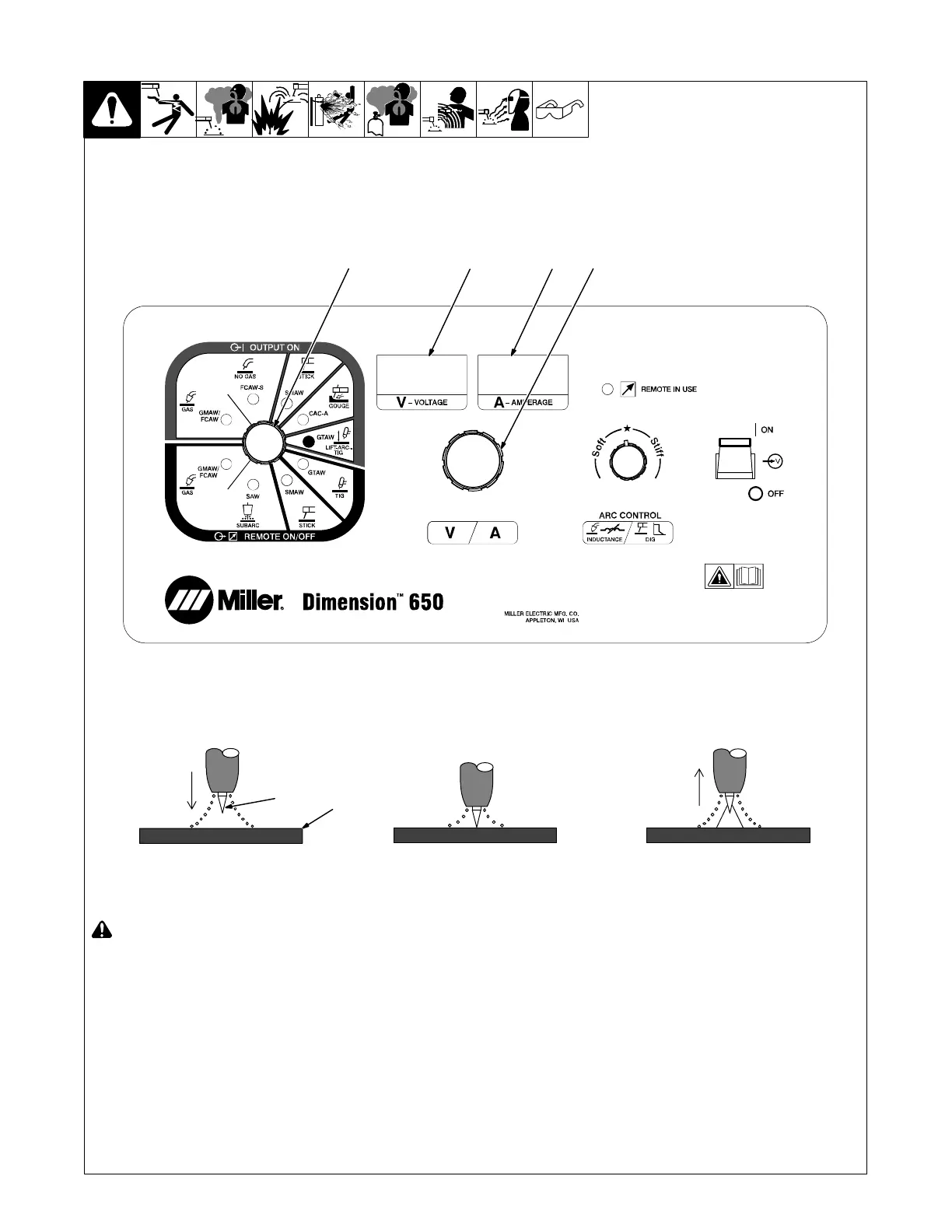
6-3. Lift-Arc TIG Welding Mode - GTAW Process
! Weld terminals are energized at all
times in Lift Arc TIG welding mode.
1 Mode Switch
2 Left Display
3 Right Display
4 Adjust Control
5 Workpiece
6 Tungsten Electrode
Setup
For typical system connections refer to
Section 6-1.
Rotate Mode Switch to LIFT-ARC TIG posi-
tion as shown.
The open-circuit voltage is shown in the
Left Display. Preset amperage is shown in
the Right Display.
Normal open-circuit voltage is not present
before the electrode touches the work-
piece, instead a low sensing voltage is
present. The sensing voltage allows the
electrode to touch the workpiece without
overheating, sticking, or getting contami-
nated.
Operation
The Adjust Control is used to set desired
preset amperage.
. If a remote control is used for amper-
age adjustment, the adjustment will
function as a percentage of the preset
amperage. The Remote In Use indica-
tor will be lit.
. For best results, firmly touch the tung-
sten electrode to the workpiece at the
weld start point. Hold electrode to
workpiece for 1-2 seconds, and lift
electrode. An arc will form when the
electrode is lifted. To minimize arc flare
at the end of the weld, pull back the
electrode quickly to extinguish the arc.
1 − 2
Seconds
“Touch”
Do NOT Strike Like A Match!
6
5
2
12.0
3
263 561-B






 To Next Page