OM-272476 Page 28
8-2. Stick Remote Welding Mode - SMAW Process
! Weld terminals are energized
through the remote control in Stick
Remote welding mode.
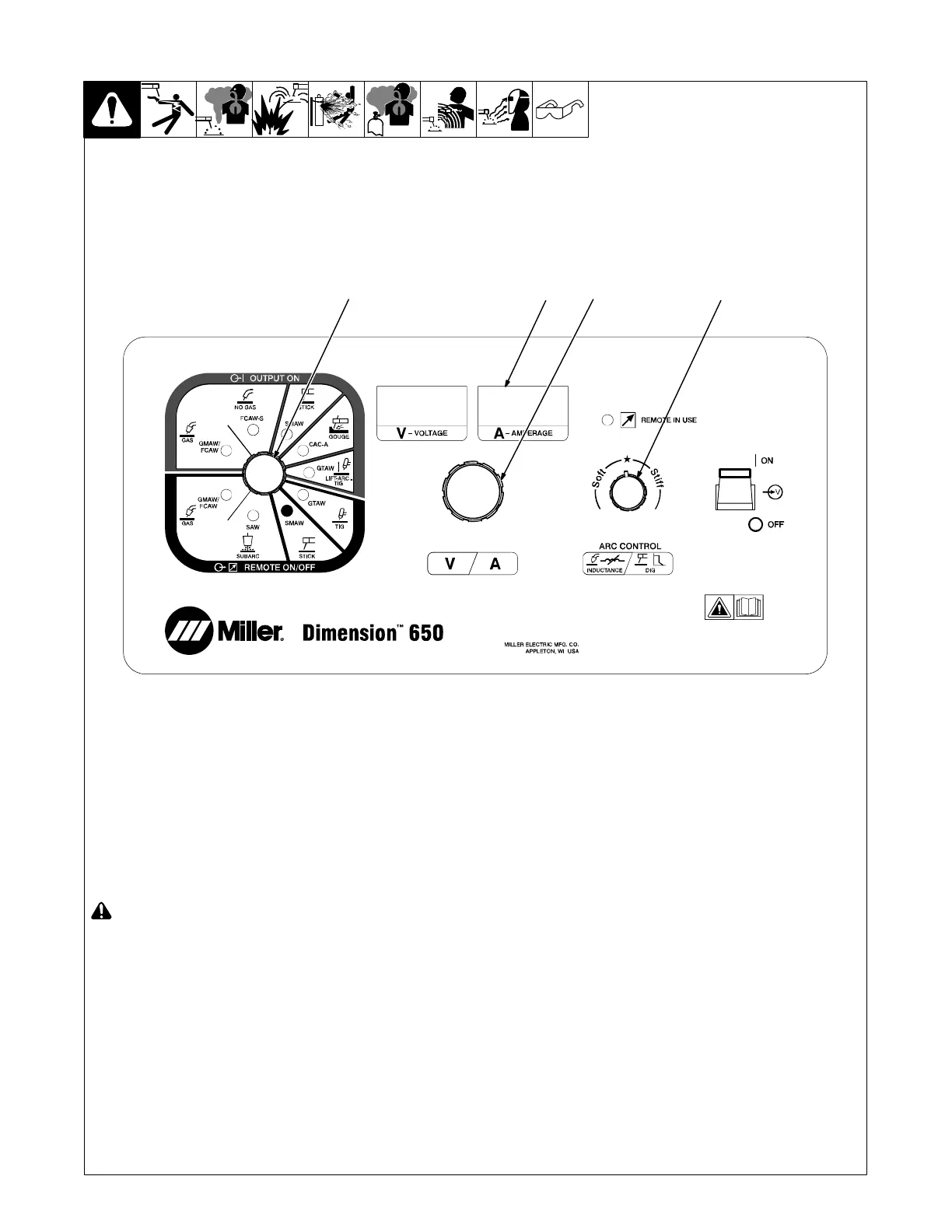
1 Mode Switch
2 Right Display
3 Adjust Control
4 Arc Control
Setup
For typical system connections refer to
Section 8-1.
Rotate Mode Switch to Stick Remote posi-
tion as shown.
The preset amperage is shown in the Right
Display with the Amps Indicator lit.
Operation
The Adjust Control is used to set desired
preset amperage.
A remote control is required to turn on the
weld output.
. If the remote control has an amperage
adjustment, the adjustment will func-
tion as a percentage of the preset am-
perage. The Remote In Use indicator
will be lit.
Adaptive Hot Start automatically increases
welding amperage at the start of a weld.
This helps eliminate electrode sticking dur-
ing arc initiation.
. For best results at the end of the weld,
pull back the electrode quickly to extin-
guish the arc.
Arc Control − Dig
Dig control allows the arc characteristics,
soft versus stiff, to be changed for specific
applications and electrodes. The star set-
ting is good for most applications. Use soft
settings (0 to 25) for smooth running elec-
trodes like E7018. Use stiff settings (0 to
25) for penetrating electrodes like E6010.
85
263 561-B
2 4
13






 To Next Page