OM-272384 Page 20
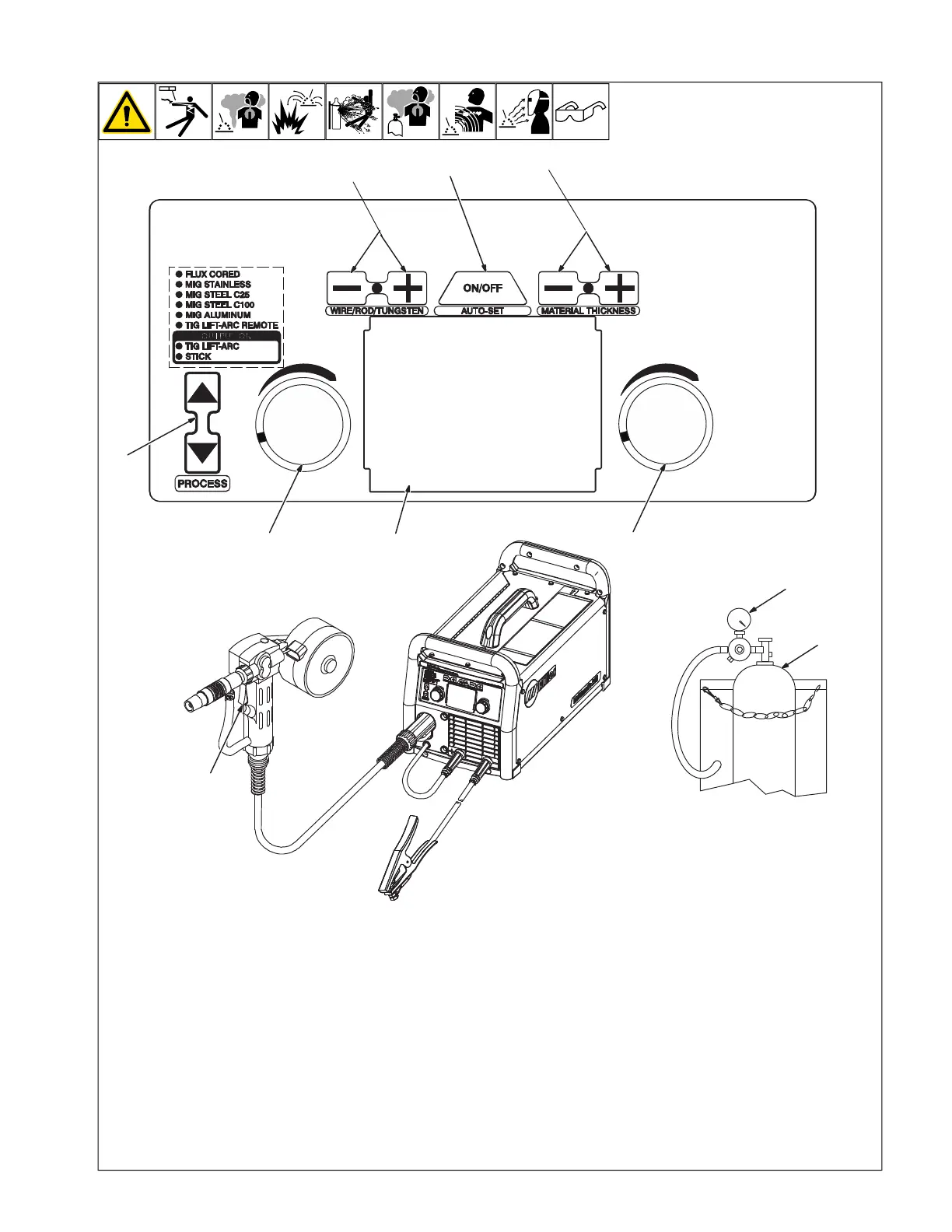
5-4. Controls For Multimatic 215
OM-272 384 Page 7
2-4. Controls For Multimatic 215
Ref. 271491A / 275178A
1
2
3
5
7
6
8
9
9
10
1 Shielding Gas Cylinder
For shielding gas connections, see welding
power source Owner’s Manual.
2 Valve
Open valve on cylinder just before welding
Close valve on cylinder when finished
welding.
3 Process Select Button
Press up and down buttons to select MIG
Aluminum.
4 Perform Motor Calibration
See the Multimatic 215 Owner’s Manual for
Spoolmate motor calibration procedure.
5 Auto-Set Button
Press button to turn Auto-Set On or Off.
6 Wire/Rod/Tungsten Buttons
Press the Plus (+) or Minus (-) button to se-
lect the size of wire, rod, or tungsten for the
selected process.
F
When MIG Aluminum process is se-
lected, Wire/Rod/Tungsten buttons are
used to select type of spool gun being
used.
7 Material Thickness Buttons
Press the Plus (+) or Minus (-) button to se-
lect material thickness for the selected
process.
8 Display
9 Adjustment Knobs
10 Trigger
Press trigger to energize welding power
source contactor, start shielding gas flow,
and begin wire feed.







 To Next Page