Measure Preset 2-11
2.4 Measure Preset
Basic Procedures:
1. Press <F10> to show the [Setup] menu.
2. Select [Measure Preset] in the [Setup] menu.
3. Preset the general measurement and application measurement.
For details, refer to "2.4.1 General Measurement Preset" and "2.4.2 Application Measurement
Preset".
4. Click [Save] to confirm.
2.4.1 General Measurement Preset
You can preset the General Measurement packages for 2D (B / Color / Power Mode), M Mode, or
Doppler (PW / CW) Mode respectively.
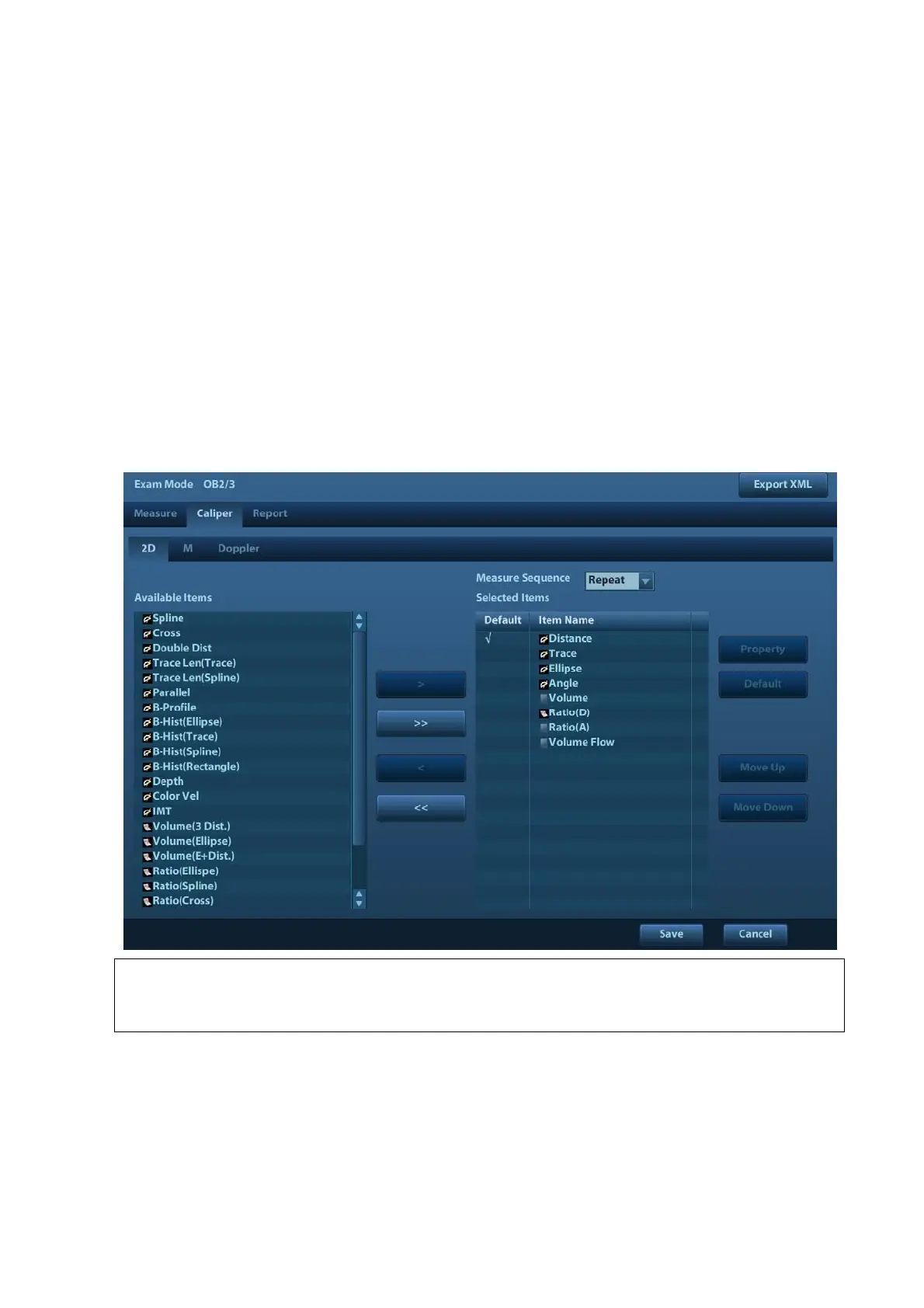
1. Select the [Caliper] in the [Measure Preset] page. As shown in figure below.
NOTE: The general measurement menu preset here are exam mode-related.
E.g. change of OB general measure preset will not affects the Adult ABD general
measurement menu.
2. Select the [2D], [M] or [Doppler] tab sheet to go to the corresponding preset.
[Available Items]: available general measurement tools configured by the system in the current
scanning mode, but they are not assigned yet.
[Selected Items]: displays the tools to be added to the menu.
3. Add/ Remove the item.
Add/ Remove the general measurement item by the following buttons:



 To Next Page