EasyManua.ls Logo

MKS 647C - Page 35

MKS 647C
57 pages
Print Icon
To Next Page IconTo Next Page
To Previous Page IconTo Previous Page
Loading...
647C 3. Functionality
TxD
CTS
RxD
RTS
DSR
DT
R
groun
sub d/9
( 3 )
( 8 )
( 2 )
( 7 )
( 6 )
( 4 )
( 5 )
647
sub d/9
groun
DT
R
DSR
RTS
RxD
CTS
TxD ( 3 )
( 8 )
( 2 )
( 7 )
( 6 )
( 4 )
PC
sub d/9
groun
DT
R
DSR
RTS
RxD
CTS
TxD ( 3 )
( 8 )
( 2 )
( 7 )
( 6 )
( 4 )
PC
sub d/9
groun
DT
R
DSR
RTS
RxD
CTS
TxD ( 3 )
( 8 )
( 2 )
( 7 )
( 6 )
( 4 )
PC
TxD
CTS
RxD
RTS
DSR
DT
R
groun
sub d/9
( 3 )
( 8 )
( 2 )
( 7 )
( 6 )
( 4 )
( 5 )
647
TxD
CTS
RxD
RTS
DSR
DT
R
groun
sub d/9
( 3 )
( 8 )
( 2 )
( 7 )
( 6 )
( 4 )
( 5 )
647
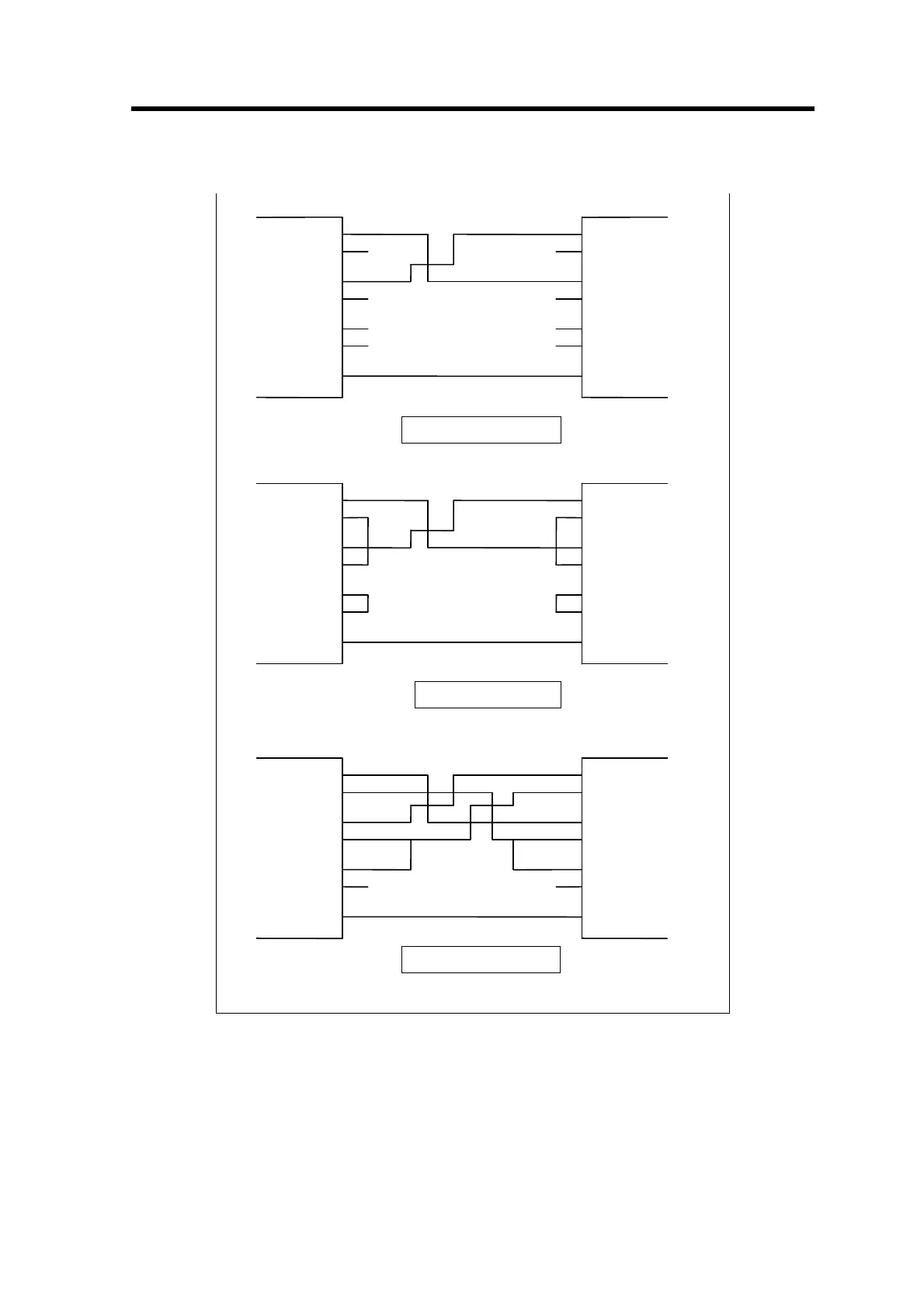
hardware handshake
software handshake
no handshake
Figure 22
A typical error in handling the RS232 line is to plug in the cable, after having switched the device
on before. As a result, the 647C works with no handshake although the host computer expects a
handshaking. At installation time it may be helpful to check the actual handshake mode.
31

Related product manuals