EVASystemUserManual
No.10LB038
Rev.04
Page52of86
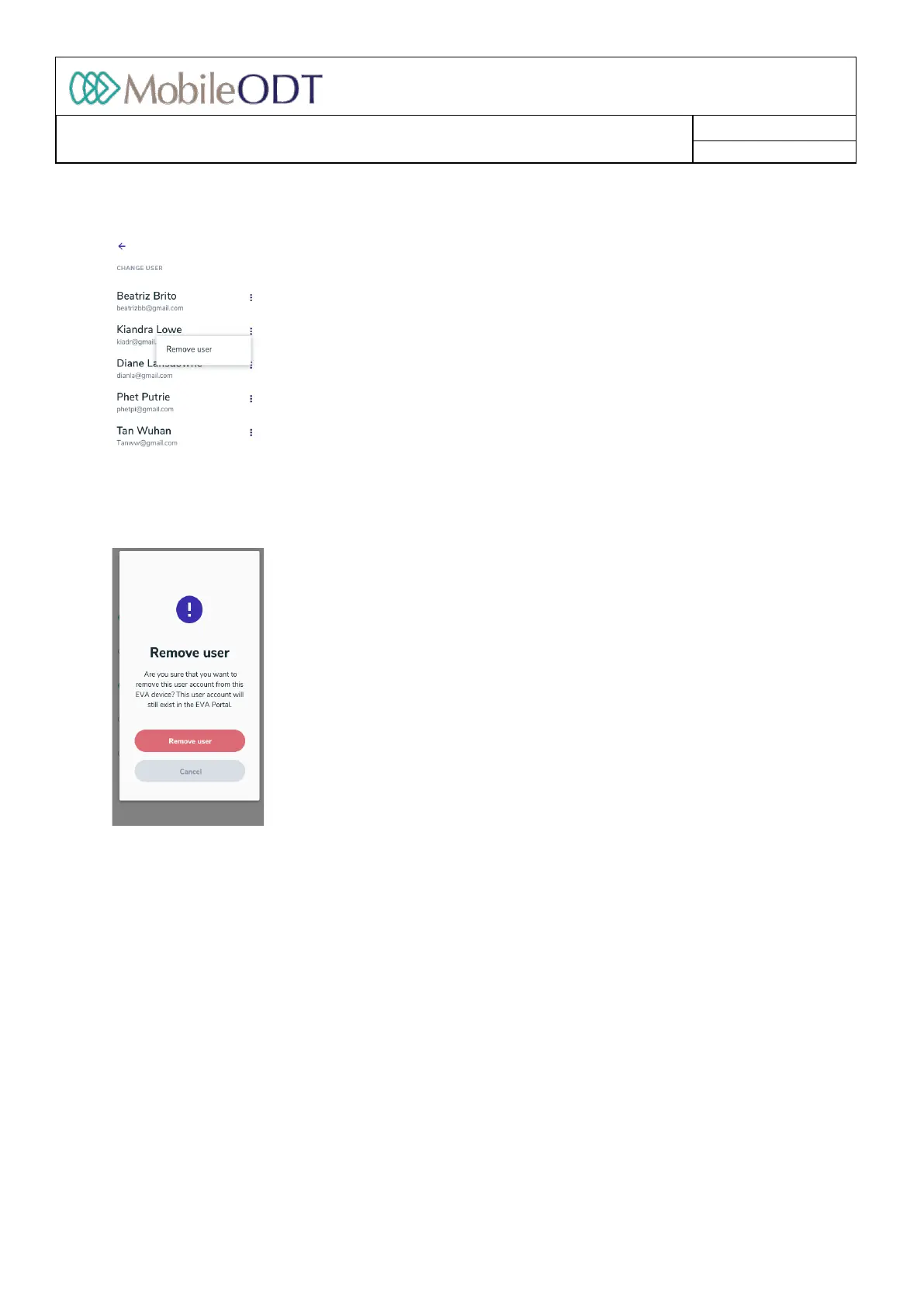
11.6.3. Ifyouwishtoremoveauserfromthedeviceyoucanpressthemenubutton(threedots)nexttothe
specificuserandthenselect“Removeuser”.
11.6.4. Onceit’spressedaconfirmationpopupisdisplayed.
Pleasenote:Theuserinquestionisonlyremovedfromthisparticulardevice.Allthedatathatthisuserhad
createdisavailablethroughtheEVAPortal.TheuserwillstillbepresentonanyotherEVAdevicethatthey
mayhaveloggedinto.Thisusercanalsoaddhis/heraccounttothisdeviceagaininthefuture.
11.7. ResetEVAaccountpassword
AUser’sEVAaccountpasswordcanberesetthroughinitiallogin
menu:
11.7.1. Tapon‘LogIn’andthen‘Resetpassword’.
Doc ID: 4baaf484d7f5f01d2b8e5dc0fedc637256236abe



 To Next Page