EVASystemUserManual
No.10LB038
Rev.04
Page53of86
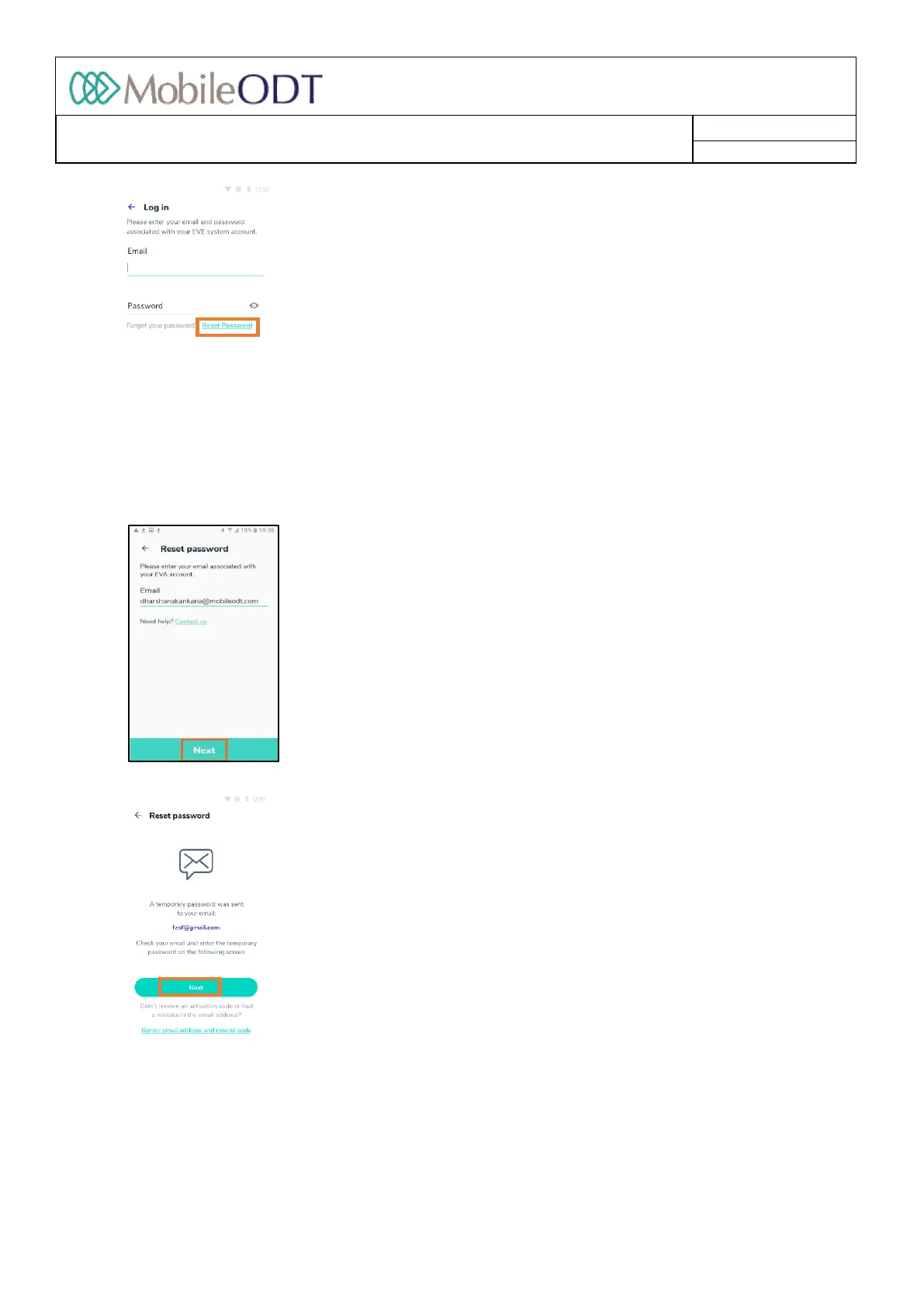
11.7.2. EnteryouremailaddressassociatedwithyourEVAaccountandtapon‘Next’.
11.7.3. Atemporarypasswordwillbesenttotheemail(inthisexample,fzsf@gmail.com).Tapon‘Next’.
11.7.4. Enterthetemporarypasswordinthededicatedfield.Enteranewpasswordinthededicatedfield.The
passwordrequiresaminimumofeightcharactersincludingacapitalletter,alowercaseletter,andone
numberandonespecialcharacter.ReenterthepasswordandTapon‘Next’.
.]]
11.8. Optoutstatus
11.8.1. Auserororganizationmaychoosetooperatein‘Optout’status,meaningthatnoneoftheirexamdata
willbeuploadedorsyncedtotheEVAPortalonlinestorage.
Doc ID: 4baaf484d7f5f01d2b8e5dc0fedc637256236abe



 To Next Page