67
Network and Power Connection
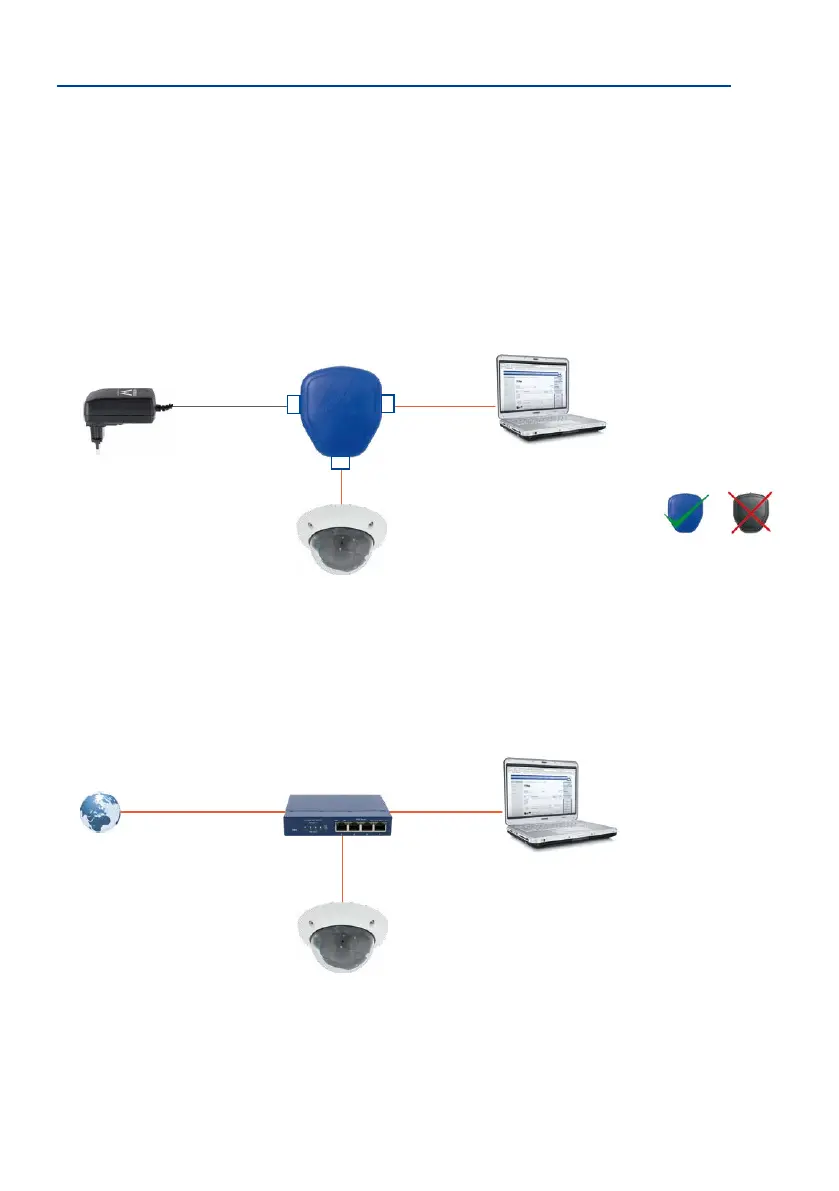
2.9.4 Power Supply When Connected Directly to a Computer
1. Connect the factory pre-installed cable of the camera to the camera connector of
the PoE adapter.
2. Connect the PC/Power connector of the PoE adapter to the Ethernet port of the
computer.
3. Plug the RJ45 connector of the power supply unit into the LAN/Power connector
of the PoE adapter.
2.9.5 Power Supply with Power-Over-Ethernet Products
Connect the factory pre-installed cable of the camera to a PoE port of the PoE switch/router.
The switch/router must support the PoE standards IEEE 802.3af or IEEE 802.3at.
IP addresses in the gure are
shown only as an example
For the D26 you should use
the blue MX-NPA-PoE-Set
or the MX-NPA-Box
– pre-
vious MOBOTIX network
power accessories, such as
the NPA-Set, Power-Box and
Power-Rack (MX-NPA-Set,
MX-NPR-4 and MX-NPR8/20)
are not suitable for
use with the D26!
PoE adapter
(MX-NPA-PoE)
Power supply
PC
(10.8.0.11/255.0.0.0)
LAN/Power
PC/Power
Camera
RJ45
RJ45
RJ45
Camera
(10.8.0.99)
IP addresses in the gure are
shown only as an example
Camera
(10.8.0.99)
PC
(10.8.0.11/255.0.0.0)
PoE/PoE+ switch/
router
LAN/www



 To Next Page