68
D26 Camera Manual: Installation
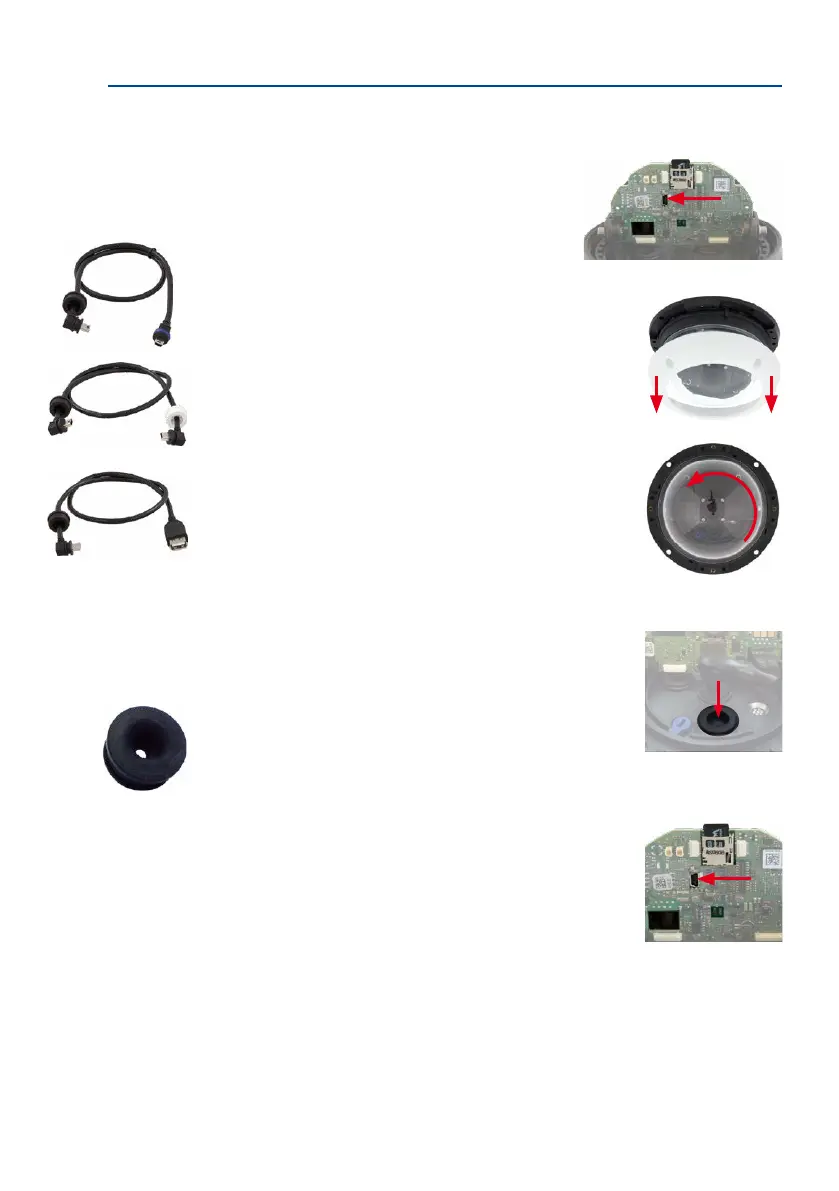
2.9.6 Connecting a USB Cable
Using the USB connector (red arrow in gure), you can attach
existing expansion modules, such as the MOBOTIX ExtIO
(USB), the MX-232-IO-Box or external USB hard drives to
the camera in a weatherproof and well-protected manner.
Procedure
• Uninstall camera: Remove the camera so you can access the
connectors on the back.
• Remove the outer shell: Remove all four Allen screws using
the supplied Allen wrench. Take o the outer shell.
• Remove the camera dome: Take the delivered plastic foil or
a cotton cloth and remove the dome by turning it in count
-
er-clockwise direction.
•
Tilt the main board: If required, release the two stainless steel
Allen screws and tilt the mainboard so you can access the USB
connector.
• Remove the sealing plug: Push one of the three sealing plugs
out of the housing by pushing it from the inside.
• Guide USB cable through wire plug: Gently push the angled
connector of the MOBOTIX USB cable (see Section 1.4, «Available
Accessories») through the supplied black single-wire plug (item
1.16).
• Insert cable plug with USB cable: Push the wire plug with the
cable from the rear into the housing (make sure that the plug
is seated properly).
• Connect USB cable: Push the MOBOTIX cable with the angled
MiniUSB plug into the USB connector (red arrow in gure).
You should use a USB
cable with an angled
MiniUSB plug inside the
housing of the D25



 To Next Page