84
D26 Camera Manual: Operating the Camera
3.3 Adjusting Lens Focus and Correcting Lens Distortion
3.3.1 Aiming and Adjusting the Lens
Make sure that you see the live image of the camera on the monitor of your computer or
laptop. Now adjust the lens mount until you see the desired image area on your monitor:
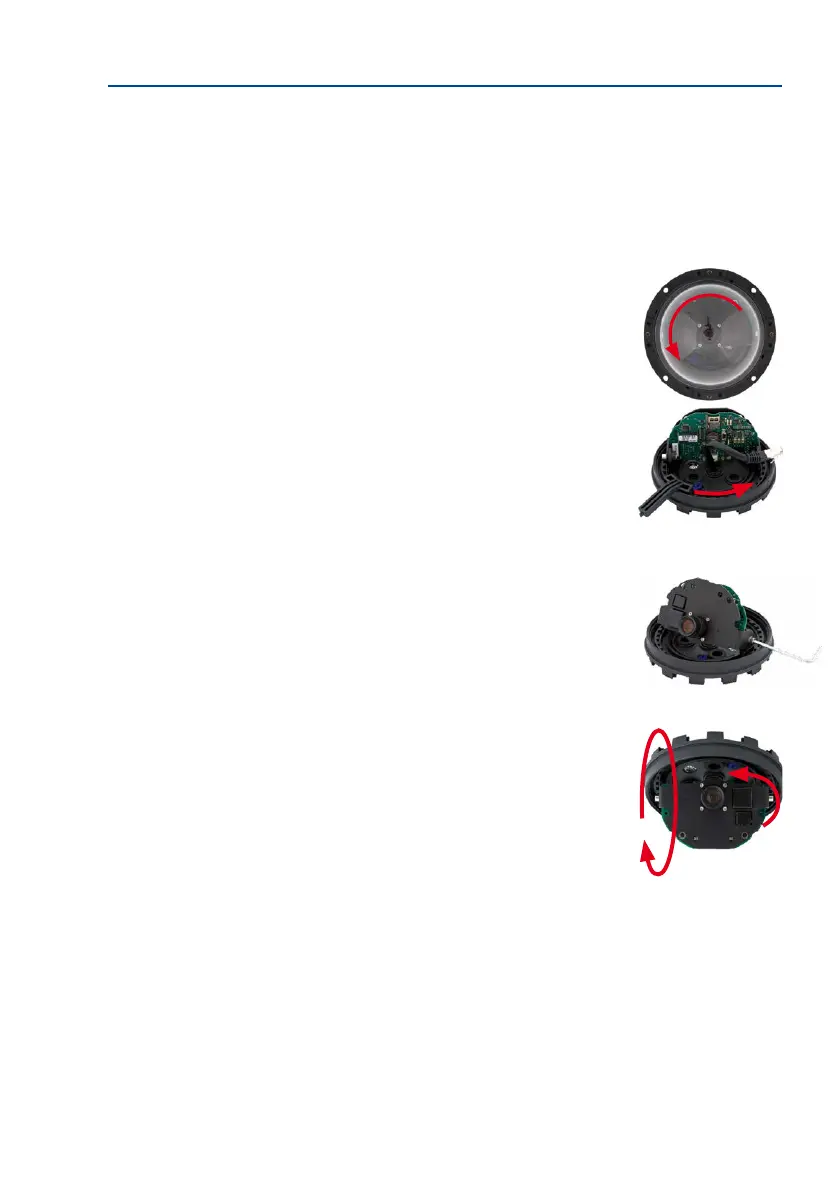
• Remove the camera dome. Use the supplied plastic foil or
a cotton cloth to remove the dome by turning it in a count
-
er-clockwise direction. You may have to remove the outer
shell rst.
• Loosen the toothed ring slightly by turning it in a count
-
er-clockwise direction using the supplied hook wrench. In
addition, loosen the two Allen screws on both sides of the
lens mount slightly by turning them in a counter-clockwise
direction using the supplied Allen wrench.
•
Loosen the ring and screws until you are still able to pan and
rotate the internal part of the camera with the lens without
much force but not so far that the lens is unable to move
on its own.
•
Now aim the camera by rotating and panning the lens mount
(Note: the MicroSD card slot must point downward for the
camera’s live image to be displayed properly). Never use force
when adjusting the direction of the camera, as this could dam-
age the camera beyond repair.



 To Next Page