30
M26 Camera Manual: Installation
Mounting to a Wall
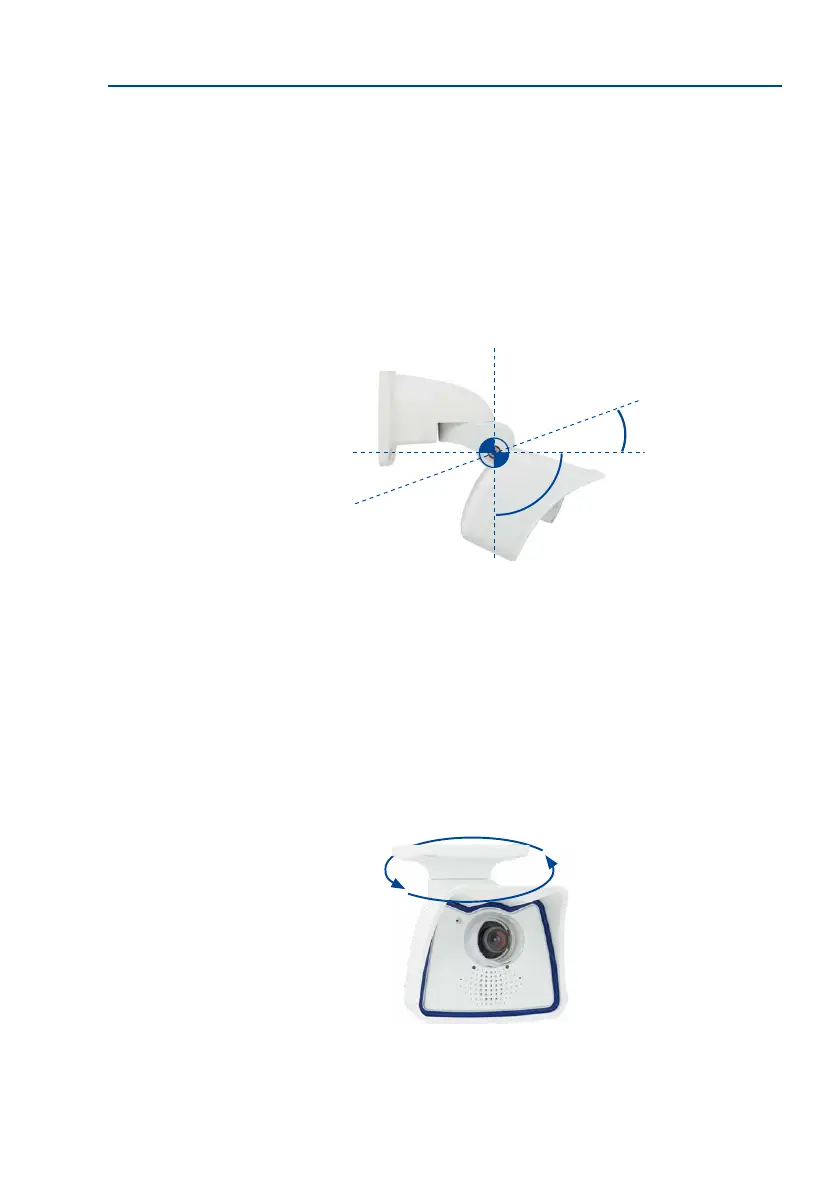
The M26 can be mounted to the wall of a building or structures, even mobile surfaces, for both
indoor and outdoor use. The camera is mounted using the pre-installed VarioFlex mount
(supplied as standard), which is easily secured using the four enclosed screws and screw
anchors (depending on the surface, it can also be mounted without screw anchors directly
over the ush-mounted socket). The Ethernet connection cable of the camera has already been
guided through the mount and simply needs to be connected with the network cable (e.g.,
by using an MX-Overvoltage-Protection-Box). By adjusting the VarioFlex mount as required,
the captured image area can be precisely adjusted to the desired practical application. The
cameracanbeturnedortilted180°horizontallyand110°vertically(from–90°to+20°).
Mounting to a Ceiling
By exchanging the wall mount for the ceiling mount* (delivered upon request), the M26 is
ready to be mounted to ceilings in just a few easy steps thanks to the VarioFlex system.
This mounting option is of particular benet when monitoring rectangular rooms with a
single camera. In such cases, the Super Wide Angle lenses B036 and B041 allow the room to
be monitored almost entirely by an M26 mounted to the ceiling in one of the corners. Using
the soware-driven PTZ, you can easily zoom in on image details in either the live image
or the recording. The camera can be turned or tilted 360° horizontally and 110° vertically
(from–90°to+20°).
*The ceiling mount is only included if this had been specied when ordering the camera!
Wall-mounted
• horizontally: 180°
• vertically: -90° to +20°
–90°
+20°
Mounting to a Wall
360°
Mounting to a Ceiling
Ceiling-mounted
• horizontally: 360°
• vertically: -90° to +20°



 To Next Page