59
EN
TECHNICAL MANUAL - B CLASSIC / B FUTURA / S CLASSIC
SERVICE MENU
SERVICE MENU – EMPTYING CYCLE
SQ39
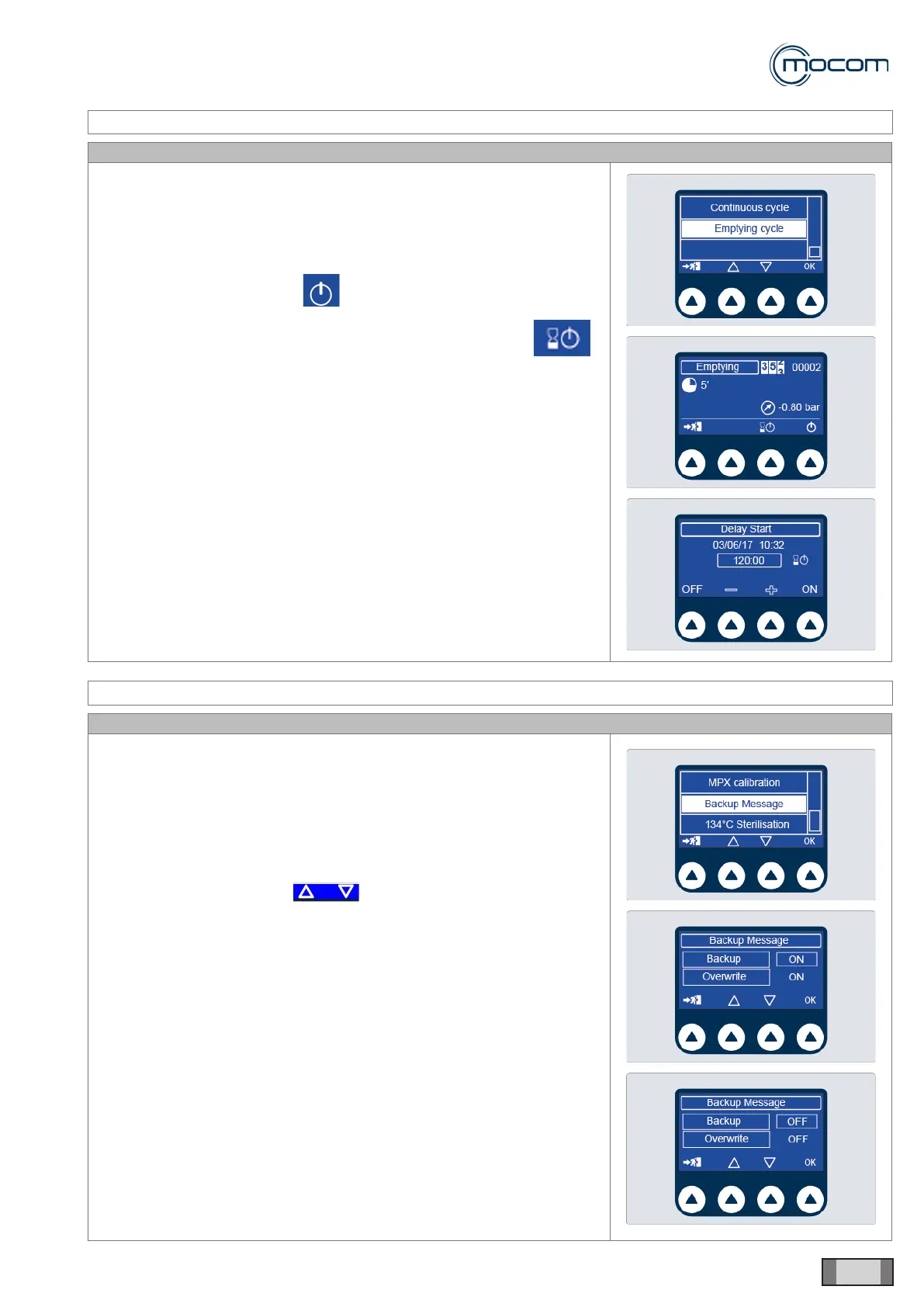
The EMPTYING CYCLE can be started after manually emptying the tanks.
Vacuum pump and heating system are activated with the aim to remove
the water and humidity left in the device.
Select EMPTYING CYCLE to display a screen where it is possible to:
- start the cycle by pressing ;
- program the delayed start of the emptying cycle by pressing
and setting the parameters from the dedicated screen.
SERVICE MENU – BACKUP MESSAGE
SQ40
Select BACKUP MESSAGE to display a screen where it is possible to
select whether to activate/deactivate backup and overwrite messages.
In particular, the backup message warns the user to run a backup every
250 cycles.
The overwrite message warns the user that the oldest data will be
immediately overwritten after 500 cycles.
The values can be modied by:
- selecting the value using
- pressing OK to conrm
- changing the value (ON/OFF) using + / -
- pressing OK to conrm
The user may reset the BACKUP and OVERWRITE messages by
downloading the cycles using the NEW option.



 To Next Page