60
EN
B CLASSIC / B FUTURA / S CLASSIC - TECHNICAL MANUAL
SERVICE MENU
SERVICE MENU – SERVICE RESET
SQ41
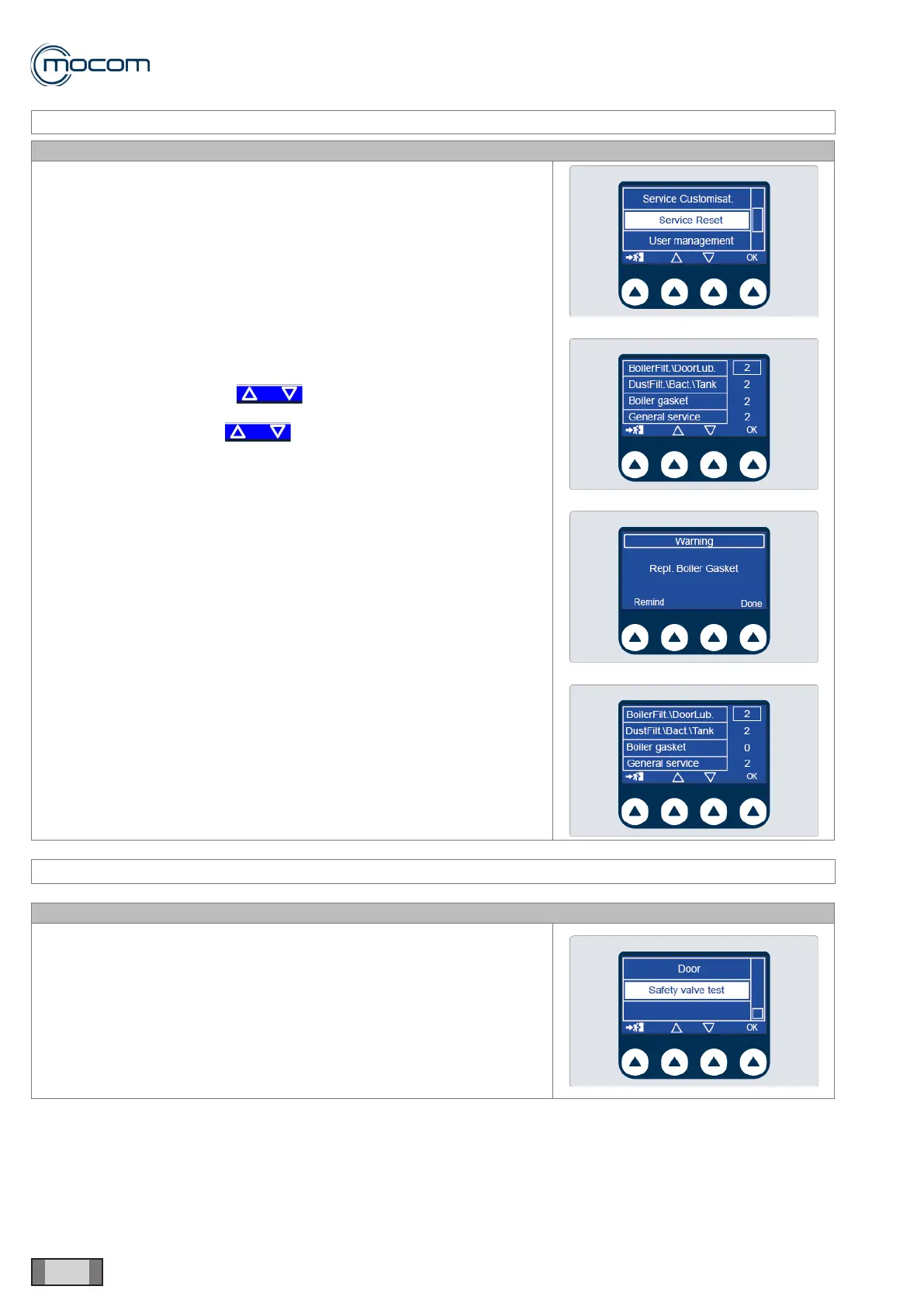
It allows resetting the maintenance/service warning messages in advance,
compared to the set number of cycles, if a maintenance operation is
performed before reaching the limit that makes the message appear.
Select SERVICE RESET to display four counters, with values expressed
in cycle number, corresponding to the following maintenance operations:
- Chamber lter/closing system lubrication
- Bacteriological lter replacement/Cleaning of tank and dust lters
- Door gasket replacement
- General service
The values can be reset by:
- selecting the value using
- pressing OK to conrm
- selecting REMIND with to cancel the reset operation,
keeping the performed cycles count, or DONE to reset the cycle
counter referred to each single message.
SERVICE MENU – SAFETY VALVE TEST
SQ42
Select this option to test the safety valve through steam pressurisation.
To start this test it is necessary to enter a dedicated password that must be
requested to the Manufacturer.



 To Next Page