61
EN
TECHNICAL MANUAL - B CLASSIC / B FUTURA / S CLASSIC
SERVICE MENU
FUTURA SERVICE MENU
FUTURA AUTOCLAVES– SERVICE MENU
SQ1
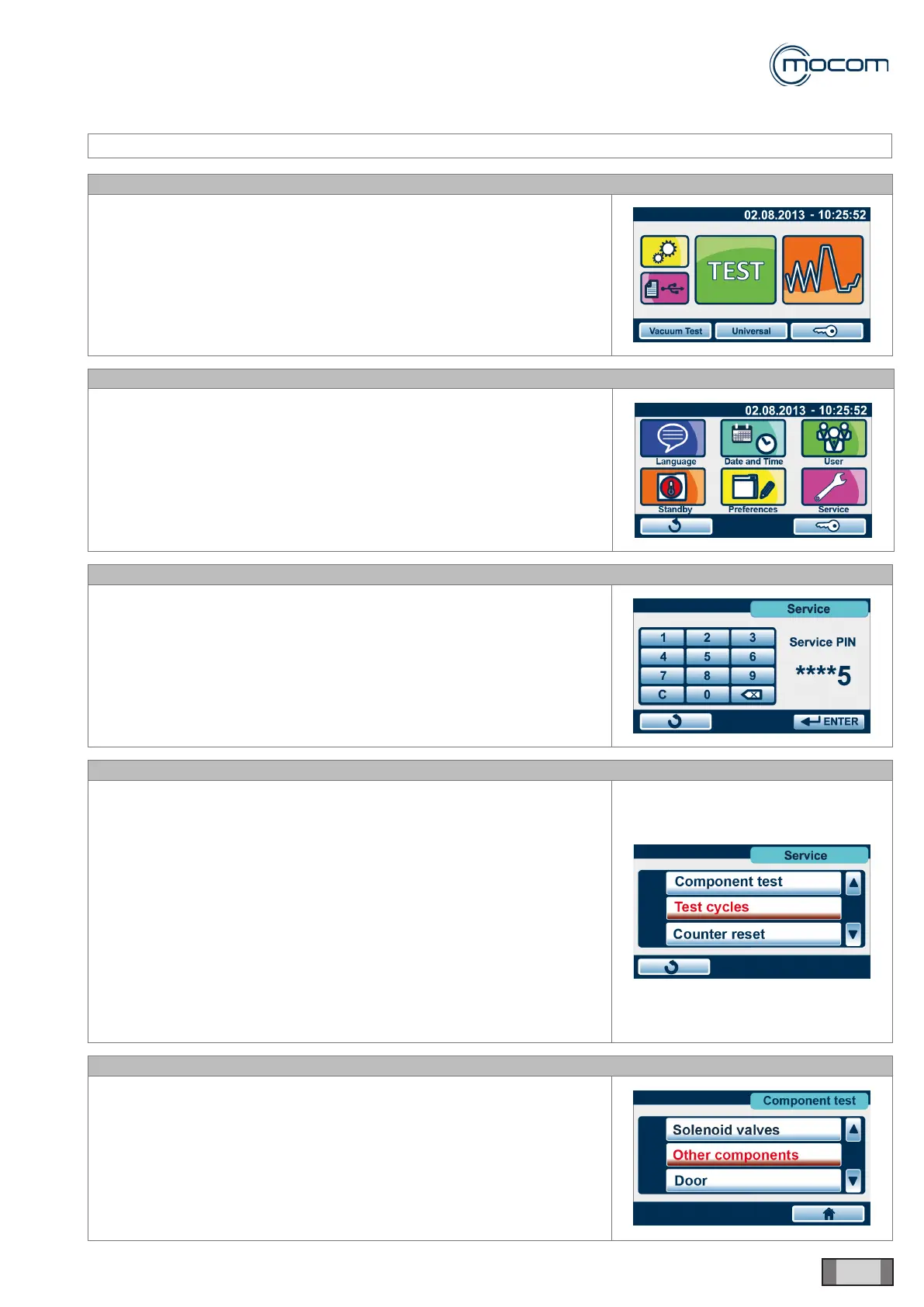
From initial screen, access SETUP menu.
SQ2
From SETUP screen, select SERVICE menu.
SQ3
To access the SERVICE menu, type PIN 0829 and press ENTER to
conrm.
PIN 0829 is valid for all autoclaves of the FUTURA and CLASSIC series.
SQ4
After accessing the SERVICE menu, a vertical scroll menu with the
following options is displayed:
- Component test
- Test cycles
- Counter reset
- Initial settings
- PT1 calibration
- Report management
- Service customization
- User management
- Network conguration
- REF input
- SN input
- MPX calibration
SQ5
Selecting COMPONENT TEST and pressing OK to conrm displays a
vertical scroll menu with the following options:
- Solenoid valves
- Other components
- Door



 To Next Page