EasyManua.ls Logo

Mocom SUPREME 17 - Page 63

Mocom SUPREME 17
128 pages
Print Icon
To Next Page IconTo Next Page
To Previous Page IconTo Previous Page
Loading...
Sterilizers SUPREME - FUTURA - CLASSIC (17-22-28)
- TECHNICAL MANUAL
EN
SERVICE MENU
61
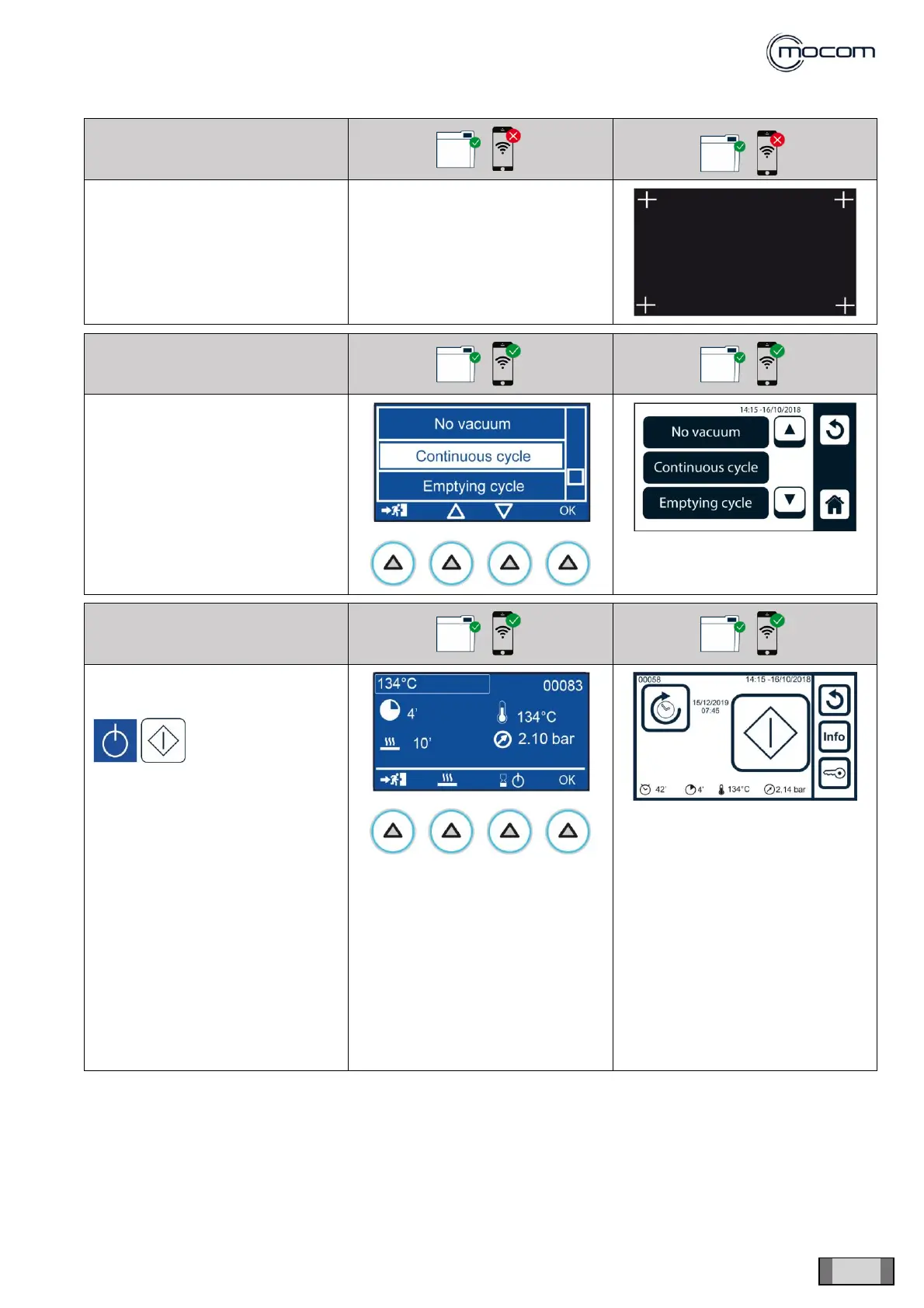
SQ21 DISPLAY CALIBRATION
With the tip of a pen, press on the
central part of each cross to
calibrate the display.
FUNCTION NOT REQUIRED
SQ22 TEST CYCLES
Select TEST CYCLES to display a
vertical scroll menu with the
following options:
- No vacuum
- Continuous cycle
- Emptying cycle
SQ23 NO VACUUM
Select NO VACUUM to display the
134°C S cycle start-up screen.
With the
command
indicated on the
left, you can
activate the cycle,
which will be
performed without
the pre-vacuum
phase.
After the heating phase, the
pressure rise is performed to
achieve the process values of
134°/2.10bar, a condition that will
be maintained for 4’.
This special cycle, which has no
alarms, is designed to detect any
steam leaks from chamber, door,
generator and connected tubes.


Table of Contents

Related product manuals