Inputs/Outputs
Digital Outputs
(continued from
previous page)
Out 1 Function
Out 2 Function
S
(continued from
previous page)
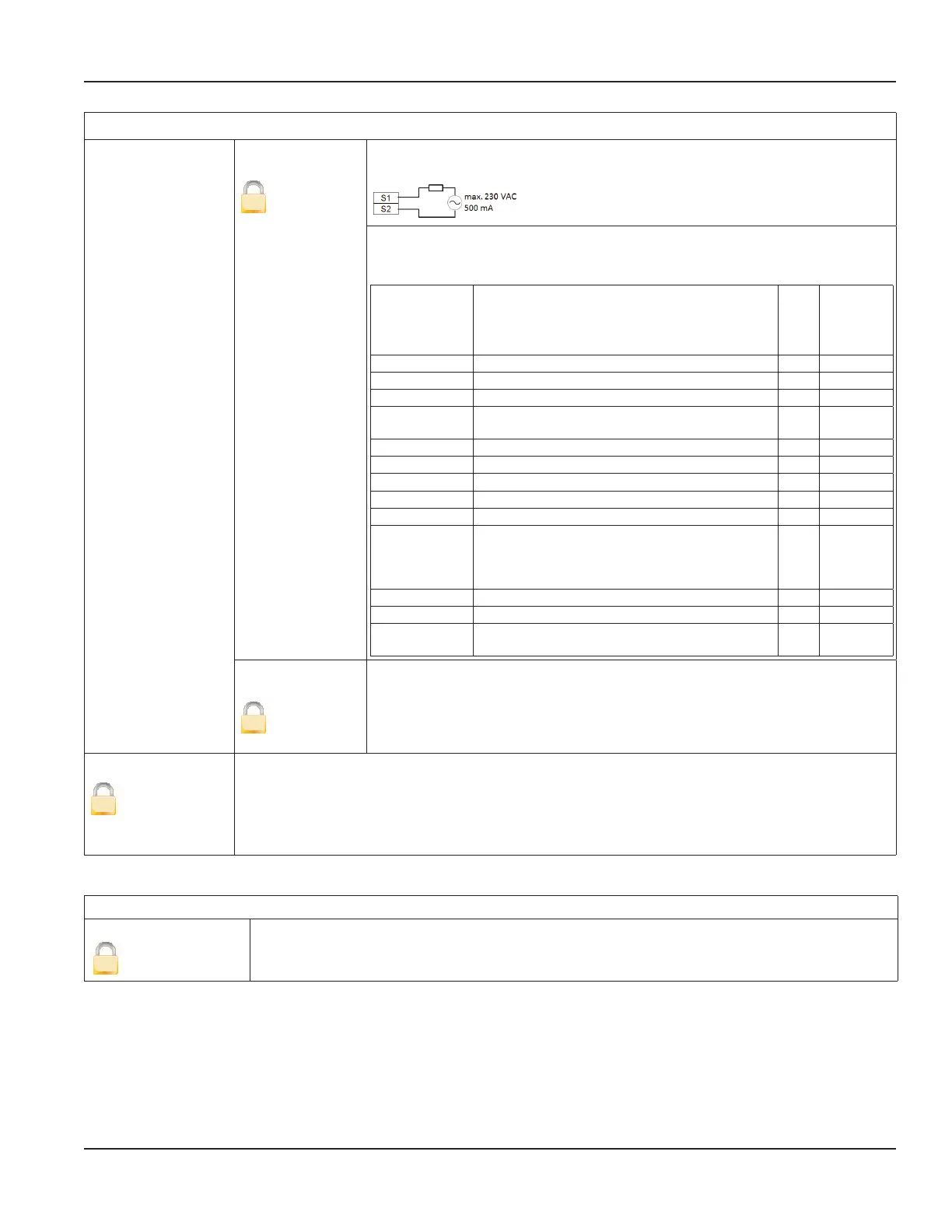
Solid-State Relay
The solid-state relay is functionally linked with Output 2. See the table below.
The following functions can be selected for Outputs 1 and 2 as well as for the
solid-state relay. The solid-state relay function is linked with the function of
Output2.
Function Meaning Out1
Out2 /
Solid-
State
Relay
Off Digital output is switched off. X X
Test Used only for the Verification Device. X X
Comparator TBD X X
Empty Pipe
Error
Indicates when a pipe is empty. X X
Error Alarm Indicates a meter error condition. X X
Forward Pulses Generates pulses during forward flow conditions. X X
Reverse Pulses Generates pulses during reverse flow conditions. X X
Direction Indicates current flow direction. X X
Loopback Shows the status of the digital input. X X
Min./Max. Alarm
Establishes, as a percentage of full scale flow,
the threshold at which the output alarm will be
activated. Flow rates below or above the threshold
will activate the output alarm.
X X
Frequency TBD X X
Rotary Encoder TBD X X
Preset
Indicates when a preset batch amount has
beenrealized.
X X
Out Type 1 and
Out Type 2
S
This parameter lets you set the output switch to normally open or normally
closed. If normally open is selected, the output switch is open (no current) when
the output is inactive, and closed (current flows) when the output is active.
If normally closed is selected, the output switch is closed (current flows) when
the output is inactive, and open (no current) when the output is active.
Simulation
S
Flow Simulation provides analog and digital output simulation based on a percentage of the full scale
flow in cases where no real flow is occurring. The range of simulation is –100…100% in steps of 10%
of the full scale flow. This function still remains active once you exit the menu. It is necessary to set it
to OFF to deactivate it. If the simulation is still active, the letter “S” will be displayed in the measuring
mode.
Totalizer Reset Menu
Totals
Clear T2
U
The Uni-directional Totalizer T2 is reset within the menu manager.
M1000 Main Menu Programming Options
Page 31 March 2020 MAG-UM-00379-EN-07


 To Next Page