CONNECTING AN AQUACUE/BEACON ENCODER INTERFACE TO THE M1000 METER
OTE: N Connect the endpoint as described. The endpoint automatically updates within one hour. See the endpoint software
user manual for programming information.
Wiring
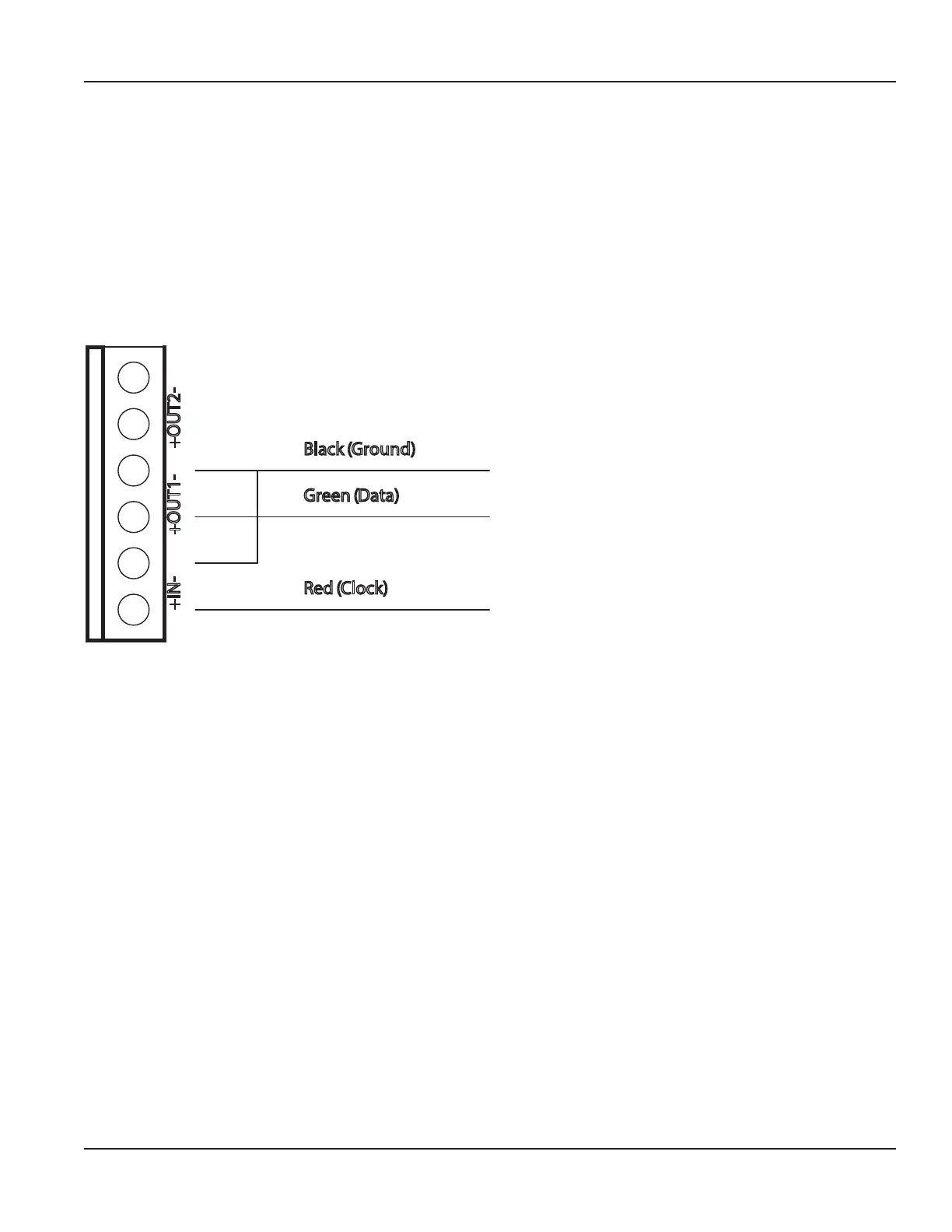
To connect the endpoint, connect:
M1000 Terminal Endpoint Wire
Input + Red (Power/Clock)
Out 1 + Green (Data)
Out 1 – Black (Ground)
Connect a jumper wire from Out 1 negative (–) to Input negative (–).
+IN- +OUT1- +OUT2-
Black (Ground)
Green (Data)
Red (Clock)
Programming
Changing the following settings configures Input and Output 1 for the endpoint.
To program the M1000 meter for the endpoint to Output #1 (forward flow):
1. Navigate to COMMUNICATION > ADE > CONTROL.
2. Use the arrows to change the values, then press EXIT/SAVE.
3. Repeat steps 1 and 2 for Control, Protocol, Dials and Resolution (the Resolution range is 0.0001…10,000).
4. Press EXIT/SAVE.
Connecting an AquaCUE/BEACON Encoder Interface to the M1000 Meter
Page 39 March 2020 MAG-UM-00379-EN-07


 To Next Page